Best Zink Printer 2026
by Remington May
The HP Sprocket 2x3 is the easiest Zink printer to recommend for most people — it prints sticky-backed 2×3" photos straight from your phone with zero ink to manage. In 2026, the Zink and portable instant-print market has expanded enough that you have genuinely good options at every price point, from budget-friendly bundles to desktop-quality dye-sublimation units that rival photo lab output.
Zink stands for Zero Ink. The technology works by embedding cyan, yellow, and magenta dye crystals directly into the paper layers. The print head applies precise heat, activating those crystals to produce color without any separate cartridge, ribbon, or toner. The result is a compact, mess-free printer that fits in a jacket pocket. You can read more about the chemistry behind it on the ZINK Wikipedia page, but what matters practically is that running costs come down to paper only — no ink surprises, no mid-party printhead clogs.

This guide covers seven printers — five true Zink models and two dye-sublimation alternatives that are worth including because they sit in the same portable, ink-free category and frequently come up in the same searches. If you're printing 4×6" photos at home rather than pocket-sized snapshots, our separate guide on the best 4×6 photo printers covers that territory in detail. For anyone comparing print technologies more broadly, our best sublimation ink guide breaks down how dye-sub quality compares to inkless systems. Browse our full buying guide section for more roundups across printers and creative tools.
Contents
- Top Rated Picks of 2026
- Full Product Breakdowns
- HP Sprocket 2x3 — Best for Everyday Snapshots
- HP Sprocket Select — Best for Slightly Larger Prints
- KODAK Step — Best for NFC Convenience
- HPRT CP2100 — Best Dye-Sub Alternative
- Liene Pearl K100 — Best Value Bundle
- XIAOMI Instant Photo Printer 1S — Best for Desktop Use
- HP Sprocket Studio Plus — Best for 4×6 Quality
- Key Features to Consider When Choosing
- What People Ask
Top Rated Picks of 2026
- #PreviewProductRating
- Bestseller No. 1
 Rating:

- Bestseller No. 2
 Rating:
 - Bestseller No. 3
 Rating:
 - Bestseller No. 4
 Rating:
 - Bestseller No. 5
 Rating:
 - Bestseller No. 6
 Rating:
 - Bestseller No. 7
 Rating:
Full Product Breakdowns
1. HP Sprocket 2x3 Instant Smartphone Photo Printer — Best for Everyday Snapshots
The HP Sprocket 2x3 is the printer that introduced a lot of people to Zink, and the second-edition model keeps that reputation intact. It connects over Bluetooth 5.3 to iOS 10+ and Android 5+ devices, and pairing through the HP Sprocket app takes under a minute. The free app isn't just a print button — it gives you filters, stickers, borders, emoji overlays, and album sharing, which makes it genuinely useful for parties and group events where everyone wants a keepsake.
Print size is 2×3 inches, which is the standard Zink output. The photos come out on glossy sticky-back paper, so you can peel the backing and stick the print directly onto a notebook, phone case, or wall. Zink paper's embedded dye crystals handle moisture, smudges, and tears better than standard photo paper, though they won't survive a full soak. Color accuracy lands in the "vibrant but warm" territory — reds and oranges pop nicely, while subtle blues and skin tones can look slightly oversaturated under some lighting. For casual social sharing and decorating purposes, it's more than sufficient.
Build quality is solid for the price. The plastic housing feels durable without being heavy, and the purple colorway (also available in other finishes) is visually distinctive. Battery life supports around 30 prints per charge, which gets you through a typical gathering. There's no built-in screen, so you do need your phone nearby at all times — but that's the norm for this class of printer.
Pros:
- Sticky-back Zink paper — no separate adhesive needed
- Compact and genuinely pocketable
- Feature-rich free HP Sprocket app
- Bluetooth 5.3 for reliable connectivity
Cons:
- 2×3" is small — not suited for display-quality prints
- Zink paper can cost more per print than dye-sub alternatives
- Colors skew warm; subtle tones less accurate
2. HP Sprocket Select 2.3x3.4 Instant Photo Printer — Best for Slightly Larger Prints
The Sprocket Select is essentially HP's answer to the question: what if the Sprocket output was a bit bigger? The print area steps up to 2.3×3.4 inches — HP markets this as 30% larger than the original Sprocket — which genuinely makes a difference when you're printing portrait-orientation photos or group shots where faces need to be legible. The Eclipse colorway has a sleek matte finish that feels more refined than the glossy standard Sprocket.
The Sprocket app unlocks an "exclusive designer features" layer for Select users, including additional frame templates and filter packs not available for the base Sprocket. One particularly fun addition is the custom sticker feature: you photograph your own hand-drawn doodles and the app converts them into stickers you can overlay on your prints. For creative users who do scrapbooking or journaling, this feature alone justifies the Select upgrade. Photo quality follows the same Zink profile as the 2x3 — vibrant, warm, and smudge-resistant, but not precision-accurate.
The Select is slightly larger than the base Sprocket to accommodate the bigger paper, but it's still easily bag-portable. Battery and connectivity specs are comparable. If you're debating between the standard Sprocket 2x3 and the Select, the extra print area is the deciding factor — it's a noticeable step up in usability, especially for sharing prints with friends who want to actually see the photo clearly.
Pros:
- 30% larger print area than the standard Sprocket
- Exclusive app features including custom doodle stickers
- Stylish matte Eclipse design
- Same Zink sticky-back paper convenience
Cons:
- Slightly bulkier than the base Sprocket 2x3
- Compatible paper is proprietary and slightly pricier
- Still limited to Bluetooth — no Wi-Fi
3. KODAK Step Instant Smartphone Photo Printer — Best for NFC Convenience
KODAK's entry into the Zink space adds one feature the HP Sprocket lineup doesn't offer: NFC tap-to-connect. If your Android phone supports NFC, you can initiate pairing just by tapping your phone against the printer — no app hunting, no manual Bluetooth pairing menu. It's a small quality-of-life improvement that becomes genuinely appreciated when you're at a busy event and handing the printer around to different people.
Beyond NFC, the KODAK Step hits the same 2×3" Zink output standard. Image quality is comparable to the HP Sprockets — the embedded dye crystals deliver durable, water-resistant prints with vibrant color. The KODAK app (available for both iOS and Android) offers collage creation, filters, borders, stickers, and text overlays. It's a competent editing suite, though HP's app has a slight edge in template variety and UI polish. The starter pack includes a sheet of Zink paper right in the box, so you can print immediately after setup.
The white design is clean and understated. This is a good option if you're in an Android-heavy group and want the friction of pairing to be essentially zero. iOS users won't get the NFC benefit, but Bluetooth pairing still works fine. KODAK's Zink paper ecosystem is compatible with other 2×3" Zink printers, which gives you some flexibility in sourcing paper at lower prices per sheet if you shop around.
Pros:
- NFC tap-to-connect for Android devices
- Full editing suite in the KODAK app
- Zink paper compatible with other 2×3" printers
- Starter paper included in the box
Cons:
- NFC only works on Android — iOS users get Bluetooth only
- App is slightly less polished than HP's
- Print quality roughly on par with the competition, not a step above
4. HPRT CP2100 Portable Photo Printer — Best Dye-Sub Alternative to Zink
The HPRT CP2100 is not a Zink printer. It uses 4-pass dye-sublimation technology, which is worth knowing before you buy because it changes both the print quality ceiling and the paper sourcing situation. Dye-sub prints in four layers — cyan, magenta, yellow, and a protective laminate — producing continuous-tone color that's visibly smoother and more accurate than Zink output. If photo fidelity matters to you, this is the category to consider.
At just 3.27"×5.75" and 0.62 lbs, the CP2100 is legitimately portable. Bluetooth 5.0 handles the wireless connection without Wi-Fi dependency. The built-in ribbon cartridge system is cleaner than you might expect — the ribbon is contained, you load it once, and you're printing 10 photos per charge right away. The 2×3" output size matches the Zink standard, so prints are the same pocket-friendly dimensions. The protective laminate layer means finished prints are fingerprint-resistant, water-resistant, and rated for color stability over decades — a meaningful step up from standard Zink longevity.
The trade-off is cost per print. Dye-sub ribbon cartridges are consumed per print, and while HPRT's system is reasonably priced, it's not quite as straightforward to source replacement ribbons as it is to buy generic Zink paper sheets. If you print occasionally, that's not a big deal. If you're printing 50+ photos at an event, factor the ribbon cost into your planning. Overall, the CP2100 earns its place in this guide because the quality gap between dye-sub and Zink is real, and for anyone who wants the best possible output in a portable form factor, it's the honest recommendation.
Pros:
- 4-pass dye-sublimation — noticeably better color accuracy than Zink
- Protective laminate layer for fingerprint and water resistance
- Ultra-slim and lightweight design
- Type-C charging for modern convenience
Cons:
- Not a Zink printer — ribbon cartridges required
- No NFC; Bluetooth only
- Ribbon replacement less universally available than Zink paper
5. Liene Pearl K100 2x3" Photo Printer — Best Value Bundle
The Liene Pearl K100 bundles 50 sheets of Zink adhesive paper with the printer at purchase, which immediately changes the value calculation compared to competitors that include only a starter pack of 10. If you plan to print regularly from day one, that extra paper means you're not immediately placing a follow-up order. Bluetooth 5.2 handles the wireless link to both iOS and Android, and Liene's app is straightforward — connect once, print directly, done.
The sliding cover design for loading paper is a thoughtful detail. It's more intuitive than the pop-top or bottom-feed mechanisms on some competing models. Liene also supports mono (black-and-white) printing if you purchase their separate mono paper rolls — a niche feature, but useful for anyone who wants a different aesthetic for specific shots. One charge gives you roughly 30 prints, and the Type-C charging port means you're not hunting for a Micro-USB cable in 2026.
Print quality follows Zink standards — vibrant, adhesive-backed, water and dust resistant. Liene claims 10-year color stability, which is in line with other Zink products. The pearl white design is clean and unobtrusive. For buyers who want a solid Zink printer without spending extra on the HP brand premium, the K100 makes a compelling case. The 50-sheet bundle and Type-C charging are real practical advantages over similarly priced HP Sprocket models.
Pros:
- 50 Zink sheets included — significantly better than most starter packs
- Type-C charging port
- Supports both color and mono (black-and-white) printing
- Intuitive sliding cover paper loading
Cons:
- Brand recognition lower than HP or KODAK
- Mono paper sold separately
- App has fewer creative features than HP Sprocket's
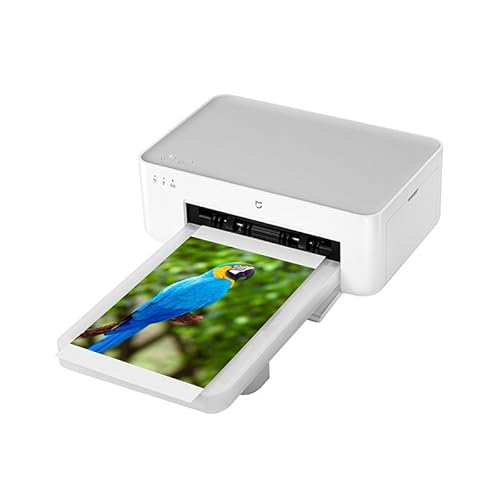
6. XIAOMI Instant Photo Printer 1S Set — Best for Desktop Use
The XIAOMI Instant Photo Printer 1S is a different category of device from the pocket-sized Zink printers above. This is a desktop sublimation printer — it's designed to sit on a desk and connect to both smartphones and computers, and it produces 3-inch or 6-inch photos at 300 DPI with 256 levels of greyscale per channel. That spec translates to professional photo lab-quality output with smooth tonal gradients and accurate skin tones. If you've been frustrated by the color limitations of Zink printing, this is what the step up looks like.
The 1S processes each print in approximately one minute and automatically applies a transparent protective laminate layer during the print cycle — no separate laminating step, no fading risk, no need for a sleeve. XIAOMI claims the output will remain color-accurate for decades, which is a reasonable expectation for dye-sub technology when stored properly. The 1,280 thermal print heads and high-precision paper feeding contribute to a level of detail that small Zink printers simply can't match at their resolution.
Connectivity covers both smartphone (via the companion app) and computer, making this a genuinely flexible option if you also print from a desktop photo editing workflow. It's worth noting this is not a portable printer — it's a desktop appliance that needs a power outlet. If you're buying for travel or events, look elsewhere. But if you want the best print quality available in a compact home printer and are willing to give up portability, the XIAOMI 1S is a strong choice. Also worth checking out our comparison of best printers for business cards if you need professional-grade small-format output for work as well.
Pros:
- 300 DPI dye-sublimation — true photo lab quality
- Prints 3-inch and 6-inch sizes
- Automatic protective laminate layer
- Connects to both smartphones and computers
Cons:
- Desktop-only — not portable
- Requires power outlet; no battery operation
- Significantly larger footprint than Zink pocket printers
7. HP Sprocket Studio Plus 4x6 Wireless Instant Photo Printer — Best for 4×6 Quality
The HP Sprocket Studio Plus bridges the gap between the pocket Sprocket lineup and a full home photo printer. It uses premium dye-sublimation technology to produce 4×6" photos — standard print size — on tear-resistant, smudge-proof, waterproof paper. This is not a Zink printer, but HP markets it alongside the Sprocket family because it uses the same app and occupies a similar "instant home printing" use case.
The bundle includes 118 sheets and three cartridges, which means you can get printing immediately without buying any accessories separately. Wi-Fi connectivity is a notable upgrade from the Bluetooth-only pocket Sprockets — you can send prints from across the room or even share the printer with multiple household members without everyone needing to pair individually. The HP Sprocket app's full creative suite (stickers, frames, filters, collages) works with the Studio Plus, so the experience is familiar if you've used any Sprocket model before.
Output quality is a clear tier above Zink. The 4×6" dye-sub prints are display-quality — accurate colors, sharp detail, and the durability to survive handling without protective sleeves. If you're printing photos you intend to frame, gift, or put in a physical album, the Studio Plus produces results you'll be proud of. The trade-off is size and price: this is a desk printer, not a bag printer, and the ongoing cartridge-plus-paper cost is higher per print than Zink. But for the output quality at this form factor, it's genuinely excellent.
Pros:
- 4×6" dye-sublimation output — display-quality prints
- Wi-Fi connectivity — multi-device household use
- 118 sheets and 3 cartridges included
- Waterproof, tear-resistant, smudge-proof paper
Cons:
- Not portable — requires a power outlet
- Higher ongoing consumable cost than Zink
- Larger footprint than the pocket Sprocket models
Key Features to Consider When Choosing a Zink Printer
Print Technology: True Zink vs. Dye-Sublimation
The most important decision in this category is understanding what you're actually buying. Zink (Zero Ink) printers use no cartridges or ribbons — color is embedded in the paper itself and activated by heat. This makes the printer extremely simple and the consumables down to paper only. Dye-sublimation printers (like the HPRT CP2100, XIAOMI 1S, and HP Sprocket Studio Plus in this guide) use a ribbon that transfers color in precise layers, producing smoother tonal gradients and more accurate color — at the cost of having a consumable ribbon to manage alongside the paper.
For casual party printing, scrapbooking stickers, and travel snapshots, Zink is the right call. The output is good enough, the friction is minimal, and the printer fits in a pocket. For anyone who wants prints that genuinely look like they came from a photo lab — sharp, color-accurate, and worthy of framing — the dye-sub options in this guide are worth the slightly more involved setup.
Print Size and Paper Cost
Most portable Zink printers produce 2×3" output. The HP Sprocket Select steps up to 2.3×3.4". The desktop models here produce 3", 4×6", or both. Size matters because it determines what you can actually do with the print — a 2×3" photo is a sticker or a memory token, not something you frame. A 4×6" dye-sub print is a real photograph.
Paper cost per print varies significantly. Generic 2×3" Zink paper runs roughly $0.20–$0.35 per sheet when bought in bulk. Dye-sub ribbons add cost on top of paper, but that cost per print can still be competitive depending on the brand. Always calculate the total cost per print (paper + consumable) before committing to any system, especially if you expect to print frequently.
Connectivity: Bluetooth, NFC, and Wi-Fi
All the portable printers in this guide connect via Bluetooth — that's the standard for pocket-sized instant printers. The KODAK Step adds NFC for Android tap-to-connect. The XIAOMI 1S and HP Sprocket Studio Plus add Wi-Fi, which is valuable for desk printers shared by multiple devices or used from a computer. Bluetooth-only is fine for a personal printer you pair once; Wi-Fi makes more sense for a shared household device. No Wi-Fi requirement is also a feature — you can use any of the Bluetooth-only models at remote locations with no network access.
Battery Life and Portability
For portable use, battery life is measured in prints per charge rather than hours. Most Zink pocket printers deliver 20–30 prints per charge. The Liene Pearl K100 claims 30 prints; HP Sprockets are similar. If you're running an event that requires more than that, bring a power bank with the appropriate charging cable — most modern models now use Type-C, though a few still use Micro-USB. The desktop models (XIAOMI 1S, HP Sprocket Studio Plus) require AC power and are not battery-operated at all. Know your use case before you buy: portable prints at events, or quality prints at home.
What People Ask
What is Zink printing and how does it work?
Zink stands for Zero Ink. Instead of liquid ink or a ribbon, the color is pre-embedded inside the paper as layers of dye crystals. When you print, the printer's heat element activates those crystals at precise temperatures to produce cyan, yellow, and magenta color without any external ink supply. The result is a self-contained system where your only ongoing cost is the paper itself.
Are Zink prints waterproof?
Zink prints are water-resistant, not fully waterproof. The glossy paper surface repels light moisture, splashes, and smudges effectively. You can handle them with slightly damp hands and they'll survive brief contact with water. Submersion or prolonged soaking will damage them. For truly waterproof output, a dye-sublimation printer with a laminate layer (like the HPRT CP2100 or HP Sprocket Studio Plus) offers better protection.
How much does Zink paper cost per print?
In 2026, 2×3" Zink paper typically runs between $0.20 and $0.35 per sheet when purchased in packs of 50 or 100. Smaller starter packs cost more per sheet. Some brands produce Zink-compatible paper that works across multiple 2×3" printers (including HP Sprocket and KODAK Step models), which allows you to shop for the best price rather than being locked into a single brand's paper.
How long do Zink prints last before fading?
Most manufacturers claim 10-year color stability for Zink prints stored under normal conditions — meaning indoors, away from direct sunlight and moisture. In practice, prints kept in albums or on surfaces away from UV exposure hold up well. Prints displayed in direct sunlight will fade faster. Dye-sublimation prints with a protective laminate layer generally have better long-term stability than Zink, particularly for displayed photos.
Can I use any Zink paper with my printer?
Most 2×3" Zink paper is cross-compatible between brands. Generic or third-party Zink paper that fits the 2×3" standard will typically work in HP Sprocket 2x3, KODAK Step, and Liene Pearl K100 printers. The HP Sprocket Select uses a slightly larger 2.3×3.4" format and requires Sprocket Select-compatible paper, which is less universally interchangeable. Always verify paper dimensions match your printer's specification before ordering in bulk.
Do Zink printers need Wi-Fi to work?
No. All the portable Zink printers in this guide connect via Bluetooth only and require no Wi-Fi or internet connection during printing. You do need the companion app installed on your smartphone, and the initial app download requires internet access. Once the app is installed and the printer is paired, you can print anywhere — at a campsite, on a plane, or at an outdoor event — with no network required.
Buy on Walmart
- HP Sprocket 2x3 Instant Smartphone Photo Printer - Portable — Walmart Link
- HP Sprocket Select 2.3x3.4 Instant Photo Printer, Print Pict — Walmart Link
- KODAK Step Instant Smartphone Photo Printer, Portable Mini C — Walmart Link
- HPRT CP2100 Portable Photo Printer for iPhone & Android | 2x — Walmart Link
- Liene Pearl K100 2x3” Photo Printer, Mini Instant Portable C — Walmart Link
- XIAOMI Instant Photo Printer 1S Set - Desktop Photo Printer, — Walmart Link
- HP Sprocket Studio Plus 4x6 Wireless Instant Photo Printer, — Walmart Link
Buy on eBay
- HP Sprocket 2x3 Instant Smartphone Photo Printer - Portable — eBay Link
- HP Sprocket Select 2.3x3.4 Instant Photo Printer, Print Pict — eBay Link
- KODAK Step Instant Smartphone Photo Printer, Portable Mini C — eBay Link
- HPRT CP2100 Portable Photo Printer for iPhone & Android | 2x — eBay Link
- Liene Pearl K100 2x3” Photo Printer, Mini Instant Portable C — eBay Link
- XIAOMI Instant Photo Printer 1S Set - Desktop Photo Printer, — eBay Link
- HP Sprocket Studio Plus 4x6 Wireless Instant Photo Printer, — eBay Link
The right Zink printer is the one you'll actually carry with you — because a photo in your hand, however small, outlasts a thousand images sitting unseen in your camera roll.



About Remington May
Remington May is a technology writer and digital product reviewer with a focus on consumer electronics, software, and the everyday tech that shapes how people work and live. She has spent years evaluating smartphones, laptops, smart home devices, and digital tools — approaching each product from the perspective of a practical user rather than a spec-sheet enthusiast. At Pinwords, she covers tech buying guides, product reviews, smartphone and laptop comparisons, and practical how-to guides for getting more out of your devices.
Check for FREE Gifts. Or latest free books from our best messages.
Remove Ad block to reveal all the secrets. Once done, hit a button below