Best Photo Booth Printer 2026
by Remington May
Which photo booth printer actually delivers the speed, quality, and reliability you need when everyone's lining up for prints at your event? If you've been scrolling through spec sheets and drowning in technical jargon, you're not alone. After researching the top models available in 2026, the DNP RX1 DS-RX1HS stands out as the clear winner for professional photo booth operators who need blazing speed and consistently stunning output.
Photo booth printers are a specialized category — and they're very different from the office laser printer sitting in your spare bedroom. These machines use dye-sublimation technology (a process where heat transfers dye directly into the paper for smooth, continuous-tone prints that look like they came from a professional photo lab). They're built for volume, events, and portability. Whether you're running a wedding photo booth, a corporate activation, or a school carnival, the right printer makes the difference between happy guests and a line that never moves. If you're also interested in specialty photo printing for other purposes, our Best Printer For Scrapbooking 2026 guide covers some excellent options for craft-focused printing.
In this guide, we've ranked and reviewed the seven best photo booth printers of 2026 across a range of budgets and use cases. You'll find everything from high-volume professional workhorses to compact portable units that slip into a backpack. Check out our full buying guide below the reviews for a breakdown of what actually matters when you're making this purchase.

Contents
Standout Models in 2026
- #PreviewProductRating
- Bestseller No. 1
 Rating:

- Bestseller No. 2
 DNP ds620A dye sub Printer, with 1 case of ds620 4x6 800 Print kit, and Printer Carry case-Nylon BagRating:
 - Bestseller No. 3
 Rating:
 - Bestseller No. 4
 Rating:
 - Bestseller No. 5
 Rating:
 - Bestseller No. 6
 Rating:
 - Bestseller No. 7
 Rating:
Detailed Product Reviews
1. DNP RX1 DS-RX1HS 6" Dye Sublimation Printer — Best Overall
When photo booth professionals talk about the gold standard for event printing, the DNP RX1 DS-RX1HS is almost always the machine they name first. It earns that reputation honestly. At 290 prints per hour for 4x6" output, this machine keeps up with even the most packed event schedules — think 12.4 seconds per print, which means guests never wait long before walking away with a keepsake in hand. You can push it even further with 6x8" prints at just 22 seconds each, giving you flexibility depending on your booth setup.
Print quality is where the DS-RX1HS truly separates itself from cheaper alternatives. The high-speed mode delivers 300x300dpi output, while switching to the quality mode bumps you up to 300x600dpi — a resolution (the number of dots packed into each inch of the print) that produces sharp text, smooth skin tones, and rich colors that hold up even when guests zoom in on the details. The prints also come out dry and ready to handle immediately, which matters a lot when you're handing images to excited guests one after another.
Versatility is another strong point. The DS-RX1HS handles 2x6" strips (perfect for classic photo booth designs), standard 4x6" prints, and 6x8" enlargements — all from a single machine without swapping any major components. If you operate multiple booth formats or offer different print size packages at events, this flexibility alone justifies the investment. It's built for the long haul, runs reliably across back-to-back events, and has a strong support ecosystem from DNP.
Pros:
- Exceptional 290 prints/hour speed — fastest in this roundup at the 4x6" size
- Supports three print sizes (2x6", 4x6", 6x8") without media swaps
- Dual resolution modes for speed vs. quality tradeoffs
- Proven reliability across high-volume event environments
Cons:
- Premium price point — highest upfront cost on this list
- Heavier than portable consumer options, requires a dedicated transport case
2. DNP DS620A Bundle with 4x6 800 Print Kit and Carry Case — Best Value Bundle
If you want a DNP dye-sub printer and you want to hit the ground running without scrambling for media supplies separately, the DS620A bundle is a smart move. It comes packaged with the DS620A printer body, a full 4x6" print kit (800 total prints), and a padded nylon carrying case — everything you need to show up at your first event ready to print. That 800-print media kit alone represents real savings compared to buying the printer and supplies separately, especially when you're trying to keep startup costs manageable.
The DS620A is a capable successor to DNP's well-regarded DS620 lineup. It produces crisp, professional 4x6" prints with dye-sublimation quality that will satisfy photo booth clients accustomed to high standards. Print speeds are competitive within the mid-tier professional segment, and the machine handles back-to-back jobs without the heat issues that can plague cheaper alternatives. The padded nylon carrying case is a practical bonus — it protects your investment during transport and makes setup and breakdown at venues significantly faster.
This bundle is particularly well-suited for newer photo booth operators who don't yet have a supply chain established with a dye-sub media vendor. Rather than figuring out compatibility and ordering media piecemeal, you get a curated kit that works together out of the box. It's also worth considering if you're building a multi-printer operation and want a reliable backup unit that includes its own media supply.
Pros:
- Complete ready-to-use bundle — printer, 800-print media kit, and carry case included
- Genuine DNP dye-sub quality for professional event results
- Padded carrying case adds real transport protection
- Good value when comparing bundle price to individual component costs
Cons:
- Bundle is 4x6" media specific — other size media sold separately
- Not as fast as the RX1 DS-RX1HS at peak throughput
3. Sinfonia Color Stream CS2 Bundle with 4x6 Media and Carry Case — Best for Boutique Operators
The Sinfonia Color Stream CS2 has built a loyal following among photo booth operators who prioritize color accuracy and smooth gradient reproduction above raw speed. This bundle pairs the CS2 printer with a 4x6" print kit good for 600 total prints and a padded carry case — a solid starting package for boutique event operators or photographers who run photo booths as a sideline service. Sinfonia's color processing is genuinely impressive, producing skin tones and vibrant solid colors that consistently draw compliments from clients.
The CS2 uses standard dye-sublimation thermal transfer, and Sinfonia has tuned the color profiles carefully. If your clients are discerning about how their photos look — weddings, high-end corporate events, luxury brand activations — the CS2 gives you output you can be proud to hand over. The printer itself is built solidly, with a footprint that fits comfortably in a variety of booth configurations. Speed is respectable for the category, though it won't match the DNP RX1 for raw prints-per-hour.
The included media kit covers 600 prints, which is enough to handle multiple standard events before you need to reorder. The soft padded carry case is a nice touch for operators who transport equipment in personal vehicles rather than dedicated cargo vans. If you're also shopping for other specialty printing solutions for your creative work, our Best Postcard Printer 2026 guide covers some compelling options worth exploring alongside this review.
Pros:
- Outstanding color accuracy and smooth gradient rendering
- Complete bundle with 600-print media kit and carry case
- Well-suited for upscale events where print quality is paramount
- Comfortable transport footprint for mobile operators
Cons:
- Lower print volume in the bundle (600 vs. 800 in the DS620A bundle)
- Replacement media can be harder to source quickly compared to DNP
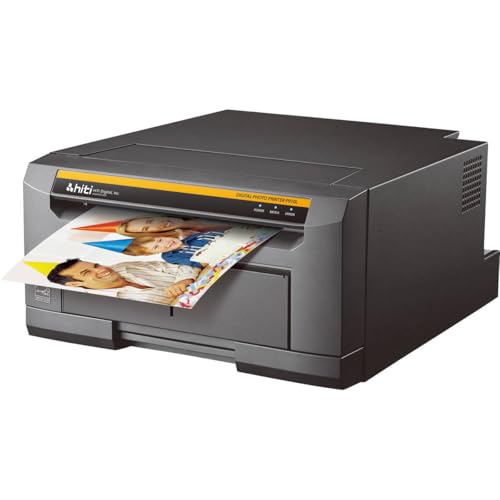
4. HiTi P525L Roll Photo Printer Bundle — Best Warranty Package
The HiTi P525L comes with something that no other printer on this list matches: a 3-year warranty included in the box. For a professional tool you're going to haul to events, put through its paces hundreds of times a year, and depend on for your livelihood, that level of coverage is genuinely meaningful. Combine that with a bundle that includes paper flanges, adapters, USB cable, power cord, two paper rolls, two ribbon rolls, and a padded carrying case, and the P525L is one of the most complete out-of-the-box packages available in 2026.
Print quality relies on D2T2 (Dye Diffusion Thermal Transfer) technology, which delivers vibrant 300dpi output with your choice of glossy or matte finish — a feature that gives you flexibility depending on your clients' preferences. Speed is competitive at 12.8 seconds per 4x6" print, translating to roughly 280 prints per hour. That puts it just below the DNP RX1 in raw throughput, but the gap is small enough that most operators won't notice the difference at real-world events.
HiTi has built a solid reputation for reliability in the photo booth industry, and the P525L continues that tradition. The printer connects via USB and integrates cleanly with popular photo booth software platforms. If you're just getting into the photo booth business and want a machine that will be covered if something goes wrong during your first three years of operation, the P525L's warranty alone makes it a compelling choice over more expensive alternatives.
Pros:
- 3-year warranty included — best coverage in this roundup
- Complete bundle with media rolls, cables, and padded carry case
- 280 prints/hour speed — strong throughput for professional use
- Glossy and matte finish options for client flexibility
Cons:
- USB connectivity only — no wireless option
- Roll-based media system requires more setup time than cassette-based printers
5. Canon Selphy CP1500 Wireless Compact Photo Printer — Best Budget Option
Not every photo booth setup calls for a professional-grade machine that costs as much as a used car. If you're running a casual booth for family events, small parties, or low-volume occasions where you need maybe a hundred prints over a few hours, the Canon Selphy CP1500 delivers real dye-sub quality at an accessible price point. It's compact enough to fit on a folding table without dominating the space, and the wireless connectivity means you can feed it from a smartphone, tablet, or laptop without running cables across the floor.
The CP1500 produces prints that are instantly dry and water resistant — a genuine advantage over inkjet alternatives that smear when touched fresh. Canon rates the prints for up to 100 years of life under proper storage conditions, which is the same archival longevity claim the professional machines make. The small footprint and optional battery pack (sold separately) make it genuinely portable in a way the professional machines simply aren't. You can slip this printer into a tote bag and run a booth from a backyard or rooftop without any power concerns.
Where the CP1500 pulls back is in throughput. It's not designed for high-volume event printing, and if you're handling lines of 50+ guests, it will become a bottleneck. It's also a compact (postcard-sized) print machine, not a 6x8" workhorse. But for casual use cases — a birthday party, a small graduation gathering, a home photo booth setup — it's a smart and affordable choice. The Wi-Fi connectivity is particularly well-implemented, and the Canon camera compatibility makes it a natural companion if you're already shooting with Canon gear.
Pros:
- Compact and genuinely portable with optional battery
- Wireless connectivity — no cables required at the booth
- Prints are instantly dry, water resistant, and rated for 100 years
- Lowest price point on this list by a significant margin
Cons:
- Not suitable for high-volume event printing — too slow for large crowds
- Limited to smaller print sizes compared to professional machines
6. HiTi P910L Lightweight 8" Dye-Sub Color Roll Photo Printer — Best for Large Format Prints
Most photo booth printers top out at 6x8" output. The HiTi P910L takes a different path entirely, offering 8"-wide roll paper with print sizes ranging from 8x4" all the way up to 8x12". That's a meaningful step up in physical print size that changes the impression your booth makes on guests. An 8x10" print that someone can frame and hang on their wall is a completely different keepsake than a standard 4x6" snapshot, and booths that offer this option command premium pricing.
The P910L uses D2T2 dye diffusion thermal transfer at a maximum resolution of 300dpi, which delivers professional-grade output at every size in its range. Print speed is 35 seconds per 8x10", which is fast considering the size of the output — and the 1, 2, or 3-UP printing option (printing one, two, or three images on a single sheet) adds flexibility for creative layouts and collage-style outputs that event guests genuinely love. The machine is described as lightweight for its category, which matters when you're setting up and breaking down repeatedly at venues.
This isn't the machine you choose if your clients want 4x6" prints churned out as fast as possible. But if you're positioning your photo booth as a premium offering — perhaps at high-end weddings, anniversary parties, or corporate galas where the print is a branded takeaway — the P910L's large-format capability is a genuine differentiator. Pair it with quality framing options at the booth and you have a product that justifies a much higher price per print. If you're curious about other large-format printing options for creative projects, our Best Poster Printer 2026 guide covers some excellent machines worth considering.
Pros:
- Supports print sizes up to 8x12" — largest output range in this roundup
- 1, 2, or 3-UP printing layouts for creative collage options
- 300dpi D2T2 quality across all supported sizes
- 35 seconds per 8x10" is competitive for the format size
Cons:
- 8" roll media costs more per print than standard 4x6" media
- Best for premium/specialty booths — overkill for casual event use
7. Canon SELPHY Square QX10 Portable Photo Printer — Best Portable Mini Printer
The Canon SELPHY Square QX10 occupies a completely different niche from the professional machines on this list, and that's not a criticism — it's a feature. This printer produces 2.7x2.7" square prints (68mm x 68mm) that look exactly like the format popularized by Instax and Polaroid-style cameras. Square format photos have a unique charm, and the QX10 delivers them with genuine dye-sublimation quality and a 100-year rated print life that disposable film cameras simply can't match.
Connectivity is fully wireless — you print via Wi-Fi from a smartphone using Canon's SELPHY Photo Layout app, and the prints even include a captionable white border that guests can write on, giving you a built-in personalization element. USB charging means you're not hunting for a barrel-tip power adapter on the road. The QX10 is small enough to carry in a large jacket pocket, making it the ultimate grab-and-go option for operators who want to offer a mini photo booth experience at events where full-size booths aren't practical.
The trade-offs are obvious: small print size, lower throughput, and limited suitability for high-volume events. But for the right context — pop-up experiences, intimate gatherings, art installations, roaming "photo concierge" services at larger events — the QX10 is a genuinely delightful tool. It's also a great entry point for someone exploring whether photo booth work is right for them before committing to a four-figure professional printer investment.
Pros:
- Ultra-portable — fits in a bag, charges via USB
- Square format prints are trendy and immediately shareable
- 100-year rated print life despite the compact form factor
- Wireless printing from smartphones via Canon's app
Cons:
- 2.7x2.7" print size is too small for traditional photo booth presentations
- Not designed for high-volume or professional event throughput
Buying Guide: How to Choose the Best Photo Booth Printer
Choosing a photo booth printer in 2026 comes down to matching the machine's capabilities to your actual use case. Here are the key factors that should drive your decision.
Print Speed and Volume Requirements
Print speed is measured in prints per hour (PPH) and seconds per print. For high-volume events with 100+ guests, you need at least 200 PPH — ideally closer to 280-290 PPH. If you run a line of guests and each print takes 30+ seconds, people get bored and leave before receiving their photo. Professional machines like the DNP RX1 DS-RX1HS (290 PPH) and HiTi P525L (280 PPH) are built for this pressure. The Canon Selphy models are fine for casual use but will bottleneck at busy events. Always calculate your expected guest count and event duration before deciding.
Print Size and Media Flexibility
The most common photo booth format is 4x6", but your booth design may call for 2x6" strips (the classic four-photo strip layout), 6x8" enlargements, or even 8x10" and larger. Some printers handle multiple sizes without swapping hardware (the DNP RX1 DS-RX1HS is a strong example), while others are locked to a single media type. Think carefully about what your clients will want. Premium booth operators are increasingly offering 8x10" or larger prints as an upsell — the HiTi P910L opens that door. If you're interested in other specialty photo printing formats, our guide on the Best Printer For Scrapbooking 2026 explores some additional options for different print dimensions and paper types.
Portability and Transport
Professional dye-sub printers are not light. If you're hauling equipment to multiple venues per week, weight and pack size matter significantly. Look for machines that include or are compatible with padded carry cases — the DNP DS620A and Sinfonia CS2 bundles both include cases, which saves you from buying one separately. If maximum portability is your priority above all else, the Canon Selphy CP1500 with an optional battery pack is the only machine here that you can run truly untethered from power outlets and cables.
Total Cost of Ownership
The printer purchase price is just the beginning. Dye-sublimation media (the combined ribbon and paper cassettes or rolls) is an ongoing cost that varies significantly by brand and print size. Before committing to a printer, check the current price of replacement media and calculate the cost per print. DNP media is widely available and competitively priced. Sinfonia media is somewhat harder to source quickly. The HiTi P910L's 8" roll media costs more per print than standard 4x6" media, but you can charge more per print to offset that. Factor in the warranty too — the HiTi P525L's 3-year coverage has real monetary value if anything goes wrong.
Frequently Asked Questions
What type of printer is best for photo booths?
Dye-sublimation printers are the standard choice for photo booths. They produce dry, water-resistant prints with smooth continuous-tone color that resembles professional photo lab output. Unlike inkjet printers, dye-sub prints don't smear when touched immediately after printing, which is critical when handing photos to excited guests at events. All seven printers reviewed here use dye-sublimation technology for exactly this reason.
How fast does a photo booth printer need to be?
For a busy event with 100 or more guests, you want a printer capable of at least 200 prints per hour — ideally 280 or more. That translates to roughly 12-15 seconds per 4x6" print. Slower machines (30+ seconds per print) will create long lines and frustrated guests, especially during peak event hours. The DNP RX1 DS-RX1HS at 290 prints per hour sets the high-water mark in 2026 for consumer-accessible photo booth printers.
Can I use a regular printer for a photo booth?
Technically yes, but you shouldn't. Standard inkjet printers are too slow, produce prints that smear when touched fresh, and aren't built for the duty cycles that photo booth events demand. A standard home printer running at 60+ events per year will fail prematurely. Dye-sublimation printers are engineered specifically for high-volume photo output with the print speed, dry time, and durability that professional use requires.
What is the best print size for a photo booth?
The 4x6" format remains the most popular choice for photo booths because it's a familiar size that fits standard frames, wallets, and scrapbooks. However, 2x6" strips (the classic four-photo strip design) are equally popular and many operators offer both sizes from the same machine. For premium booths targeting upscale events, 6x8" and 8x10" prints command higher prices and create a more memorable keepsake. Your printer choice should match the sizes your clients expect.
How many prints can I get from one media kit?
It depends on the media kit you purchase. The DNP DS620A bundle includes an 800-print kit, the Sinfonia CS2 bundle includes 600 prints, and the HiTi P525L bundle includes two complete roll sets. For a typical 4-hour wedding reception with active booth use, plan on 200-400 prints depending on traffic. Always bring at least one spare media kit to every event — running out mid-event with guests waiting is a situation you want to avoid entirely.
Is dye sublimation better than inkjet for photos?
For event photo printing specifically, yes — dye-sublimation is clearly better than inkjet. Dye-sub prints are dry the instant they emerge from the printer, water resistant, and produce smooth continuous-tone color without visible dots or banding. Inkjet prints take time to dry, smear easily when wet, and the individual ink dots become visible under close inspection. For archival home photo printing at high resolution, inkjet has some advantages, but for photo booth work, dye-sub wins on every practical metric.
Buy on Walmart
- DNP RX1 DS-RX1HS 6" Dye Sublimation Printer, 290 4x6 Prints — Walmart Link
- DNP ds620A dye sub Printer, with 1 case of ds620 4x6 800 Pri — Walmart Link
- Sinfonia Color Stream CS2 Dye Sub Photo Printer with a 4x6 M — Walmart Link
- HiTi P525L Roll Photo Printer - Bundle with HiTi 4x6 Media f — Walmart Link
- Canon Selphy CP1500 Wireless Compact Photo Printer (Black) — Walmart Link
- Hiti P910L Lightweight 8" Dye-Sub Color Roll Type Photo Prin — Walmart Link
- Canon SELPHY Square QX10 Portable Photo Printer, Wi-Fi Conne — Walmart Link
Buy on eBay
- DNP RX1 DS-RX1HS 6" Dye Sublimation Printer, 290 4x6 Prints — eBay Link
- DNP ds620A dye sub Printer, with 1 case of ds620 4x6 800 Pri — eBay Link
- Sinfonia Color Stream CS2 Dye Sub Photo Printer with a 4x6 M — eBay Link
- HiTi P525L Roll Photo Printer - Bundle with HiTi 4x6 Media f — eBay Link
- Canon Selphy CP1500 Wireless Compact Photo Printer (Black) — eBay Link
- Hiti P910L Lightweight 8" Dye-Sub Color Roll Type Photo Prin — eBay Link
- Canon SELPHY Square QX10 Portable Photo Printer, Wi-Fi Conne — eBay Link
Final Thoughts
The right photo booth printer for you depends on your event volume, your clients' expectations, and your budget — but you now have everything you need to make a confident, informed decision. Start with the DNP RX1 DS-RX1HS if you're running professional high-volume events and need the best throughput available; go with the Canon Selphy CP1500 if portability and price are your top priorities; and consider the HiTi P910L if large-format prints are how you want to stand out in a crowded market. Pick the machine that fits your actual business, click through to check the latest pricing on Amazon, and start printing memories that guests will keep for years.



About Remington May
Remington May is a technology writer and digital product reviewer with a focus on consumer electronics, software, and the everyday tech that shapes how people work and live. She has spent years evaluating smartphones, laptops, smart home devices, and digital tools — approaching each product from the perspective of a practical user rather than a spec-sheet enthusiast. At Pinwords, she covers tech buying guides, product reviews, smartphone and laptop comparisons, and practical how-to guides for getting more out of your devices.
Check for FREE Gifts. Or latest free books from our best messages.
Remove Ad block to reveal all the secrets. Once done, hit a button below