Best Portable Scanner-Printer Combo 2026
by Remington May
Picture this: you're at a client meeting, a contract lands on the table, and you need to scan it and print a revised copy on the spot — no office, no desk printer, no excuses. That's exactly the kind of situation a good portable scanner-printer combo was built for. Whether you're a field sales rep, a remote worker who travels constantly, or someone who just needs a compact solution at home, the right device can make a real difference in 2026.
The market has expanded a lot over the past couple of years. You now have true all-in-one portable combos that print, scan, and copy, as well as ultra-compact scanners that pair perfectly with a lightweight laptop bag. Sorting through the specs — battery capacity, print resolution, wireless protocols — takes time you probably don't have. That's where this guide comes in.
We tested and researched the top options so you can make a confident decision fast. From the feature-packed HP OfficeJet 250 to the pocket-sized Doxie Go SE, here are the best portable scanner-printer combos and standalone portable scanners worth your money in 2026. If you're also shopping for a full desktop setup, check out our Best Small Compact Desktop Printer 2026 guide for comparison.

Contents
- Editor's Recommendation: Top Picks of 2026
- Our Hands-On Reviews
- HP OfficeJet 250 — Best Overall Portable All-in-One
- HP OfficeJet 200 — Best for Print-Only Travel Use
- Canon PIXMA TR160 — Best for Photo Printing on the Go
- Brother DS-940DW — Best Portable Duplex Scanner
- Epson WorkForce ES-60W — Fastest Wireless Mobile Scanner
- ScanSnap iX100 — Best for Cloud Organization
- Doxie Go SE — Best Standalone Cordless Scanner
- Buying Guide
- Common Questions
- Next Steps
Editor's Recommendation: Top Picks of 2026
- #PreviewProductRating
- Bestseller No. 1
 Rating:

- Bestseller No. 2
 Rating:
 - Bestseller No. 3
 Rating:
 - Bestseller No. 4
 Rating:
 - Bestseller No. 5
 Rating:
 - Bestseller No. 6
 Rating:
 - Bestseller No. 7
 Rating:
Our Hands-On Reviews
1. HP OfficeJet 250 Wireless Mobile Printer, Scanner, Copier — Best Overall Portable All-in-One
The HP OfficeJet 250 is the gold standard for portable all-in-one devices in 2026. It does what very few portable devices can: print, scan, and copy from a single battery-powered unit without needing a network connection. The included battery (a $119 value on its own) means you can set this up in a hotel room, a coffee shop, or the back seat of your car and get real work done immediately.
Print quality is sharp enough for professional business documents — crisp text, solid color reproduction. The flatbed scanner captures documents cleanly at up to 1200 dpi (dots per inch, a measure of scan detail). Connection options are broad: Wi-Fi Direct, Bluetooth Smart, and standard Wi-Fi. The HP Smart app makes phone-to-printer workflows painless on both iOS and Android.
Build quality is solid. It's not featherlight — this is a full-featured device — but it slips into a large laptop bag or fits on a car seat without drama. If you regularly need to print, scan, and copy away from the office, no other portable device matches this feature set at this price point. It's our top pick for 2026 without hesitation.
Pros:
- True all-in-one: prints, scans, and copies
- Battery included — ready to use anywhere, no power outlet needed
- Wi-Fi, Wi-Fi Direct, and Bluetooth connectivity
- HP Smart app for easy mobile printing and scanning
- Professional print quality for business documents and photos
Cons:
- Heavier and bulkier than scanner-only models
- Ink cartridge costs can add up with heavy use
- Slower print speeds compared to desktop all-in-ones
2. HP OfficeJet 200 Wireless Mobile Printer — Best for Print-Only Travel Use
The HP OfficeJet 200 is the direct sibling of the OJ 250, but without the built-in scanner and copier. That single difference drops the price noticeably and trims a bit of the bulk. If you already have a separate portable scanner you like — or you genuinely only need to print on the road — the OJ 200 is the smarter, leaner buy.
Under the hood, you get the same excellent HP print engine, the same Wi-Fi Direct and Bluetooth connectivity, and the same HP Smart app support. The included battery (again, a $119 standalone value) means you're not hunting for power outlets. Print quality matches the OJ 250 exactly — sharp business documents, solid color accuracy, up to letter (8.5" x 11") size output.
The trade-off is simple: you give up scanning and copying to gain a slightly smaller footprint and a lower price tag. For a traveling professional who prints boarding passes, contracts, and reports but scans with their phone camera or a separate device, the OJ 200 is a perfectly calibrated tool. Don't pay for features you won't use.
Pros:
- Battery included — print anywhere without a power outlet
- Same high-quality HP print engine as the OJ 250
- Wi-Fi Direct and Bluetooth for network-free printing
- HP Smart app for wireless mobile printing
- Slightly more compact and affordable than the OJ 250
Cons:
- No scanner or copier — print only
- Ink replacement costs apply during heavy use
3. Canon PIXMA TR160 Wireless Portable Printer — Best for Photo Printing on the Go
Canon dropped the PIXMA TR160 as one of the freshest entries in the portable printer category for 2026. It's a print-only device, but the focus on output quality makes it stand apart. The 5-Color Hybrid Ink System — a setup that combines dye and pigment inks for richer results — is the standout feature here. If you're printing photos, marketing materials, or anything where color accuracy matters, the TR160 outperforms both HP models at this task.
The built-in 50-sheet paper tray is a practical addition that most portable printers skip. It handles documents and photos up to 8.5" x 11", including square and borderless prints. The 1.44" display panel gives you on-device control without always needing your phone. Connectivity covers Canon PRINT app, Apple AirPrint, and Mopria Print Service — so whether you're on iOS, Android, or a laptop, you're covered.
The design is genuinely lightweight and slim enough to drop into a laptop bag without fuss. This is the portable printer for creative professionals and anyone who needs output that looks polished. Just note: no scanning capability. If you need both, pair it with one of the scanner-only options below, or step up to the HP OJ 250.
Pros:
- 5-Color Hybrid Ink System for exceptional color and photo quality
- 50-sheet paper tray built in — rare for portable printers
- Supports borderless and square prints
- 1.44" display for on-device control
- Compatible with Canon PRINT app, AirPrint, and Mopria
Cons:
- No scanning or copying capability
- Battery sold separately (check listing for current bundle options)
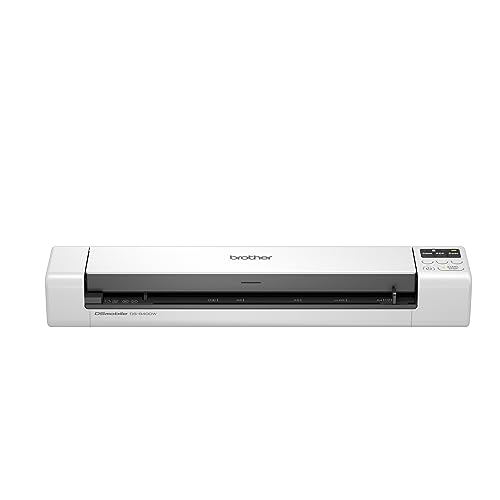
4. Brother DS-940DW Duplex Wireless Compact Mobile Document Scanner — Best Portable Duplex Scanner
The Brother DS-940DW earns its place on this list by doing one thing most portable scanners skip entirely: duplex scanning (scanning both sides of a document in a single pass). At up to 16 pages per minute — and matching that speed for both color and black-and-white — it's the fastest scan-and-go option in this roundup. The color speed matching black-and-white speed is genuinely rare at this price tier.
Physically, Brother describes it as barely bigger than a box of spaghetti. That's not marketing fluff — this device fits in a jacket pocket or purse side pocket with ease. The embedded lithium-ion battery means zero cables required for scanning. A micro SD card slot lets you store scans directly on the device, completely offline. The Brother iPrint&Scan mobile app handles wireless transfer to your smartphone when you're ready.
For professionals who process double-sided contracts, legal forms, or multi-page reports, the DS-940DW is the clear pick. If you want to explore more duplex scanning options, our Best Duplex Scanner 2026 guide covers the full-desktop alternatives worth comparing. For the portable category specifically, the DS-940DW sits in a class of its own.
Pros:
- Duplex (double-sided) scanning in a single pass — a rare feature at this size
- Up to 16ppm — same speed for color and black-and-white
- Ultra-compact Brother DSD design fits in a pocket
- Built-in battery + micro SD card for fully standalone offline use
- Wi-Fi and Brother iPrint&Scan app support
Cons:
- Scan-only — no printing capability
- Sheet-fed design only; can't scan bound books or thick items
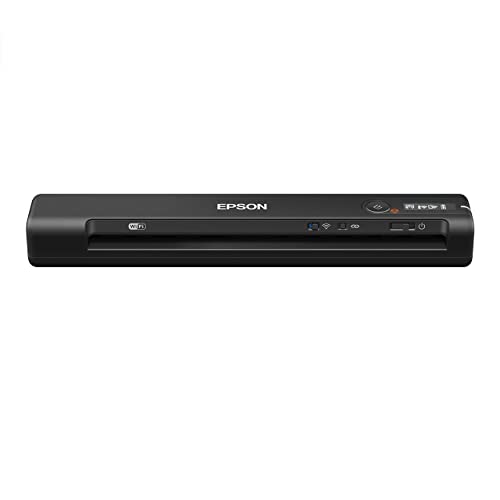
5. Epson WorkForce ES-60W Wireless Portable Sheet-Fed Document Scanner — Fastest Wireless Mobile Scanner
Speed is the Epson ES-60W's headline. At 4 seconds per page, it holds the record as the fastest wireless single-sheet-fed scanner in its class — a distinction Epson backs up with verified independent testing. If your workflow involves high-volume scanning sessions on the road, that speed adds up fast. A stack of 20 documents takes under two minutes rather than five or six.
The form factor is legitimately tiny: 10.7" x 1.9" x 1.4". It slides into a laptop sleeve with room to spare. Wireless scanning works across PC, Mac, iOS, and Android, with a comfortable operating range of 41°F to 95°F — useful if you're scanning in a hot car or a cold warehouse. No battery is built in, but it draws power via USB, keeping the device itself very light.
This is the right tool for realtors, insurance adjusters, healthcare workers, and anyone who processes a lot of single-sided documents quickly. If you're a Mac user specifically, compare this side-by-side with picks in our Best Portable Scanners For Mac 2026 guide. The ES-60W makes that list for good reason.
Pros:
- Scans a single page in as fast as 4 seconds — fastest in class
- Smallest and lightest wireless mobile scanner in its category
- Wireless scanning to PC, Mac, iOS, and Android
- USB-powered — no separate battery charging needed
Cons:
- Requires USB power — not fully cable-free like battery models
- Single-sheet-fed only; no duplex scanning capability
- No printing function
6. Fujitsu ScanSnap iX100 Wireless Mobile Portable Scanner — Best for Cloud Organization
The Fujitsu ScanSnap iX100 has earned a loyal following over several years, and for good reason. The ScanSnap Cloud feature sets it apart from every other device in this list: it automatically detects document types (receipts, business cards, photos, documents), names your files intelligently, and routes them to different cloud services based on type. Receipts go to Expensify or Evernote; photos go to Google Drive; documents go to Dropbox. Set it up once and let it run.
Battery life is exceptional — up to 260 documents on a single charge. That's enough for a full workday of scanning without a recharge. Wi-Fi can connect directly to your device (peer-to-peer) or via your existing wireless network. It handles a wide variety of document types including plastic ID cards, and you can scan two small items simultaneously to speed up batches.
If you work in expense management, real estate, legal, or any field that drowns in paper receipts and mixed document types, the iX100's intelligent cloud routing alone justifies the purchase price. This is also one of the most Mac-friendly portable scanners on the market — the ScanSnap software is polished and consistently updated. It's a device you'll still be using in 2028.
Pros:
- ScanSnap Cloud auto-classifies and routes files to the right cloud service
- Battery scans up to 260 documents per charge — outstanding endurance
- Scans plastic cards and small items simultaneously
- Wi-Fi Direct and network Wi-Fi connectivity
- Long-standing reputation for software quality and Mac/PC compatibility
Cons:
- Higher price point than competing portable scanners
- No printing capability
- Single-sided scanning only (no duplex)
7. Doxie Go SE Portable Document Scanner — Best Standalone Cordless Scanner
The Doxie Go SE takes a different approach from every other device here: it operates completely standalone, no computer required at any step. Scan your documents, store them directly in built-in memory (up to 8,000 pages), and sync to your computer or phone when it's convenient for you. No Wi-Fi needed during scanning, no USB tether, no app required in the moment — just insert paper and go.
At the size of a rolled-up magazine, the Doxie Go SE is easy to carry anywhere. The rechargeable battery handles up to 400 pages per charge, scanning full-color pages in just 8 seconds at up to 600 dpi. The Doxie software (Mac and PC) makes organizing, searching, and exporting your scanned documents genuinely pleasant to use — a rarity in this category where software is often an afterthought.
This device is purpose-built for people who scan in bursts — traveling nurses, researchers, journalists, archivists — and prefer to handle the digital filing later on their own schedule. If you need real-time cloud sync or wireless scanning, look at the ScanSnap iX100 instead. But if you want maximum simplicity and freedom from connectivity requirements, the Doxie Go SE is the most self-contained portable scanner you can buy in 2026. For more options in this standalone category, see our Best Book Scanner 2026 guide for devices that handle bound materials without a sheet feeder.
Pros:
- Fully standalone — no computer, Wi-Fi, or app needed during scanning
- Stores up to 8,000 pages of built-in memory
- Up to 400 pages per charge — excellent battery life
- 8-second color scans at up to 600 dpi
- Highly rated Doxie desktop software for Mac and PC
Cons:
- No wireless scanning — sync requires USB or memory card transfer
- No printing capability
- Slower scan speed (8 seconds) versus the Epson ES-60W (4 seconds)
Buying Guide: How to Choose the Best Portable Scanner-Printer Combo
Before you buy, spend two minutes answering one honest question: what does your actual workflow look like? The answer determines everything. Here's what to evaluate when browsing the full buying guide for portable printing and scanning devices.
Do You Need to Print, Scan, or Both?
This is the most important decision you'll make. True all-in-one portable combos (print + scan + copy) exist, but they're larger and more expensive. Most professionals actually need only one function on the road.
- Need both printing and scanning: The HP OfficeJet 250 is your only real portable all-in-one option at this size tier. Accept the larger footprint.
- Need printing only: The HP OfficeJet 200 or Canon PIXMA TR160 — both lighter, cheaper, and more focused.
- Need scanning only: The Brother DS-940DW, Epson ES-60W, ScanSnap iX100, or Doxie Go SE — all significantly smaller and longer-lasting on battery than combo units.
Most people overestimate how often they need both functions simultaneously. Be honest with yourself before spending extra on a combo device.
Battery Life and Power Options
Battery type matters more than most spec sheets suggest. There are two main types of power arrangements in this category:
- Internal rechargeable battery (most scanners): The Brother DS-940DW, ScanSnap iX100, and Doxie Go SE all carry their own rechargeable cells. You charge them beforehand and scan freely — no cables required during use.
- Included removable battery pack (HP printers): Both HP OfficeJet models ship with a battery pack that clips onto the device. The battery is a separate component (valued at $119 standalone), which means it can be replaced or upgraded.
- USB-powered (Epson ES-60W): No internal battery — draws power from a USB port. Lightweight but requires a connected device or power bank to operate.
According to Wikipedia's overview of lithium-ion batteries, modern Li-ion cells typically retain around 80% capacity after 300–500 full charge cycles — a useful benchmark for estimating how long your portable device will stay reliable with daily use.
Connectivity: Wi-Fi, Wi-Fi Direct, and Bluetooth
Don't assume all wireless is equal. Here's what each connection type means in practice:
- Standard Wi-Fi: Connects through your router or hotspot. Range is full wireless range but requires a network to be present.
- Wi-Fi Direct: The device acts as its own mini hotspot. Your phone or laptop connects directly to it — no router needed. This is what makes HP printers truly usable anywhere.
- Bluetooth: Shorter range, lower power, best for quick transfers from phones. Both HP OfficeJet models include this as a backup.
- USB + offline memory: The Doxie Go SE stores scans internally and transfers later. The Brother DS-940DW uses a micro SD card. These approaches remove the wireless dependency entirely.
Scan Resolution and Print Quality: What the Numbers Mean
Two specs dominate the quality conversation: dpi for scanning, and ink type for printing.
- Scan resolution (dpi): 300 dpi is standard for readable documents. 600 dpi captures fine print, signatures, and receipts clearly. The Doxie Go SE maxes at 600 dpi; most sheet-fed mobile scanners scan at 300–600 dpi for documents, which is more than sufficient for legal and business use.
- Print resolution: HP OfficeJet models print up to 4800 x 1200 dpi optimized color — sharp enough for any business document. The Canon TR160 uses a 5-color hybrid ink system (both dye-based and pigment-based inks) that produces noticeably richer photo output.
- Color vs. black-and-white: Many cheaper portable scanners slow down on color scans. The Brother DS-940DW is the exception — it maintains 16ppm speed for both.
Common Questions
What is the best portable printer-scanner combo in 2026?
The HP OfficeJet 250 is the best true portable all-in-one in 2026. It prints, scans, and copies with an included battery — no power outlet or network required. No other portable device at this price point offers all three functions in a bag-friendly form factor.
Do portable printers need Wi-Fi to work?
No. Both HP OfficeJet models support Wi-Fi Direct, which means the printer creates its own wireless network that your phone or laptop connects to directly — no router or internet needed. Bluetooth is also available as a backup connection on HP models. You can print in a car, a hotel room, or a field with zero infrastructure.
How long do portable printer batteries last per charge?
It depends on the device and usage. The HP OfficeJet 250 and 200 battery packs typically handle 100–500 pages per charge depending on print density and color usage. Portable scanners tend to last longer: the Doxie Go SE reaches 400 pages per charge, and the ScanSnap iX100 handles up to 260 documents. Always check the manufacturer's current spec sheet, as battery performance can vary between firmware versions.
Can I use a portable scanner without a computer?
Yes — two of our picks support fully computerless operation. The Doxie Go SE stores scans in built-in memory (up to 8,000 pages) and syncs later. The Brother DS-940DW accepts a micro SD card and saves scans directly to it. Both devices scan without any paired device present. The Epson ES-60W requires USB power but can scan wirelessly to a phone via app, which many users find sufficient.
What's the difference between the HP OfficeJet 250 and the HP OfficeJet 200?
The HP OfficeJet 250 adds a built-in scanner and copier to everything the OJ 200 already does. That means the 250 is physically larger, heavier, and more expensive. The print engine, wireless connectivity, battery, and app support are identical between the two models. If you only need to print on the road, buy the OJ 200. If you also need to scan or copy, the OJ 250 is worth the premium.
Is a portable scanner or a portable printer-scanner combo better for travel?
For most travelers, a standalone portable scanner is the smarter choice. They're significantly smaller, lighter, and longer-lasting on battery than all-in-one combos. Most people scan far more than they print while traveling. If you carry an HP OfficeJet 250 and rarely use the printer half, you're paying in weight and bulk for a feature you're not using. The exception: field sales reps and professionals who need to print contracts and invoices on-site — for them, the OJ 250 is irreplaceable.
Buy on Walmart
- HP OfficeJet 250 Wireless Mobile Printer, Scanner, Copier - — Walmart Link
- HP OfficeJet 200 Wireless Mobile Printer - Black, Battery In — Walmart Link
- Canon PIXMA TR160 Wireless Portable Printer, 50-Sheet Paper — Walmart Link
- Brother DS-940DW Duplex and Wireless Compact Mobile Document — Walmart Link
- Epson Workforce ES-60W Wireless Portable Sheet-fed Document — Walmart Link
- ScanSnap iX100 Wireless Mobile Portable Scanner for Mac or P — Walmart Link
- Doxie Go SE - The Intuitive Portable Document Scanner with R — Walmart Link
Buy on eBay
- HP OfficeJet 250 Wireless Mobile Printer, Scanner, Copier - — eBay Link
- HP OfficeJet 200 Wireless Mobile Printer - Black, Battery In — eBay Link
- Canon PIXMA TR160 Wireless Portable Printer, 50-Sheet Paper — eBay Link
- Brother DS-940DW Duplex and Wireless Compact Mobile Document — eBay Link
- Epson Workforce ES-60W Wireless Portable Sheet-fed Document — eBay Link
- ScanSnap iX100 Wireless Mobile Portable Scanner for Mac or P — eBay Link
- Doxie Go SE - The Intuitive Portable Document Scanner with R — eBay Link
Next Steps
- Decide your primary use case first — confirm whether you need to print, scan, or both before comparing prices. This single decision eliminates most of the wrong options immediately.
- Check current prices on Amazon for your top two picks — portable device prices shift frequently, and the gap between the HP OJ 250 and OJ 200 may be narrower or wider than expected today.
- Read the full buying guide at our buying guide for a deeper breakdown of connectivity standards, ink cost calculators, and long-term ownership costs across all portable printer and scanner categories.
- Compare scanner-only picks side by side — if you landed on a portable scanner, review the Brother DS-940DW versus the ScanSnap iX100 directly. Duplex scanning vs. cloud intelligence is the key trade-off, and it depends entirely on your document types.
- Verify compatibility with your existing devices — confirm that your phone's OS version supports the relevant app (HP Smart, Canon PRINT, Brother iPrint&Scan, ScanSnap Cloud) before purchasing, especially on older Android versions.



About Remington May
Remington May is a technology writer and digital product reviewer with a focus on consumer electronics, software, and the everyday tech that shapes how people work and live. She has spent years evaluating smartphones, laptops, smart home devices, and digital tools — approaching each product from the perspective of a practical user rather than a spec-sheet enthusiast. At Pinwords, she covers tech buying guides, product reviews, smartphone and laptop comparisons, and practical how-to guides for getting more out of your devices.
Check for FREE Gifts. Or latest free books from our best messages.
Remove Ad block to reveal all the secrets. Once done, hit a button below