Best Small Compact Desktop Printer 2026
by Remington May
The Brother HL-L2460DW is our top pick for 2026 — it prints at 36 pages per minute with automatic duplex and fits neatly on any desk. Finding the right small compact desktop printer can feel overwhelming when store shelves are packed with options that all look the same from the outside. Whether you need a quick laser printer for work documents or a color inkjet that handles everything from receipts to school projects, the wrong choice costs you money and counter space.
In 2026, compact printers have gotten genuinely impressive. Manufacturers have squeezed full-size performance into footprints no bigger than a hardcover book. You can get wireless, duplex (double-sided printing), and fast speeds without a machine that takes over half your desk. But not every small printer is built the same — some are cheap to buy but expensive to run, and others sacrifice speed for size in ways that will frustrate you within a week.
We tested and reviewed seven of the best small compact desktop printers available right now, covering laser and inkjet options across a range of budgets. Whether you're printing a few pages a week or dozens of documents a day, this guide will match you to the right machine. For more context on what makes a printer worth buying, check out our broader buying guide or our roundup of the best duplex printers if two-sided printing is a priority for you.

Contents
- Editor's Recommendation: Top Picks of 2026
- Full Product Breakdowns
- Brother HL-L2460DW — Best Overall
- HP LaserJet M110w — Best Ultra-Compact Laser
- Canon imageCLASS MF113w — Best Multifunction Compact
- HP LaserJet Pro M15w — Best Budget Laser
- HP DeskJet 2755e — Best Color Inkjet for Home
- Epson EcoTank ET-2800 — Best for Low Running Costs
- Brother MFC-J1010DW — Best Compact All-in-One Inkjet
- What to Look For When Buying
- Questions Answered
- Final Thoughts
Editor's Recommendation: Top Picks of 2026
- #PreviewProductRating
- Bestseller No. 1
 Rating:

- Bestseller No. 2
 Rating:
 - Bestseller No. 3
 Rating:
 - Bestseller No. 4
 Rating:
 - Bestseller No. 5
 Rating:
 - Bestseller No. 6
 Rating:
 - Bestseller No. 7
 Rating:
Full Product Breakdowns
1. Brother HL-L2460DW Wireless Compact Monochrome Laser Printer — Best Overall
If you print documents regularly — even a modest stack of pages a day — the Brother HL-L2460DW is the printer you want on your desk in 2026. It cranks out up to 36 pages per minute, which is fast enough that you're never standing around waiting. Automatic duplex (double-sided) printing is built right in, which saves paper and looks professional without any extra effort from you. The dual-band wireless (2.4GHz and 5GHz) means a stronger, more reliable connection than older single-band printers, and you also get Ethernet and USB for wired setups.
Brother's Mobile Connect app gives you full remote control from your phone — check toner levels, order supplies, and send print jobs from anywhere. Alexa integration is a nice bonus if you use a smart speaker. The machine itself stays compact enough to sit beside your monitor without crowding your workspace. Toner costs are reasonable for a laser printer, and the Refresh subscription trial means you get a heads-up before you run dry. Print quality is clean, sharp, and consistent on plain paper, which is exactly what you need for contracts, reports, invoices, and everyday documents.
This is a black-and-white-only printer, so if you need color output regularly, look further down this list. But for a home office or small team that primarily prints text documents, the HL-L2460DW delivers more speed, more reliability, and more convenience than almost anything else at this price point.
Pros:
- Exceptional 36ppm print speed for a compact laser printer
- Built-in automatic duplex printing saves paper and time
- Dual-band Wi-Fi plus Ethernet and USB connectivity options
- Brother Mobile Connect app for remote management and toner ordering
- Works with Alexa for hands-free control
Cons:
- Monochrome only — no color printing
- Toner cartridge yield could be higher on the starter cartridge
2. HP LaserJet M110w Wireless Black & White Printer — Best Ultra-Compact Laser
HP calls the LaserJet M110w the world's smallest laser printer in its class, and it earns that title. This machine is genuinely tiny — small enough to slide onto a corner of your desk or a closet shelf without thinking twice. It's designed specifically for small teams of one to three people who need professional-quality black-and-white documents without a bulky machine dominating the room. From America's most trusted printer brand, it brings HP's proven laser reliability into one of the most space-efficient packages available in 2026.
Speed comes in at up to 21 pages per minute, which won't match the Brother HL-L2460DW but is more than fast enough for occasional to moderate print volumes. Setup is easy — HP's Smart app walks you through wireless configuration in minutes, and you can print directly from your phone without needing a computer nearby. Print quality is sharp and consistent, producing crisp text on business letters, invoices, and reports. The small footprint does mean a smaller paper tray capacity, so high-volume print jobs will require more frequent reloading.
This is the pick if desk real estate is your single biggest constraint. You're trading some speed and paper capacity for a dramatically smaller machine, but the tradeoff makes complete sense in a tight apartment office or shared workspace where every inch counts.
Pros:
- World's smallest laser printer in its class — fits virtually anywhere
- Simple wireless setup via HP Smart app
- Professional-quality black-and-white output
- Great for 1–3 person small teams or home offices
Cons:
- 21ppm speed is slower than competing laser printers
- No automatic duplex — manual double-sided printing only
- Smaller paper tray requires more frequent refilling
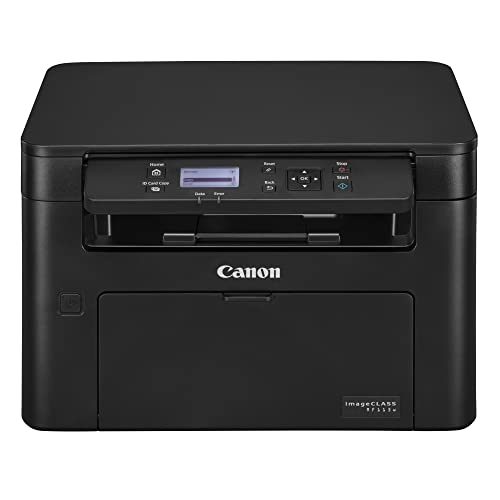
3. Canon imageCLASS MF113w Multifunction Wireless Laser Printer — Best Compact Multifunction
The Canon imageCLASS MF113w packs print, scan, and copy into a compact body without inflating the footprint to full office-copier size. Canon's engineering has always prioritized reliability, and this machine reflects that — it's built to handle consistent small-office workloads without requiring constant maintenance attention. When something needs fixing, like a toner swap, Canon's built-in maintenance videos walk you through the process right on the printer, which is a genuinely useful feature for anyone who hates reading manuals.
Connectivity is a standout. Beyond standard Wi-Fi, the MF113w can create its own Wi-Fi Direct hotspot, meaning you connect your phone or tablet directly to the printer without needing your home or office router at all. That's useful in environments with finicky network setups or for mobile workers who need to print from a phone quickly. The first page prints in as fast as 23 seconds from a cold start, and it supports full mobile printing and scanning workflows. Scan-to-digital is clean and accurate, which matters if you're converting paper documents into files you need to store or email.
If you need print-only, simpler options on this list serve you better. But if you regularly scan documents, make copies, and print from a phone, the imageCLASS MF113w delivers all three reliably in a machine that won't crowd your desk. If you're also interested in how a multifunction device compares to a standalone scanner, check out our guide to the best multiple page scanners.
Pros:
- Print, scan, and copy in a compact all-in-one body
- Wi-Fi Direct hotspot — connects without a router
- Canon's signature reliability with intuitive maintenance videos
- Mobile printing and scanning support
- Fast 23-second first-print time from cold start
Cons:
- Black and white only — no color output
- No automatic duplex printing
4. HP LaserJet Pro M15w Wireless Monochrome Printer — Best Budget Laser
The HP LaserJet Pro M15w holds a special place in the compact printer world: it's 35% smaller than its predecessor yet delivers the same professional-quality black-and-white output you'd expect from HP's laser lineup. If you're on a tighter budget and don't need blazing speed, this machine hits the sweet spot between affordability, reliability, and an impossibly small form factor. HP calls it one of the world's smallest LaserJet Pro printers in its class, and you'll feel that the first time you pull it out of the box.
Print speed is up to 19 pages per minute, and the first page comes out in as few as 8.1 seconds from ready mode — fast enough for single-document print jobs where you're standing at the printer waiting. The HP Smart app handles everything from your phone: scan from your smartphone camera, order toner before you run out, and print files directly from cloud storage like Google Drive, iCloud, and Dropbox. Alexa integration rounds out the smart home features. For a budget laser printer, the feature list is genuinely competitive.
Where you feel the budget most is in print volume capacity — the paper tray is small, and if you're printing dozens of pages daily, this will frustrate you. But for a home user who prints contracts, forms, and the occasional report a few times a week, the M15w gets the job done without asking you to spend much money upfront. It pairs especially well with HP Instant Ink if you want predictable running costs. You might also find our roundup of the best printers for coupons useful if you're printing deals regularly.
Pros:
- Extremely compact — 35% smaller than its predecessor
- Fast 8.1-second first page out from ready mode
- HP Smart app with cloud printing from Google Drive, iCloud, Dropbox
- Works with Alexa
- Budget-friendly entry price for a laser printer
Cons:
- 19ppm is on the slower side compared to competing lasers
- Small paper tray is limiting for higher-volume print jobs
- No duplex printing
5. HP DeskJet 2755e Wireless Color Inkjet Printer — Best Color Inkjet for Home
If black-and-white text documents are all you ever print, a laser printer is the smarter buy. But if your household prints color recipes, travel boarding passes, school projects, greeting cards, and everyday forms, the HP DeskJet 2755e is the compact color printer that makes sense in 2026. It handles print, scan, and copy at 1200 DPI (dots per inch — a measure of print sharpness) resolution, which delivers clean, vibrant color output for everyday home printing tasks.
Wireless setup is straightforward, and HP's dual-band Wi-Fi with self-reset means the connection stays stable without you having to troubleshoot it every other week. The printer supports a wide range of media: plain paper, photo paper, envelopes, labels, cards — versatile enough that you're not hunting for a second device to handle specialty print jobs. The 6-month Instant Ink trial that comes included gives you a practical runway to evaluate whether the subscription model saves you money on ink costs before you commit.
Inkjet printers (which use liquid ink sprayed through tiny nozzles, unlike laser printers that use powdered toner) cost more per page than lasers for everyday text documents, and the DeskJet 2755e is no exception. If you print hundreds of pages a month, the ink cost adds up. But for light home use — a few dozen pages a week — this is a cheerful, capable, and affordable machine that handles color beautifully without taking up half your desk. Learn more about how inkjet printing works if you want to understand the technology behind this type of printer.
Pros:
- Full color printing at 1200 DPI — handles photos, recipes, and everyday documents
- Print, scan, and copy all-in-one compact body
- Dual-band Wi-Fi with self-reset for stable wireless connections
- Supports labels, envelopes, photo paper, cards, and plain paper
- 6-month Instant Ink trial included
Cons:
- Higher per-page ink cost than laser printers
- 60-sheet input tray is small — requires frequent paper reloading
- Slower than laser printers at around 7.5ppm for color
6. Epson EcoTank ET-2800 Wireless Color All-in-One Printer — Best for Low Running Costs
The Epson EcoTank ET-2800 flips the traditional inkjet printer business model on its head. Instead of small, expensive ink cartridges that you replace every few weeks, the ET-2800 uses large refillable ink tanks — each bottle set is equivalent to roughly 80 individual cartridges. You pay more upfront for the printer, but your running costs drop dramatically. Epson claims you can save up to 90% on replacement ink compared to cartridge-based inkjet printers, and with page yields of up to 4,500 pages black and 7,500 pages color per bottle set, you're not shopping for ink every other month.
Print quality is driven by Epson's Micro Piezo Heat-Free Technology (a precision printing method that doesn't use heat to apply ink, resulting in sharper detail and reduced ink waste). Output is vivid and detailed — better than basic inkjets on photo-quality prints and everyday color documents. Speed reaches up to 10 pages per minute, which is adequate for home use. The all-in-one body adds scan and copy, and wireless connectivity through the Epson Smart Panel app makes mobile printing seamless.
The higher upfront cost is the only real barrier. If you print infrequently — just a few pages a month — you might not recoup that cost. But if your household prints consistently, the math works in your favor quickly. The ET-2800 is the rare compact printer where buying it feels like a genuinely smart long-term investment rather than just another appliance purchase. Also worth considering alongside this is our roundup of the best all-in-one printers for home use for broader comparison.
Pros:
- Cartridge-free supertank system — huge ink capacity per fill
- Up to 90% savings on replacement ink versus cartridge printers
- Up to 4,500 black / 7,500 color pages per ink bottle set
- Vivid color output via Micro Piezo Heat-Free Technology
- Print, scan, and copy all-in-one
Cons:
- Higher upfront purchase price than cartridge-based inkjets
- 10ppm speed is slower than laser options
- Not ideal for very infrequent users who won't recoup the initial investment
7. Brother MFC-J1010DW Wireless Color Inkjet All-in-One Printer — Best Compact All-in-One Inkjet
The Brother MFC-J1010DW proves that "compact" doesn't have to mean "stripped down." This renewed premium machine packs print, scan, copy, and fax into a small footprint that fits comfortably in a home, home office, or small office without dominating the space. Brother's commitment to full functionality in a compact body is evident here — you're not making major sacrifices to get an all-in-one at this size. Fast print and scan speeds mean workflows move smoothly even in a busy household.
Duplex printing is built in, which puts it ahead of many similarly priced compact inkjets. The Refresh subscription keeps you from running out of ink at the worst possible moment — Brother monitors your ink levels and ships replacements before you run dry. Amazon Dash Replenishment Ready integration means the printer can automatically reorder ink on its own. Wireless connectivity and mobile printing support round out a feature set that punches well above the compact inkjet category.
As a renewed premium unit, you get the performance of a current-generation machine at a price reduction — Brother tests and certifies these units, so reliability is not a concern. If you want a color all-in-one that handles everything a family or small office throws at it, fits on a desk without complaint, and automates its own supply management, the MFC-J1010DW is a compelling pick for 2026.
Pros:
- Full all-in-one: print, scan, copy, fax in a compact body
- Automatic duplex printing included
- Refresh subscription + Amazon Dash Replenishment Ready for automatic ink restocking
- Color inkjet output handles photos and everyday documents
- Renewed premium unit — tested, certified, and price-reduced
Cons:
- Renewed unit — not brand new out of the box
- Ink cartridge running costs higher than EcoTank alternatives over time
What to Look For When Buying a Small Compact Desktop Printer
Laser vs. Inkjet — Choose Based on What You Print
This is the most important decision you'll make. Laser printers use powdered toner that fuses to paper with heat, producing sharp text at low cost per page and consistent performance over high volumes. Inkjet printers use liquid ink and excel at color reproduction, making them better for photos, colorful documents, and mixed-media printing. If you mostly print black-and-white text — contracts, reports, invoices — go laser. If your household prints in color regularly, go inkjet. Don't let anyone talk you into the wrong type for your actual use case.
Running Costs: Per-Page Price Matters More Than Purchase Price
A printer that costs $79 can end up being far more expensive than one that costs $199 if the ink or toner cartridges are pricey and drain fast. Calculate the per-page cost before you buy. Cartridge yield (how many pages each cartridge prints) divided by cartridge price gives you the per-page cost. EcoTank-style printers with refillable tanks have dramatically lower per-page costs. Laser printers typically beat standard inkjets on per-page cost for black-and-white output. If you print frequently, this number matters more than anything on the spec sheet.
Print Speed and Paper Capacity for Your Volume
Print speed is measured in pages per minute (ppm). For a one-to-three person home office printing a few dozen pages a week, 19–21ppm is entirely sufficient. For a small business team printing dozens of documents a day, you want 30ppm or higher. Paper tray capacity matters equally — a 60-sheet tray in a busy office means constant reloading. Most compact printers sacrifice tray capacity for size, so be honest about your volume before committing. Match the machine to how you actually work, not how you think you might someday work.
Connectivity and Mobile Printing Support
In 2026, a printer without wireless connectivity is a liability. You want at minimum 2.4GHz Wi-Fi, and ideally dual-band (2.4GHz/5GHz) for a more stable connection. Check for mobile app support — HP Smart, Brother Mobile Connect, and Epson Smart Panel all let you print from your phone and manage the printer remotely. Wi-Fi Direct (creating a direct printer-to-device hotspot without needing a router) is a bonus for mobile users. Cloud printing — support for Google Drive, Dropbox, iCloud — matters if you store files in the cloud and want to print them without transferring to a computer first.
Questions Answered
What is the best small compact desktop printer in 2026?
The Brother HL-L2460DW is our top pick for 2026. It delivers 36 pages per minute, includes automatic duplex printing, and connects via dual-band Wi-Fi, Ethernet, or USB — all in a compact footprint that fits any desk. For color printing, the Epson EcoTank ET-2800 or HP DeskJet 2755e are the strongest choices depending on your print volume and budget.
Is a laser printer or inkjet printer better for home use?
It depends on what you print. Laser printers are better for high-volume black-and-white document printing — they're faster, cheaper per page, and the toner doesn't dry out if you don't print for weeks. Inkjet printers are better if you print in color regularly, including photos and colorful documents. For a typical home that mixes text documents and occasional color, a color inkjet or the Epson EcoTank is usually the right call.
How much should I spend on a compact desktop printer?
Budget laser printers like the HP LaserJet Pro M15w start around $100–$130. Mid-range compact lasers with faster speeds and duplex, like the Brother HL-L2460DW, run $130–$180. EcoTank inkjets like the Epson ET-2800 cost more upfront ($200+) but save significantly on running costs over time. For most home users, spending $130–$180 on a reliable compact laser or $200 on an EcoTank inkjet represents the best long-term value.
Do compact printers have worse print quality than full-size printers?
No. Modern compact printers produce the same print quality as full-size machines — the reduction in size affects paper tray capacity and sometimes print speed, not output quality. The Brother HL-L2460DW, HP LaserJet M110w, and Canon imageCLASS MF113w all produce sharp, professional-quality black-and-white output that is indistinguishable from what a larger office laser would produce.
Can I print from my phone with a compact desktop printer?
Yes — every printer on this list supports mobile printing. HP models use the HP Smart app, Brother models use Brother Mobile Connect, and Epson uses the Epson Smart Panel app. All support printing from iOS and Android devices. Canon's imageCLASS MF113w adds Wi-Fi Direct, letting you connect your phone directly to the printer without needing your home Wi-Fi network at all, which is especially useful when your router is acting up.
What is the cheapest printer to run long-term?
The Epson EcoTank ET-2800 has the lowest long-term running cost among inkjet printers on this list. Its refillable supertank system delivers up to 4,500 black pages and 7,500 color pages per ink bottle set, saving up to 90% on ink costs versus traditional cartridge printers. For black-and-white-only printing, laser printers like the Brother HL-L2460DW have very low toner cost per page and are the most economical choice if you don't need color.
Buy on Walmart
- Brother HL-L2460DW Wireless Compact Monochrome Laser Printer — Walmart Link
- HP LaserJet M110w Wireless Black & White Printer, Print, Fas — Walmart Link
- Canon imageCLASS MF113w - Multifunction, Wireless, Mobile Re — Walmart Link
- HP LaserJet Pro M15w Wireless Monochrome Printer, Works with — Walmart Link
- HP DeskJet 2755e Wireless Color Inkjet-Printer, Print, scan, — Walmart Link
- Epson EcoTank ET-2800 Wireless Color All-in-One Cartridge-Fr — Walmart Link
- Brother MFC-J1010DW Wireless Color Inkjet All-in-One Printer — Walmart Link
Buy on eBay
- Brother HL-L2460DW Wireless Compact Monochrome Laser Printer — eBay Link
- HP LaserJet M110w Wireless Black & White Printer, Print, Fas — eBay Link
- Canon imageCLASS MF113w - Multifunction, Wireless, Mobile Re — eBay Link
- HP LaserJet Pro M15w Wireless Monochrome Printer, Works with — eBay Link
- HP DeskJet 2755e Wireless Color Inkjet-Printer, Print, scan, — eBay Link
- Epson EcoTank ET-2800 Wireless Color All-in-One Cartridge-Fr — eBay Link
- Brother MFC-J1010DW Wireless Color Inkjet All-in-One Printer — eBay Link
Final Thoughts
The right small compact desktop printer for you comes down to three honest questions: do you need color, how much do you print, and how much are you willing to spend upfront versus ongoing? Start with the Brother HL-L2460DW if you want the best all-around performer for black-and-white document printing, the Epson EcoTank ET-2800 if long-term ink savings are your priority, or the HP DeskJet 2755e if color printing at home is what you need most — then click through to Amazon to check the latest pricing and make your move today.



About Remington May
Remington May is a technology writer and digital product reviewer with a focus on consumer electronics, software, and the everyday tech that shapes how people work and live. She has spent years evaluating smartphones, laptops, smart home devices, and digital tools — approaching each product from the perspective of a practical user rather than a spec-sheet enthusiast. At Pinwords, she covers tech buying guides, product reviews, smartphone and laptop comparisons, and practical how-to guides for getting more out of your devices.
Check for FREE Gifts. Or latest free books from our best messages.
Remove Ad block to reveal all the secrets. Once done, hit a button below