Best ID Card Printers 2026
by Remington May
The Zebra ZC300 is our top pick for 2026 — it prints in both color and monochrome with multiple encoding options, giving you more flexibility than anything else at its price point. If you manage an office, school, gym, or event venue where you issue ID badges regularly, you already know how much time and money a bad printer costs you. The wrong machine jams constantly, produces washed-out colors, or locks you into expensive proprietary supplies that eat your budget every month.
ID card printers are specialized machines. They're not like your office inkjet or laser printer. Most use dye-sublimation printing technology — a process that transfers dye directly onto card stock using heat, producing crisp, professional results that resist fading. Some higher-end models use retransfer printing (HDP), where the image is printed onto a film first and then bonded to the card, delivering true edge-to-edge coverage and better durability. Understanding these differences is the first step to buying the right machine. You can also check our buying guide section for a broader overview of specialty printing equipment.
We tested and reviewed seven of the best ID card printers available in 2026, covering entry-level single-sided machines all the way up to high-volume, high-definition dual-sided workhorses. Whether you need 50 cards a month or 5,000, there's a right answer on this list. If you're also thinking about supplies like ribbons and inks, our guide to best sublimation ink has useful context on dye-sub materials more broadly. And if your organization handles other print tasks too, our roundup of the best printers for business cards covers complementary machines worth knowing about.
Best Choices for 2026
- #PreviewProductRating
- Bestseller No. 1
 Rating:

- Bestseller No. 2
 Rating:
 - Bestseller No. 3
 Rating:
 - Bestseller No. 4
 Rating:
 - Bestseller No. 5
 Rating:
 - Bestseller No. 6
 Rating:
 - Bestseller No. 7
 Rating:
Product Reviews
1. Zebra ZC300 Dual Sided ID Card Printer — Best Overall
The Zebra ZC300 earns the top spot in 2026 because it refuses to make your life complicated. You get dual-sided color and monochrome printing in one machine, which matters if your organization issues different card types — full-color employee badges one day, plain black-and-white access cards the next. The LED/LCD interface is genuinely easy to use. Icons, animations, and text-based messages walk any user through printer status and maintenance without requiring a manual. That's a bigger deal than it sounds when you're training new staff or dealing with a jam at the worst possible moment.
The ZC300 also gives you serious encoding flexibility. You can produce magnetic stripe cards for swipe-based access control and contactless smart cards for modern tap-to-enter systems — all from the same printer. The ZIP Pocket feature and updated Software Development Kits (SDKs) mean you can integrate third-party contactless encoders without a headache. Print speeds are solid for a mid-range machine, and Zebra's reputation for durability means this unit will run reliably for years in a busy environment. The build quality feels premium — this is not a printer that flexes or rattles under load.
Where does it fall short? The upfront cost is higher than budget options on this list, and replacement ribbons carry Zebra's premium pricing. But if you need a machine that works every time, handles encoding, and won't leave you troubleshooting at 8 a.m., the ZC300 is worth every dollar.
Pros:
- Prints both color and monochrome — flexible for any card type
- Intuitive LED/LCD interface with icons and animated guides
- Supports magnetic stripe and contactless smart card encoding
- ZIP Pocket and SDKs for easy third-party encoder integration
- Robust, commercial-grade build quality
Cons:
- Higher upfront price than entry-level alternatives
- Replacement ribbons are more expensive than generic options
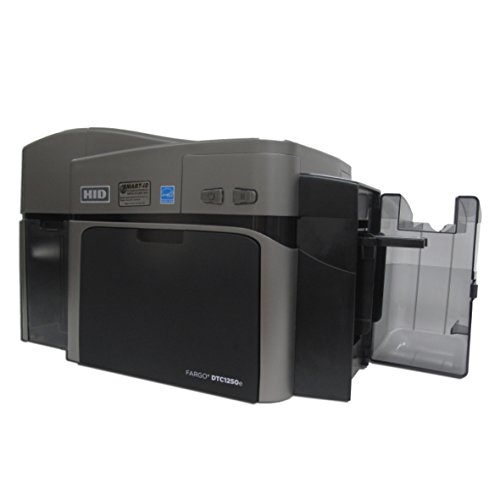
2. Fargo DTC1250e Dual Sided ID Card Printer — Best Budget Pick
If your budget is tight but you still need a reliable dual-sided printer, the Fargo DTC1250e is the honest answer. This is a direct-to-card (DTC) printer, meaning the dye goes straight onto the card surface — no intermediate film layer. The result is excellent color vibrancy at a price point that won't require a budget approval meeting. USB connectivity keeps setup simple, and the machine is known for being genuinely easy to use straight out of the box.
One feature that stands out on the DTC1250e is the built-in erase and rewrite function for rewritable cards. If your organization uses temporary visitor badges, event passes, or day-use access cards, you can print, erase, and reprint the same cards over and over rather than buying new stock constantly. That saves real money over time and reduces plastic waste. The print quality for a budget machine is consistently good — color reproduction is accurate, text is sharp, and card throughput is reasonable for small-to-medium operations.
The trade-off is that the DTC1250e lacks the advanced encoding options of higher-end machines. If you need contactless smart card encoding as a built-in feature, you'll need to step up. But for organizations that just need clean, professional ID cards printed fast at a low cost per card, this Fargo delivers. It's the workhorse pick for schools, small businesses, and nonprofits.
Pros:
- Accessible price point — strong value for dual-sided printing
- Built-in erase and rewrite for reusable temporary cards
- Simple USB setup, minimal learning curve
- Consistent color and text quality for everyday ID needs
Cons:
- Limited advanced encoding options compared to premium models
- Lower throughput speed — not ideal for high-volume runs
3. Evolis Primacy 2 Dual-Sided ID Card Printer — Best Bundle Value
The Evolis Primacy 2 is the successor to the highly regarded Primacy 1, and Evolis improved the design in every measurable way for 2022 — faster print speeds, a cleaner card path, and better software integration. What makes this listing particularly compelling is the bundle: you get a color ribbon, 100 blank PVC cards, and Card Imaging design software included with the machine. If you're starting a new ID card program from scratch, that means you're printing on day one without hunting down supplies separately.
The Primacy 2 uses direct-to-card dye-sublimation technology, which produces vivid, accurate colors with excellent consistency across a full print run. The printer handles up to 300 cards per hour in single-sided mode — fast enough for mid-to-large organizations without stepping into enterprise-tier pricing. The card path is smooth and reliable, and the top-loading card feeder makes replenishing stock quick during a busy session. Evolis built a strong reputation for print quality in Europe and the U.S. market, and the Primacy 2 upholds that standard.
The included Card Imaging software is functional for basic badge design — you can add photos, text fields, barcodes, and logos without needing a third-party application. For more complex card designs or database-driven batch printing, you'll want to upgrade to a more capable ID software package, but the included tool gets most users printing professional cards immediately. This is the pick if you want a complete, ready-to-run setup from a trusted brand.
Pros:
- Complete bundle — ribbon, 100 cards, and design software included
- High print speed — up to 300 cards/hour single-sided
- Improved design over Primacy 1 with cleaner card path
- Strong color accuracy and consistency across full print runs
Cons:
- Included software is basic — advanced users need a third-party upgrade
- Higher cost than direct budget alternatives
4. Card Imaging Fargo HDP5000 — Best for HD Quality
When print quality is non-negotiable, the Fargo HDP5000 is the printer you want. Unlike standard DTC machines, this model uses HDP (High Definition Printing) retransfer technology — the image is first printed onto a clear film, then thermally bonded over the entire card surface. The result is true edge-to-edge coverage with zero white borders on either side, plus a level of image clarity that makes the difference very obvious when you hold a card from this machine next to one from a budget printer.
The bundle includes a YMCK color ribbon, transfer film, Card Imaging design software, and 100 PVC cards — everything you need to start printing immediately. The HDP film also adds a protective layer to the card surface, which means your cards resist scratches, abrasion, and UV fading significantly better than cards printed by direct-to-card machines. This is critical for cards that live in wallets or get swiped and handled daily. The dual-sided printing capability means your IDs can carry encoding data, barcodes, or secondary imagery on the back without a second machine.
The HDP5000 is not a budget buy, and it requires you to keep both YMCK ribbon and transfer film stocked — two consumables instead of one. But if your organization issues premium credentials — government IDs, university cards, high-security facility access cards — the print quality and durability justify the cost. This is professional-grade output, and you'll notice the difference immediately.
Pros:
- HDP retransfer printing — true edge-to-edge, no white borders
- Superior card durability — film layer resists scratches and UV fade
- Complete bundle with ribbon, film, software, and blank cards
- Ideal for high-security or premium credential programs
Cons:
- Requires two consumables (ribbon + transfer film) — higher running costs
- Larger and heavier footprint than DTC machines
5. Fargo DTC4500e Dual Sided ID Card Printer — Best for High Volume
The Fargo DTC4500e is built for organizations that print a lot of cards. This is a direct-to-card printer designed with throughput in mind — the kind of machine you deploy for back-to-school ID seasons at a large university, badge issuance at a corporate campus, or ongoing batch printing at a healthcare system. Dual-sided direct-to-card printing means both sides of your card come out finished in a single pass, keeping your workflow moving without manual flipping or a second print run.
Fargo built the DTC4500e on a robust platform that has proven itself in demanding enterprise environments over many years. The machine accepts high-capacity ribbon cartridges, which reduces how often you need to reload supplies during a long print run. The card hopper handles a generous stack of blank cards, and the output stacker organizes finished cards neatly. It also supports a wide range of encoding modules — magnetic stripe, smart card contact, and contactless — so you can configure it to match your specific access control or data requirements.
You should know going in that this is not the simplest machine to set up. The DTC4500e rewards IT staff and badge administrators who take the time to configure it properly, and the software integration options are extensive. If you want plug-and-play simplicity, look at the Zebra ZC300 or Magicard 300 instead. But for a high-volume shop that needs throughput and encoding flexibility, the DTC4500e delivers where it counts. It's also worth noting that if you need ink for your other office printers, our guide to best remanufactured ink cartridges covers cost-saving options for standard machines.
Pros:
- Built for high-volume, high-throughput ID card production
- High-capacity ribbon cartridges reduce reload frequency
- Wide encoding module support — magnetic stripe, contact, contactless
- Strong enterprise reliability track record
Cons:
- Setup complexity — not ideal for non-technical users
- Higher upfront investment appropriate for volume use cases
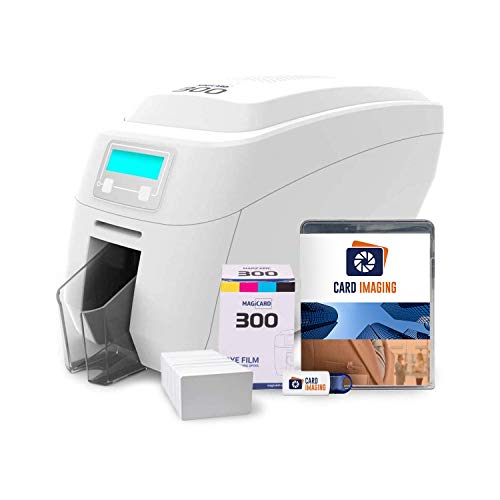
6. Magicard 300 Dual Sided ID Card Printer — Best for Beginners
The Magicard 300 is the friendliest machine on this list for first-time ID card administrators. The bundle includes a color ribbon, 100 PVC cards, and Card Imaging design software — so the barrier to your first printed badge is as low as it gets. The LCD display delivers plain-English messages that tell you exactly what the printer needs: load cards, replace ribbon, clear a jam. There's no decoding cryptic error codes or digging through a manual to understand what went wrong.
Magicard adds something no other printer on this list includes: HoloKote watermark security technology. HoloKote prints a built-in holographic watermark directly onto your cards using the existing ribbon, with no extra supplies needed. It's a meaningful deterrent against card forgery — if someone tries to copy or fake your IDs, the watermark won't reproduce correctly. For schools, healthcare facilities, and secure workplaces, that's a real security upgrade over standard DTC printing at no added cost per card.
Print quality is solid for a mid-range machine — colors are vibrant, text is crisp, and the dual-sided output is consistent across a full print run. Magicard also provides free tech support to help with initial setup, which means if you hit a snag during installation, there's a real human available to help you through it. The machine won't win on raw throughput speed compared to the Fargo DTC4500e, but for organizations printing hundreds rather than thousands of cards per month, the Magicard 300 hits an excellent balance of security, ease, and quality.
Pros:
- LCD display with plain-English status messages — easy for any user
- Built-in HoloKote holographic watermark security at no extra cost
- Complete bundle with ribbon, cards, and design software
- Free tech support for setup and troubleshooting
Cons:
- Moderate throughput speed — not suited for large batch runs
- Advanced encoding requires optional add-on modules
7. Evolis Zenius 2 Single Sided ID Card Printer — Best Single-Sided
The Evolis Zenius 2 is the 2026 replacement for the original Zenius, and Evolis made it the most complete single-sided package on the market. If you only ever print on one side of your cards — which is true for a surprising number of organizations — you don't need to pay for dual-sided hardware you'll never use. The Zenius 2 focuses that budget entirely on print quality, reliability, and a great out-of-box experience. The bundle includes a 200-capacity color ribbon, 100 blank cards, and Card Imaging design software — the 200-capacity ribbon alone is a meaningful upgrade over the 100-capacity ribbons bundled with most entry-level machines.
The Zenius 2 uses direct-to-card dye-sublimation printing, producing the same vivid, accurate color output Evolis is known for. The card path is clean and reliable — the original Zenius had a minor reputation for occasional mis-feeds that Evolis addressed in this generation. The machine is compact enough to sit on any desk without taking over the workspace, and the connectivity options cover USB at minimum with network options available depending on configuration. Setup is straightforward, and the included Card Imaging software handles the most common badge designs without needing a separate purchase.
Single-sided printing is simply faster per card since the flipper mechanism is removed from the equation. If your cards carry all identifying information on the front — photo, name, title, barcode or QR code — and you use a plain white or pre-printed back, the Zenius 2 gets those cards into your hands faster and at a lower cost per card than any dual-sided machine. For small businesses, retail environments, and low-to-medium-volume nonprofit operations, this is the smart, efficient choice in 2026.
Pros:
- New for 2026 — improved card path reliability over original Zenius
- 200-capacity ribbon included — less frequent ribbon changes
- Complete bundle with cards and design software ready to print
- Compact footprint ideal for desk-based installations
- Faster per-card output than dual-sided machines for single-side jobs
Cons:
- Single-sided only — not suitable if you need back-of-card printing
- Included software is entry-level — complex designs need a separate app
What to Look For When Buying an ID Card Printer
Print Technology: Direct-to-Card vs. Retransfer
This is the most important decision you'll make. Direct-to-card (DTC) printing applies dye directly onto the card surface. It's faster, less expensive per card, and works perfectly for most standard ID badge applications. The trade-off is that a small white border remains around the card edges, and cards are slightly more vulnerable to surface abrasion over time.
Retransfer printing — also called HDP (High Definition Printing) — prints to an intermediate film that is then laminated over the card. This method delivers true edge-to-edge printing with no white borders and produces cards that are noticeably more durable. You pay more for the printer and more per card (you're consuming both ribbon and transfer film). If your cards need to look premium or survive rough daily handling, retransfer is worth the investment. For standard employee or student ID programs, DTC is the practical choice.
Single-Sided vs. Dual-Sided
Dual-sided printers print both faces of the card in a single pass using an internal flipper mechanism. You pay a premium — typically a few hundred dollars more — for dual-sided capability. Before you spend it, actually look at your card design. If your back side carries nothing more than a magnetic stripe, a plain white background, or a generic disclaimer, you might not need dual-sided at all. Single-sided machines are faster, less complex, and have fewer components that can wear out.
If your cards carry a photo, name, and title on the front with a barcode, department info, or access level data on the back, dual-sided is the right call. Don't pay for what you won't use, but don't design yourself into a corner with a single-sided machine that can't grow with you either.
Encoding Options
Modern ID cards do more than display a photo and name. Encoding lets your cards work with physical access control systems, time-and-attendance readers, and logical network access systems. The three main options are:
- Magnetic stripe — the classic swipe card. Reliable, inexpensive, widely compatible but easier to clone than newer options.
- Smart card contact — a chip embedded in the card that makes physical contact with a reader. Higher security, stores more data, requires a compatible reader infrastructure.
- Contactless / RFID — tap-to-enter technology. Convenient, fast, and increasingly the default for modern access control installations.
Most printers accept encoding as an optional factory-installed module. Decide what your access control infrastructure requires before you buy, because adding encoding after the fact often means sending the printer back for retrofitting — or buying a new unit.
Print Volume and Running Costs
Every manufacturer rates their printers by cards per hour and by ribbon yield — how many cards you get from a single ribbon cartridge. Do the math on your monthly card volume before you buy. A machine rated for 150 cards per hour that struggles with more than 500 cards per month will underperform in a high-volume environment no matter how good its specs look on paper.
Running costs matter as much as the purchase price. A low-cost printer with expensive proprietary ribbons will cost more over three years than a pricier machine from a brand with competitive supply pricing. Check the cost-per-card figures for each machine you're considering — it's usually expressed in cents per card and factors in both ribbon yield and card stock cost. For context on how consumable costs work across different print technologies, our overview of sublimation ink covers the underlying economics of dye-sub printing in more detail.
What People Ask
What is the difference between a DTC and HDP ID card printer?
DTC (Direct-to-Card) printers apply dye directly onto the card surface, producing a slight white border at the card edges. HDP (High Definition Printing) retransfer printers print to a clear film first, then bond that film to the card — delivering true edge-to-edge printing and better durability. HDP machines cost more to buy and operate but produce noticeably higher-quality cards suited for premium or high-security credentials.
How many cards can an ID card printer produce per hour?
Entry-level single-sided printers typically produce 100–150 cards per hour. Mid-range dual-sided machines like the Evolis Primacy 2 reach around 150–300 cards per hour single-sided. High-volume machines like the Fargo DTC4500e push beyond that for enterprise batch printing. Match the rated throughput to your actual monthly volume — a machine running near its maximum continuously will wear faster and jam more often.
What supplies do I need for an ID card printer?
At minimum you need blank PVC cards (CR80 standard size, the same dimensions as a credit card) and a color ribbon (usually YMCKO — Yellow, Magenta, Cyan, Black, Overlay). Retransfer printers also require transfer film as a second consumable. Some machines need cleaning kits for routine maintenance to prevent print head contamination. Bundled machines like the Evolis Primacy 2 and Magicard 300 include an initial supply of cards and ribbon to get you started.
Can I print magnetic stripe or smart card chips with a standard ID card printer?
Not automatically — encoding requires a specific module that must be installed in the printer, either at the factory or added later. Magnetic stripe encoding is the most common and widely supported option. Smart card contact and contactless RFID encoding are available on higher-end machines like the Zebra ZC300 and Fargo DTC4500e as factory-installed or field-installable modules. Always confirm encoding compatibility before purchase if your access control system requires it.
How long do ID cards printed by these machines last?
Cards printed by a standard DTC printer with a good YMCKO ribbon typically last 3–5 years under normal handling conditions. HDP retransfer cards last significantly longer — often 5–10 years — because the transfer film adds a protective overlay layer. Card longevity also depends on how the card is used: cards that are constantly swiped, exposed to sunlight, or carried in a wallet alongside abrasive objects will fade faster than cards used in controlled environments.
Do I need special software to design ID cards?
Most ID card printers are bundled with basic card design software, and several models on this list include Card Imaging software that handles photos, text, barcodes, and logos. For advanced needs — database-driven batch printing, integration with HR or access control systems, or complex multi-layer designs — you'll want dedicated ID software like BadgeMaker, CardExchange, or similar professional-grade applications. The included software is a solid starting point for most small-to-mid-size operations.
Buy on Walmart
- Zebra ZC300 Dual Sided ID Card Printer — Walmart Link
- Fargo DTC1250e Dual Sided ID Card Printer — Walmart Link
- Evolis Primacy 2 Dual-Sided ID Card Printer & Supplies Bundl — Walmart Link
- Card Imaging Fargo HDP5000 Dual Side High Definition ID Card — Walmart Link
- Fargo DTC4500e Dual Sided ID Card Printer — Walmart Link
- Magicard 300 Dual Sided ID Card Printer & Supplies Bundle Ba — Walmart Link
- Evolis Zenius 2 Single Sided ID Card Printer & Supplies Bund — Walmart Link
Buy on eBay
- Zebra ZC300 Dual Sided ID Card Printer — eBay Link
- Fargo DTC1250e Dual Sided ID Card Printer — eBay Link
- Evolis Primacy 2 Dual-Sided ID Card Printer & Supplies Bundl — eBay Link
- Card Imaging Fargo HDP5000 Dual Side High Definition ID Card — eBay Link
- Fargo DTC4500e Dual Sided ID Card Printer — eBay Link
- Magicard 300 Dual Sided ID Card Printer & Supplies Bundle Ba — eBay Link
- Evolis Zenius 2 Single Sided ID Card Printer & Supplies Bund — eBay Link
Buy the printer that matches your actual volume and security requirements — overspending on features you'll never use costs just as much as underspending on a machine that can't keep up.



About Remington May
Remington May is a technology writer and digital product reviewer with a focus on consumer electronics, software, and the everyday tech that shapes how people work and live. She has spent years evaluating smartphones, laptops, smart home devices, and digital tools — approaching each product from the perspective of a practical user rather than a spec-sheet enthusiast. At Pinwords, she covers tech buying guides, product reviews, smartphone and laptop comparisons, and practical how-to guides for getting more out of your devices.
Check for FREE Gifts. Or latest free books from our best messages.
Remove Ad block to reveal all the secrets. Once done, hit a button below