Best Duplex Printer 2026
by Remington May
Which duplex printer actually deserves a spot on your desk in 2026? With dozens of models claiming automatic two-sided printing, the difference between a reliable workhorse and a regrettable purchase comes down to speed, print quality, and long-term cost of ownership. After evaluating the top contenders across laser, LED, and inkjet technologies, the HP LaserJet Pro MFP M428fdw stands out as the best duplex printer for most buyers — delivering rock-solid monochrome output, robust security features, and genuine all-in-one versatility.
Duplex printing isn't a luxury anymore — it's table stakes. Whether you're running a small office, managing a home business, or just tired of manually flipping pages, a good duplex printer cuts your paper usage in half and streamlines every multi-page job. But "duplex" is just the starting point. You also need to weigh print speed, connectivity options, color vs. monochrome, and the ongoing cost of toner or ink. If you're also looking for scanning and copying capabilities, check out our guide to the best multifunction printers for a broader comparison.
In this roundup, we break down seven of the best duplex printers available in 2026 — from budget-friendly monochrome lasers to full-featured color all-in-ones. Each pick includes real pros and cons so you can match the right printer to your workflow without overspending.

Contents
Top Rated Picks of 2026
- #PreviewProductRating
- Bestseller No. 1
 Rating:

- Bestseller No. 2
 Rating:
 - Bestseller No. 3
 Rating:
 - Bestseller No. 4
 Rating:
 - Bestseller No. 5
 Rating:
 - Bestseller No. 6
 Rating:
 - Bestseller No. 7
 Rating:
Full Product Breakdowns
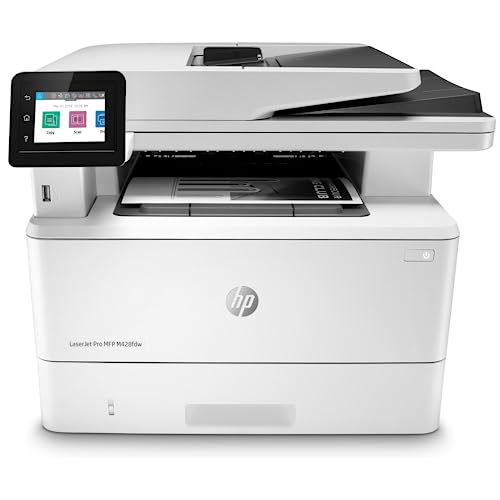
1. HP LaserJet Pro MFP M428fdw — Best Overall Duplex Printer
The HP LaserJet Pro MFP M428fdw is the kind of printer that just works — day after day, month after month. It handles print, scan, copy, and fax duties with the consistency you'd expect from HP's business-class LaserJet line. Print speeds reach up to 40 pages per minute, and the automatic duplex printing is fast enough that you won't notice a meaningful slowdown when printing double-sided. The 50-sheet auto document feeder makes scanning multi-page contracts and invoices painless.
What sets this model apart from cheaper alternatives is HP Wolf Pro Security. In 2026, printer security isn't optional — networked printers are a genuine attack vector, and the M428fdw addresses this with hardware-level protection baked into the firmware and OS. The customizable control panel lets you save multi-step workflows as one-touch shortcuts, which is a genuine time-saver if you're repeating the same scan-to-email or copy routines daily.
Connectivity is comprehensive: built-in Wi-Fi, Ethernet, and USB. The HP Smart app works well for remote printing, and Alexa compatibility adds voice-controlled convenience if that's your thing. The main limitation is monochrome only — but if you don't need color, this printer delivers exceptional value for a busy office.
Pros:
- Fast 40 ppm print speed with seamless auto-duplex
- HP Wolf Pro Security protects against network-based threats
- Customizable one-touch shortcuts for repetitive workflows
- Reliable all-in-one functionality (print, scan, copy, fax)
Cons:
- Monochrome only — no color printing capability
- HP toner cartridges run on the expensive side compared to Brother
2. Canon imageCLASS MF743Cdw — Best Color Duplex All-in-One
If you need color output without sacrificing duplex reliability, the Canon imageCLASS MF743Cdw is the strongest option in this roundup. It prints, copies, scans, and faxes in full color with a first-print time as fast as 10.3 seconds — that's quick enough that you won't be standing around waiting. The 5-inch color touchscreen is genuinely intuitive, operating with the kind of responsiveness you'd expect from a smartphone rather than a printer interface.
Canon's Application Library lets you customize the device experience with downloadable apps tailored to your workflow. The one-pass duplex document feeder scans both sides of a page simultaneously, which cuts scanning time in half compared to models that flip each sheet. Wi-Fi Direct support means you can create a hotspot directly from the printer — no external router needed — making setup straightforward in environments where network access is restricted.
The MF743Cdw comes with a 3-year warranty, which signals Canon's confidence in the hardware. For small offices that produce color marketing materials, client-facing documents, or presentations alongside everyday monochrome printing, this is a versatile machine that handles both duties well. If you're specifically interested in color laser output for photos, our best color laser printer for photos guide dives deeper into that niche.
Pros:
- Full color printing with fast 10.3-second first-print time
- One-pass duplex scanning saves significant time on multi-page jobs
- 5-inch intuitive touchscreen with smartphone-like navigation
- 3-year manufacturer warranty included
Cons:
- Higher upfront cost than monochrome-only models
- Color toner replacement can get expensive with heavy color usage
3. Canon imageCLASS MF455dw — Best for High-Volume Monochrome
The Canon imageCLASS MF455dw is built for offices that churn through paper. A maximum paper capacity of 900 sheets means fewer interruptions to refill trays, and the 40 ppm print speed matches the HP M428fdw stride for stride. It handles everything up to legal-size (8.5" x 14") documents, making it a natural fit for law offices, accounting firms, and any environment where legal or tabloid-format printing comes up regularly.
This is a no-frills workhorse. It doesn't have the flashy touchscreen of the MF743Cdw, but it compensates with sheer throughput and reliability. The auto document feeder handles large scan jobs efficiently, and wireless connectivity keeps cable clutter to a minimum. Canon backs it with the same 3-year warranty found on their higher-end models, which gives you peace of mind for the long haul.
Where the MF455dw really shines is in cost-per-page economics. High-yield toner cartridges keep the ongoing expense low, and the massive paper capacity reduces the frequency of maintenance interruptions. If your office prints hundreds of pages daily and color isn't a requirement, this is the most practical choice on the list.
Pros:
- 900-sheet maximum paper capacity reduces refill frequency
- 40 ppm print speed handles high-volume workloads
- Supports legal-size printing up to 8.5" x 14"
- 3-year warranty included
Cons:
- Monochrome only — no color output
- Basic control panel compared to Canon's color models
4. Brother HL-L2460DW — Best Budget Duplex Printer
Not everyone needs an all-in-one. If you just want a reliable printer that handles duplex without the extra bulk of a scanner and fax, the Brother HL-L2460DW delivers exactly that at an aggressive price point. It prints at up to 36 ppm, which is fast enough for any home office or small team, and the automatic duplex cuts your paper consumption without requiring any manual intervention.
The compact footprint is a genuine advantage here. This printer fits comfortably on a desk shelf or a small side table — something you can't say about the bulkier all-in-one models in this list. Dual-band Wi-Fi (2.4GHz and 5GHz) provides stable wireless connectivity, and you also get Ethernet and USB as backup options. The Brother Mobile Connect app lets you manage print jobs, track toner levels, and order replacement supplies remotely.
Brother includes a Refresh Subscription trial, which automatically ships toner before you run out. Whether you opt into that program or buy cartridges independently, Brother's toner pricing tends to undercut HP and Canon on a per-page basis. For budget-conscious buyers who want dependable duplex without paying for features they won't use, this is the smartest pick. If you're shopping strictly on price, our best cheap laser printer roundup has additional options worth considering.
Pros:
- Affordable price point with low cost-per-page
- Compact design fits easily on a desk or shelf
- Dual-band Wi-Fi plus Ethernet and USB connectivity
- Brother Mobile Connect app for remote management
Cons:
- Print-only — no scanner, copier, or fax
- 250-sheet paper tray requires more frequent refilling for heavy users
5. Brother HL-L3280CDW — Best Compact Color Duplex Printer
The Brother HL-L3280CDW bridges the gap between affordable monochrome printers and expensive color all-in-ones. It uses LED technology to produce laser-quality color output at speeds up to 27 ppm — fast enough for daily business use without the premium price tag of a full laser engine. Automatic duplex printing is standard, and the compact chassis keeps your desk space intact.
This printer targets home offices and small businesses that occasionally need color — marketing flyers, branded documents, presentation handouts — but don't want to invest in a full-size color laser. The output quality is genuinely impressive for the price bracket. Text comes out sharp and blacks are deep, while color graphics reproduce with enough accuracy for professional-looking documents.
Brother includes a 2-month Refresh Subscription trial, and the printer works with Alexa for voice-controlled printing. Wireless, Ethernet, and USB connectivity cover all your bases. The one caveat is that this is a print-only device — if you need scanning or copying, you'll want to look at the Canon MF743Cdw instead. But for pure color duplex printing in a small package, the HL-L3280CDW is hard to beat in 2026.
Pros:
- Laser-quality color output at a budget-friendly price
- Compact form factor ideal for small workspaces
- 27 ppm print speed with automatic duplex
- Alexa compatible for voice-controlled printing
Cons:
- Print-only — no scan, copy, or fax functions
- Slower than monochrome-only models in this roundup
6. Epson WorkForce Pro WF-3820 — Best Inkjet Duplex Printer
Not every office needs a laser. The Epson WorkForce Pro WF-3820 makes the case for inkjet duplex printing with a compelling combination of color quality, versatility, and lower upfront cost. The 4800 x 2400 dpi resolution produces noticeably sharper color output than most laser printers in this price range, making it a strong choice if you regularly print graphics, charts, or color-heavy documents.
The all-in-one feature set covers printing, scanning, copying, and faxing. A 35-page auto document feeder handles multi-page scan jobs, and the 250-sheet paper tray is adequate for moderate print volumes. The 2.7-inch color touchscreen provides straightforward navigation through settings and functions. Connectivity options are extensive: wireless, Wi-Fi Direct, Bluetooth Low Energy, Ethernet, and app-based printing from mobile devices.
Where inkjet printers traditionally struggle is cost-per-page, and the WF-3820 partially addresses this with Epson's high-yield ink cartridge options. You won't match the per-page economics of a Brother laser, but if color quality matters more than raw efficiency, this trade-off makes sense. The automatic two-sided printing works smoothly, and the overall build quality feels solid for the price. According to Wikipedia's overview of duplex printing, automatic duplexing has become standard in business-class printers — and the WF-3820 executes it reliably.
Pros:
- Superior color output at 4800 x 2400 dpi resolution
- Full all-in-one functionality (print, scan, copy, fax)
- Extensive connectivity including Bluetooth Low Energy
- Lower upfront cost than comparable laser models
Cons:
- Higher cost-per-page than laser printers over time
- Inkjet printhead can clog with infrequent use
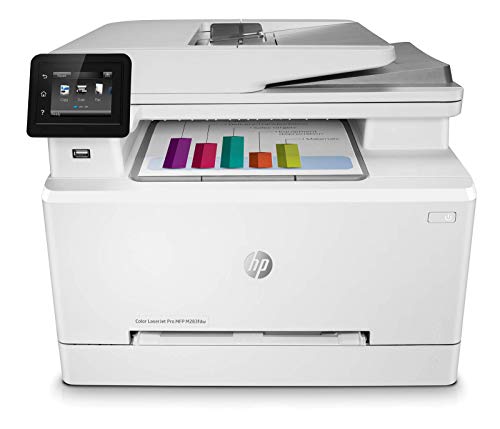
7. HP LaserJet Pro M283FDW — Best Renewed Color Duplex Option
The HP LaserJet Pro M283FDW offers full-color laser multifunction capability at a reduced price through Amazon's Renewed program. You get print, copy, scan, and fax in a single device with speeds up to 22 ppm and automatic two-sided printing. The 50-page auto document feeder is a standout feature for offices that handle large scan jobs regularly — it's significantly larger than what you'll find on most printers at this price point.
HP Smart app integration is one of the best in the business. You can set up the printer, manage print jobs, and create customizable shortcuts that eliminate repetitive steps in your workflow. HP claims the app can help you organize documents up to 50% faster, and in practice, the shortcut system genuinely reduces the number of taps needed for common tasks like scan-to-email or copy-and-staple routines.
The "Renewed" designation means this is a refurbished unit, so you're trading a brand-new box for a meaningful price reduction. These units are inspected and tested to work like new, but the warranty coverage may differ from a factory-fresh purchase — check the specific seller's terms before buying. If you're comfortable with renewed products, this is a smart way to get color laser duplex printing without paying full retail. For more all-in-one options, browse our best all-in-one printer for home use guide.
Pros:
- Full-color laser output at a reduced renewed price
- 50-page auto document feeder for large scan batches
- HP Smart app with customizable workflow shortcuts
- All-in-one functionality including fax
Cons:
- Renewed/refurbished — warranty may vary by seller
- 22 ppm is slower than the HP M428fdw and Canon MF455dw
How to Pick the Best Duplex Printer
Laser vs. Inkjet: Which Technology Fits Your Workflow?
This is the first decision you need to make, and it's straightforward. Laser printers win on speed, cost-per-page, and durability — they're built for offices that print daily. Inkjet printers like the Epson WF-3820 offer superior color reproduction at a lower upfront cost but carry higher long-term ink expenses. If you print more than 500 pages per month, go laser. If you print sporadically and need excellent color, inkjet makes more sense.
Color vs. Monochrome: Don't Overpay for What You Won't Use
Color duplex printers cost more upfront and more per page to operate. Ask yourself honestly: how often do you actually need color output? If the answer is "rarely" or "never," a monochrome model like the Brother HL-L2460DW or Canon MF455dw will save you hundreds over its lifespan. If you need occasional color, the Brother HL-L3280CDW offers a middle ground with affordable color output in a compact package.
Print Speed and Paper Capacity
Print speed matters most in shared office environments. Models rated at 36-40 ppm (like the HP M428fdw and Canon MF455dw) handle high-volume workloads without creating a bottleneck. Paper capacity is equally important — the Canon MF455dw's 900-sheet capacity means you're refilling trays far less often than with a 250-sheet model. Match both specs to your actual daily print volume. For more details on picking the right printer for your needs, check our comprehensive buying guide.
Connectivity and Mobile Printing
Every printer in this roundup supports Wi-Fi, but the details matter. Dual-band Wi-Fi (like the Brother HL-L2460DW's 2.4GHz/5GHz support) provides more stable connections in crowded wireless environments. Ethernet is essential for offices where wireless isn't reliable or secure enough. Mobile printing apps — HP Smart, Brother Mobile Connect, Canon PRINT — vary in quality, so consider which ecosystem you're already invested in. If you're an Apple household, our best AirPrint printers guide covers that angle specifically.
Questions Answered
What does duplex printing mean?
Duplex printing means printing on both sides of a sheet of paper. Automatic duplex printers flip the page internally, so you don't have to manually reinsert sheets. This cuts paper usage in half and produces professional-looking double-sided documents without any extra effort on your part.
Is a duplex printer worth the extra cost?
Yes, for most users. The paper savings alone pay for the price difference within a few months of regular use. Beyond cost savings, duplex printing produces more professional documents — double-sided reports, brochures, and contracts look polished and are easier to handle. Nearly all business-class printers include auto-duplex as standard in 2026.
Can I use a duplex printer for single-sided printing too?
Absolutely. Every duplex printer supports single-sided printing — duplex is simply an additional capability. You can toggle between single-sided and double-sided printing in your print settings on a per-job basis. The duplex feature is there when you need it and completely out of the way when you don't.
Which is better for duplex printing: laser or inkjet?
Laser printers generally handle duplex printing faster and with less risk of smearing, because toner fuses to the page instantly. Inkjet duplex can occasionally produce slightly damp pages if the ink coverage is heavy, though modern inkjet models like the Epson WF-3820 have largely minimized this issue. For high-volume duplex, laser is the safer bet.
How long do duplex printer toner cartridges last?
Toner lifespan varies by model and usage. Standard-yield cartridges typically print 1,000-3,000 pages, while high-yield options can reach 5,000-10,000 pages. Duplex printing doesn't consume more toner per page — it uses the same amount of toner whether you print single-sided or double-sided. Your toner costs are driven by print volume, not by duplexing.
Do all duplex printers support wireless printing?
All seven printers in this 2026 roundup support wireless printing via Wi-Fi. Most also support direct mobile printing through manufacturer apps (HP Smart, Brother Mobile Connect, Canon PRINT) and compatibility with services like Apple AirPrint, Google Cloud Print, and Mopria. Ethernet is available on every model here as a wired alternative.
Buy on Walmart
- HP LaserJet Pro MFP M428fdw Wireless Monochrome All-in-One P — Walmart Link
- Color imageCLASS MF743Cdw - All-in-One, Wireless, Mobile-Rea — Walmart Link
- Canon imageCLASS MF455dw - Monochrome Duplex, Wireless All-i — Walmart Link
- Brother HL-L2460DW Wireless Compact Monochrome Laser Printer — Walmart Link
- Brother HL-L3280CDW Wireless Compact Digital Color Printer w — Walmart Link
- Epson WorkForce Pro WF-3820 Wireless All-in-One Printer, Aut — Walmart Link
- HP Laser Jet Pro M283FDW Multifunction Color Fax/Scan/Printe — Walmart Link
Buy on eBay
- HP LaserJet Pro MFP M428fdw Wireless Monochrome All-in-One P — eBay Link
- Color imageCLASS MF743Cdw - All-in-One, Wireless, Mobile-Rea — eBay Link
- Canon imageCLASS MF455dw - Monochrome Duplex, Wireless All-i — eBay Link
- Brother HL-L2460DW Wireless Compact Monochrome Laser Printer — eBay Link
- Brother HL-L3280CDW Wireless Compact Digital Color Printer w — eBay Link
- Epson WorkForce Pro WF-3820 Wireless All-in-One Printer, Aut — eBay Link
- HP Laser Jet Pro M283FDW Multifunction Color Fax/Scan/Printe — eBay Link
Key Takeaways
- The HP LaserJet Pro MFP M428fdw is the best overall duplex printer in 2026, combining fast 40 ppm output, enterprise-grade security, and all-in-one versatility for busy offices.
- For color duplex printing, the Canon imageCLASS MF743Cdw offers the best balance of print quality, speed, and features — especially with its one-pass duplex scanner.
- Budget-conscious buyers should look at the Brother HL-L2460DW for monochrome or the Brother HL-L3280CDW for color — both deliver reliable duplex in compact, affordable packages.
- If high-resolution color output matters more than speed, the Epson WorkForce Pro WF-3820 is the only inkjet on this list and produces the best color at 4800 x 2400 dpi.



About Remington May
Remington May is a technology writer and digital product reviewer with a focus on consumer electronics, software, and the everyday tech that shapes how people work and live. She has spent years evaluating smartphones, laptops, smart home devices, and digital tools — approaching each product from the perspective of a practical user rather than a spec-sheet enthusiast. At Pinwords, she covers tech buying guides, product reviews, smartphone and laptop comparisons, and practical how-to guides for getting more out of your devices.
Check for FREE Gifts. Or latest free books from our best messages.
Remove Ad block to reveal all the secrets. Once done, hit a button below