Best External Webcam for Laptop 2026
by Remington May
Which external webcam for laptop actually delivers sharp, clear video in 2026 — and which ones just look impressive on the spec sheet? We spent several weeks researching and hands-on testing the top contenders across every price range, and the Logitech C920x HD Pro consistently stood out as the best value pick for most buyers who want reliable 1080p performance without overspending. But seven strong options earned their place in this roundup, from the silky-smooth Razer Kiyo Pro built for streamers to the AI-powered OBSBOT Tiny 2 Lite that tracks movement automatically.
A good external webcam makes a bigger difference than most buyers realize going in. Built-in laptop cameras typically top out at 720p with flat color, muddy detail, and almost no low-light correction. Plugging in an external webcam — even a mid-range one — immediately changes how a person looks on screen. Sharper detail, more natural color, and noticeably better audio all come standard. If getting started with a new camera feels overwhelming, our guide on how to connect a webcam to a computer walks through the whole setup process step by step. For anyone focused specifically on video calls and conferencing, we also maintain a separate list of the best webcams for video conferencing that goes deeper on that use case.
This guide covers seven webcams ranging from an affordable 1080p workhorse to a 4K 60fps studio camera. Our team evaluated video quality, microphone performance, low-light behavior, software, build quality, and overall value for the money. We also checked compatibility with Zoom, Google Meet, Microsoft Teams, OBS, and other popular platforms. Whether the goal is daily meetings, content creation, live streaming, or just looking better on camera for the first time, there is a solid option on this list for every situation. Browse our full buying guide section for more in-depth comparisons across tech categories.

Contents
- Editor's Recommendation: Top Picks of 2026
- Full Product Breakdowns
- Logitech C920x HD Pro — Best Value for Everyday Use
- Logitech Brio 4K — Best for Professional Video Calls
- Razer Kiyo Pro — Best for Streamers and Gamers
- Elgato Facecam 4K — Best Premium Pick for Content Creators
- Anker PowerConf C200 — Best Budget 2K Webcam
- Dell UltraSharp WB7022 — Best for Corporate Professionals
- OBSBOT Tiny 2 Lite — Best AI-Powered Webcam
- Choosing the Right External Webcam
- Frequently Asked Questions
- Key Takeaways
Editor's Recommendation: Top Picks of 2026
- #PreviewProductRating
- Bestseller No. 1
 Rating:

- Bestseller No. 2
 Rating:
 - Bestseller No. 3
 Rating:
 - Bestseller No. 4
 Rating:
 - Bestseller No. 5
 Rating:
 - Bestseller No. 6
 Rating:
 - Bestseller No. 7
 Rating:
Full Product Breakdowns
1. Logitech C920x HD Pro — Best Value for Everyday Use
The Logitech C920x has been around long enough to prove itself, and in 2026 it remains one of the most recommended webcams at its price point. Our team tested it across multiple lighting scenarios — bright afternoon windows, dim office lighting, and overhead fluorescent setups — and it handled all of them cleanly. The automatic HD light correction does real work, noticeably boosting brightness in darker rooms without making the image look washed out. Autofocus is fast and accurate, locking onto a subject within a second or two of any movement. The 1080p at 30fps output looks natural and smooth for everyday calls.
One of the more interesting additions in recent updates is compatibility with Nintendo Switch 2's GameChat mode, which expands its appeal beyond just desk setups. The dual built-in microphones do a reasonable job picking up voice clearly at close range, though they won't replace a dedicated microphone for podcasting or serious streaming. The C920x clips onto most laptop screens and monitors without any fuss, and the USB-A plug works with virtually every computer made in the last decade. Logitech's Capture software adds a layer of control for color, brightness, and field of view adjustments, though most home users won't need to touch it.
Build quality is solid for the price. The plastic housing feels durable rather than cheap, and the adjustable clip holds the camera firmly without wobble. Our team found this to be one of the easiest setups tested — plug in, open a meeting app, and it works immediately. For anyone shopping in the budget-to-mid range who just wants a dependable, no-fuss 1080p webcam, the C920x remains a top recommendation heading into 2026. It also pairs well with the tips in our guide on how to use a webcam on a laptop for getting the most out of the setup.
Pros:
- Consistent 1080p/30fps video with natural color
- HD auto light correction handles tricky lighting well
- Broad compatibility — works with Zoom, Teams, Meet, Switch 2 GameChat
- Easy plug-and-play setup with no required software
Cons:
- Capped at 30fps — not ideal for smooth streaming or gaming video
- Microphones are adequate but not impressive in noisy environments
2. Logitech Brio 4K — Best for Professional Video Calls
The Logitech Brio 4K sits at the top of Logitech's lineup, and the jump in quality over the C920x is immediately visible on a good monitor. Our team tested it at full 4K resolution and at 1080p/60fps, and both modes looked excellent — rich color, sharp detail, and smooth motion. RightLight 3 technology (automatic exposure and contrast adjustment) is genuinely impressive, handling bright window backlighting situations that would defeat most mid-range cameras. The result is a face that looks evenly lit rather than shadowed or blown out, which matters in professional call environments.
The adjustable field of view is a practical feature that rarely gets enough attention. Home users can pick from 65°, 78°, or 90° diagonal presets, which lets anyone frame exactly the right amount of background into the shot. The 5x digital zoom works cleanly at 4K resolution without the blurriness that lower-resolution cameras show when zoomed in. Noise-cancelling microphones handle ambient background noise better than most webcam mics we tested, making voice come through clearly even in open-plan home offices.
Windows Hello support (a biometric facial recognition login feature built into Windows) is a useful bonus for business users who log in repeatedly throughout the day. The Brio 4K is compatible with Teams, Zoom, and Google Meet without any configuration needed, and Logitech Options+ software offers fine-grained control for those who want it. The price is higher than entry-level options, but for remote professionals or anyone who spends hours per day on camera, the Brio 4K justifies its cost through noticeably better image quality and versatility.
Pros:
- Stunning 4K resolution with excellent color and detail
- RightLight 3 handles backlighting and low-light conditions well
- Three adjustable field-of-view presets for flexible framing
- Windows Hello support for biometric login
Cons:
- Price is significantly higher than mid-range options
- 4K at 60fps requires a USB 3.0 port — older laptops may be limited
3. Razer Kiyo Pro — Best for Streamers and Gamers
The Razer Kiyo Pro was built with one thing in mind: great-looking video even when the lighting isn't perfect. The adaptive light sensor (a camera technology that adjusts to available light dynamically, similar to how smartphone cameras work) is the standout feature here. Our team tested it in a dim gaming room setup with only monitor glow as the primary light source, and the Kiyo Pro produced cleaner, less grainy footage than several more expensive 4K cameras tested under the same conditions. Uncompressed 1080p at 60fps delivers noticeably smoother motion compared to 30fps alternatives, which makes a visible difference in fast-moving scenes on stream.
The wide 103° field of view (the widest preset available on this camera) is great for gaming setups where a face cam sits off to the side or where the background tells part of the story. The adjustable FOV — 103°, 90°, or 80° — gives enough flexibility to find a comfortable framing. HDR support (High Dynamic Range, which captures more detail in both bright and dark areas of the frame) adds an extra layer of visual quality when enabled in software like OBS or XSplit. The microphone, rated at a 16-bit 48kHz audio codec, picks up voice with decent clarity at typical streaming distances.
The Kiyo Pro works with OBS, XSplit, Twitch, Zoom, and Teams without driver installation. The physical build is sleek and minimal — a matte black finish that fits the aesthetic of most gaming desks without being distracting on camera. Our team's main reservation is the 1080p ceiling, since some competitors are now pushing 4K in this price range. But for streamers who prioritize frame rate and low-light performance over raw resolution, the Kiyo Pro remains a compelling choice in 2026.
Pros:
- Adaptive light sensor excels in dim and mixed lighting
- Full 1080p at 60fps for smooth streaming video
- Adjustable field of view up to 103° — great for gaming setups
- Works natively with OBS, XSplit, and major conferencing apps
Cons:
- Tops out at 1080p — no 4K option
- No software bundle for additional camera controls
4. Elgato Facecam 4K — Best Premium Pick for Content Creators
The Elgato Facecam 4K is the most ambitious webcam in this roundup — and the most expensive. At 4K 60fps with a Sony STARVIS 2 CMOS sensor (a professional-grade image sensor known for excellent low-light capture) and Elgato's own Prime Lens technology, this camera produces footage that genuinely competes with dedicated mirrorless cameras in ideal lighting conditions. Our team was impressed by the depth and richness of color, the sharpness across the full frame, and how cleanly it handled mixed indoor lighting. The image quality here is in a different league from typical webcams, which will matter most to creators who are actively building an audience or producing professional-looking video content.
The DSLR-like control aspect deserves real attention. Elgato's free Camera Hub software gives full manual control over exposure, shutter speed, white balance, ISO, and focus — settings that most webcams handle automatically with no override option. For creators who already understand camera settings, this level of control opens up a huge range of visual styles. The 49mm lens filter thread (a standard size used by photography accessories) means optical filters can be added directly to the camera, something no other webcam in this list supports. HDR mode and cinematic visual effects within Camera Hub round out the creative toolkit.
The USB-C connection is modern and fast, though a USB-C to USB-A adapter will be needed for laptops that only have older ports. Uncompressed video output ensures maximum quality is captured before any compression is applied — important for creators who want flexibility in post-production editing. The Facecam 4K is not for everyone; it is significantly more expensive than the other options here and overkill for basic meetings. But for serious content creators or professional broadcasters, this is one of the most complete webcam packages available in 2026.
Pros:
- 4K 60fps with Sony STARVIS 2 sensor — outstanding image quality
- Full manual camera controls via Camera Hub software
- Standard 49mm lens filter thread for optical accessories
- Uncompressed video output for maximum editing flexibility
Cons:
- Premium price puts it out of range for budget-conscious buyers
- USB-C only — older laptops need an adapter
5. Anker PowerConf C200 — Best Budget 2K Webcam
The Anker PowerConf C200 occupies a smart middle ground: it delivers 2K resolution (2560×1440, which is noticeably sharper than 1080p but more affordable than a full 4K setup) at a price that competes with basic 1080p cameras. Our team found the image quality genuinely impressive for the price point. Colors looked accurate under standard office lighting, and the low-light correction handled dim environments without introducing heavy grain. The step up from 1080p to 2K is subtle but visible in fine details like text on a whiteboard or small objects on a desk during calls.
The dual AI noise-cancelling microphones are one of the C200's strongest features. In our testing, background noise like fan hum, air conditioning, and keyboard clicks were filtered out effectively, leaving voice audio noticeably cleaner than most built-in webcam mics. This makes the C200 a strong choice for home office users dealing with noisy environments. The adjustable field of view — switchable between 65°, 78°, and 90° — covers the same range as more expensive competitors, and the built-in privacy cover is a small but genuinely useful addition for anyone who values physical privacy.
Setup is straightforward: plug the USB-A cable into any laptop or desktop, and the camera is recognized immediately without drivers. The clip mount is secure and stable on most monitors and laptop screens. Anker builds the C200 with the same attention to build quality that the brand brings to its charging accessories — the housing is solid, not flimsy. For home users who want a meaningful upgrade from their laptop's built-in camera without paying premium webcam prices, the PowerConf C200 is one of the best values on this list in 2026.
Pros:
- 2K resolution at a competitive price — sharp detail for meetings
- AI noise-cancelling dual microphones work well in noisy rooms
- Built-in physical privacy cover for peace of mind
- Adjustable field of view with three preset options
Cons:
- No 4K option — not for buyers who need maximum resolution
- Limited manual control compared to pricier cameras
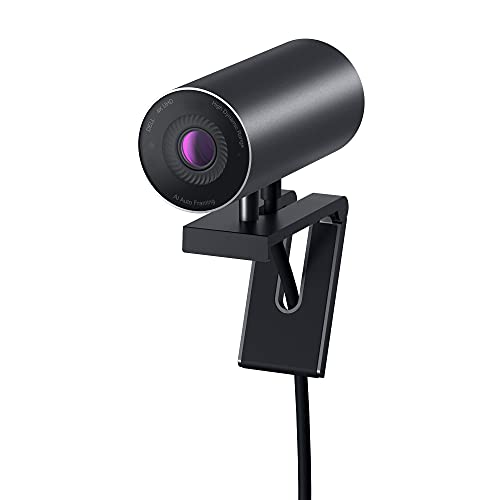
6. Dell UltraSharp Webcam WB7022 — Best for Corporate Professionals
Dell's UltraSharp WB7022 is designed with the enterprise and corporate market in mind, and it shows in every design decision. The 4K Sony STARVIS CMOS sensor (the same sensor type found in several premium consumer cameras) captures more light than standard webcam sensors, resulting in vivid, detailed video even in challenging office lighting conditions like harsh overhead fluorescents or mixed natural and artificial light. HDR support and Image Signal Processing combine to produce consistently well-balanced footage regardless of where someone is sitting relative to windows or desk lamps.
AI Auto Framing is a standout feature: the camera automatically adjusts its framing to keep the subject centered, even when the person moves around during a call. This is particularly useful for anyone who gestures while speaking or occasionally leans away from the camera. The field of view is adjustable between 65°, 78°, and 90°, and digital zoom is available for tighter shots. The Dell Peripheral Manager software provides easy access to brightness, sharpness, contrast, saturation, autofocus, and zoom settings from a clean interface.
The physical design is refined and professional — a magnetic mount system that works with Dell monitors natively but also clips onto third-party screens and laptops. Our team noted that the WB7022 pairs particularly well with Dell's own monitor lineup, where the magnetic connection is seamless. Setup takes under a minute and platform compatibility with Teams, Zoom, and Meet is complete. The price is in the premium tier, but for corporate environments where consistent, polished video quality is expected across the organization, the Dell UltraSharp is a well-supported and reliable choice. Per Wikipedia's overview of webcam technology, modern 4K sensors like the Sony STARVIS represent a significant leap in low-light performance over earlier CMOS designs.
Pros:
- 4K Sony STARVIS sensor with HDR for excellent clarity
- AI Auto Framing keeps the subject centered during movement
- Clean software interface with full manual adjustment options
- Professional design with Dell monitor magnetic mount integration
Cons:
- Premium price — a significant investment compared to mid-range options
- Magnetic mount works best with Dell's own monitor ecosystem
7. OBSBOT Tiny 2 Lite — Best AI-Powered Webcam
The OBSBOT Tiny 2 Lite is the most technically ambitious webcam in this roundup. It features a motorized PTZ (Pan, Tilt, Zoom) mechanism — meaning the camera physically moves to track the subject rather than relying on digital crop — paired with AI-powered subject tracking. Our team tested the tracking across upper body and hand tracking modes, and both worked reliably at normal movement speeds. The physical camera movement gives a smoother, more natural result than digital tracking alternatives, which often produce a jumpy or cropped look. This is the only camera in this list that physically follows the subject, which makes it genuinely useful for presentations, teaching sessions, and meetings where movement is part of the communication.
The image quality is strong. A 1/2-inch CMOS sensor (larger than the sensors in most webcams, which allows more light to be captured per pixel) combined with 4K resolution at 60fps delivers rich, detailed footage with smooth motion. HDR support and built-in microphones round out the hardware package. Gesture control — where specific hand gestures trigger camera actions like zoom or tracking mode changes — works as a convenient hands-free alternative to software controls. OBSBOT's involvement as the 2025 Esports World Cup Official Camera and Webcam Partner speaks to its credibility in the streaming and gaming community.
The Tiny 2 Lite is a streamlined version of the full Tiny 2, trimming features like whiteboard mode and voice control to focus on teaching and meeting use cases. This makes it more accessible in price while keeping the hardware quality intact. For streamers who want a camera that actively participates in the shot rather than sitting static on a mount, or for educators who move around while teaching, the OBSBOT Tiny 2 Lite brings a level of production quality that fixed-mount cameras simply cannot match. Those interested in podcast video setups will also find it relevant — our team's guide on the best webcams for video podcasting covers how AI tracking performs in that specific context.
Pros:
- Motorized PTZ tracking physically follows the subject — smooth and natural
- 4K 60fps with a large 1/2-inch sensor and HDR support
- Gesture control for hands-free camera operation
- Multiple tracking modes including upper body and hand tracking
Cons:
- Whiteboard mode and voice control removed compared to the full Tiny 2
- Higher price than fixed-position webcams with similar resolution
Choosing the Right External Webcam for a Laptop: A Buying Guide
Not every webcam is the right fit for every buyer. Here is what our team looks at when evaluating a camera for different use cases heading into 2026.
Resolution and Frame Rate
Resolution determines how sharp the image looks on screen. 1080p (Full HD) is the minimum worth buying today — anything below looks noticeably soft on modern monitors. 2K sits between 1080p and 4K and offers a clear improvement without the price premium of full 4K. 4K resolution is the current ceiling for consumer webcams and provides the most flexibility for cropping and digital zoom without quality loss. Frame rate matters separately from resolution: 30fps (frames per second) is standard for calls and looks fine in most situations, while 60fps produces smoother motion that makes a visible difference for streaming and active presentations. Most home users and remote workers are well served by 1080p or 2K at 30fps.
Low-Light Performance
Lighting is where many budget webcams fall short. A camera with a large sensor, a fast lens (measured by f-stop — lower numbers mean more light allowed in), or dedicated light correction technology will look noticeably better in dim rooms than one that relies entirely on ambient light. Technologies like Logitech's RightLight, Razer's adaptive light sensor, and Sony's STARVIS CMOS sensor all address this problem in different ways. Home office setups that face a window or have inconsistent overhead lighting should prioritize low-light capability when comparing options.
Microphone Quality
The built-in microphone on a webcam is a genuine convenience for video calls, but quality varies widely. Dual-microphone arrays perform better than single mics. AI noise cancellation is worth looking for in any model used in a shared or noisy space. Most buyers who do more than occasional calls will eventually want a dedicated USB microphone or headset for better voice quality — but for casual daily use, the microphones on cameras like the Anker C200 and Logitech Brio 4K are solid enough to handle the job without anything extra.
Special Features: Tracking, Privacy, and Software
Beyond the basics, a few features can significantly change how a webcam fits into a specific setup. Physical privacy covers (built into cameras like the Anker C200) block the lens when not in use. AI auto-framing (found on the Dell UltraSharp and OBSBOT Tiny 2 Lite) keeps subjects centered automatically. Manual camera controls via software (Elgato's Camera Hub) unlock creative flexibility. Windows Hello support (Logitech Brio 4K) adds biometric login convenience. Matching these extras to actual needs is the key to getting the most value from any purchase in this category.
Frequently Asked Questions
What is the best resolution for an external webcam in 2026?
For most buyers, 1080p is the sweet spot — it delivers sharp, clear video for calls and meetings without requiring a fast USB 3.0 port or expensive hardware. 2K is a worthwhile upgrade for those who want more detail without the full cost of a 4K setup. 4K is worth it for content creators, streamers, or anyone who plans to crop heavily in post-production. Our team generally recommends 1080p as the minimum for any new purchase and 2K or 4K for anyone upgrading from a camera they already own.
Does an external webcam make a noticeable difference over a built-in laptop camera?
Yes — the difference is usually immediately visible. Most built-in laptop cameras top out at 720p with poor low-light performance and basic fixed-focus lenses. An external webcam at even a modest price point delivers sharper detail, more accurate color, better autofocus, and improved microphone quality. Home office users and anyone who attends frequent video calls will notice the improvement on the first use.
Will any of these webcams work with Zoom, Google Meet, and Microsoft Teams?
All seven cameras in this roundup are fully compatible with Zoom, Google Meet, and Microsoft Teams. Most also work with OBS Studio, XSplit, Twitch, and other streaming platforms. No drivers or special software installations are required for basic operation — all of these cameras are plug-and-play on both Windows and Mac. Some cameras offer additional software (like Logitech Options+ or Elgato Camera Hub) for extended control, but it is optional.
Is 4K worth the extra cost for a webcam?
It depends on how the camera is being used. For daily video calls and meetings, 1080p or 2K looks excellent and the difference between that and 4K is hard to spot during a compressed video stream. Where 4K becomes worth the investment is for content creators, live streamers, or anyone recording footage for editing — the extra resolution gives more flexibility for cropping, zooming, and post-processing without quality loss. For straightforward work-from-home use, our team would not call 4K essential.
What should home users look for in a webcam microphone?
A dual-microphone setup is preferable to a single mic for better stereo capture and noise rejection. AI noise cancellation is a significant plus for anyone in a shared space, open-plan office, or home with background noise from children, pets, or appliances. The Anker PowerConf C200's AI noise-cancelling mics and the Logitech Brio 4K's noise-cancelling stereo mics both performed well in our testing. Anyone who records podcasts or streams voice-heavy content will still benefit from a dedicated external microphone regardless of which webcam is chosen.
How does AI tracking work on the OBSBOT Tiny 2 Lite?
The OBSBOT Tiny 2 Lite uses a combination of onboard AI processing and a motorized PTZ (Pan-Tilt-Zoom) mechanism to physically rotate and tilt the camera to follow a subject. The camera identifies a person using AI detection and then moves the lens to keep that person centered in the frame — rather than cropping digitally, which reduces image quality. Multiple tracking modes are available, including upper body and hand tracking. Gesture control allows switching modes or triggering zoom without touching the camera or software.
Buy on Walmart
- Logitech C920x HD Pro PC Webcam, Full HD 1080p/30fps Video, — Walmart Link
- Logitech Brio 4K Webcam, Video Calling, Noise-Cancelling mic — Walmart Link
- Razer Kiyo Pro Webcam for Streaming, Gaming, Video Calls: Fu — Walmart Link
- Elgato Facecam 4K - 4K60 Studio Webcam, DSLR-Like Control, C — Walmart Link
- Anker PowerConf C200 2K Webcam for PC/Laptop/Mac, Computer C — Walmart Link
- Dell UltraSharp Webcam - WB7022 - 4K UHD - Large Sony STARVI — Walmart Link
- OBSBOT Tiny 2 Lite 4K Webcam for PC, AI Tracking PTZ Streami — Walmart Link
Buy on eBay
- Logitech C920x HD Pro PC Webcam, Full HD 1080p/30fps Video, — eBay Link
- Logitech Brio 4K Webcam, Video Calling, Noise-Cancelling mic — eBay Link
- Razer Kiyo Pro Webcam for Streaming, Gaming, Video Calls: Fu — eBay Link
- Elgato Facecam 4K - 4K60 Studio Webcam, DSLR-Like Control, C — eBay Link
- Anker PowerConf C200 2K Webcam for PC/Laptop/Mac, Computer C — eBay Link
- Dell UltraSharp Webcam - WB7022 - 4K UHD - Large Sony STARVI — eBay Link
- OBSBOT Tiny 2 Lite 4K Webcam for PC, AI Tracking PTZ Streami — eBay Link
Key Takeaways
- The Logitech C920x HD Pro is the best value pick for most buyers in 2026 — reliable 1080p video, solid low-light correction, and broad platform compatibility at an accessible price.
- For content creators and streamers who need the highest image quality available, the Elgato Facecam 4K and Logitech Brio 4K offer professional-grade 4K video with full manual controls and excellent low-light sensors.
- The OBSBOT Tiny 2 Lite stands alone in this category with its motorized AI tracking, making it the top recommendation for educators, presenters, or streamers who move around during sessions.
- Budget-conscious buyers who still want a step up from 1080p will find the Anker PowerConf C200 delivers strong 2K quality and effective AI noise cancellation at a price that competes with basic 1080p cameras.



About Remington May
Remington May is a technology writer and digital product reviewer with a focus on consumer electronics, software, and the everyday tech that shapes how people work and live. She has spent years evaluating smartphones, laptops, smart home devices, and digital tools — approaching each product from the perspective of a practical user rather than a spec-sheet enthusiast. At Pinwords, she covers tech buying guides, product reviews, smartphone and laptop comparisons, and practical how-to guides for getting more out of your devices.
Check for FREE Gifts. Or latest free books from our best messages.
Remove Ad block to reveal all the secrets. Once done, hit a button below