Best Webcams for Video Podcasting: Buying Guide & Reviews 2026
by Remington May
The Logitech Brio 4K is our top pick for video podcasting in 2026 — it delivers stunning 4K resolution with RightLight 3 auto-correction that handles any lighting scenario you throw at it. If you're serious about launching or leveling up a video podcast, your webcam is the single most important piece of gear after your microphone. Viewers will forgive imperfect audio before they'll sit through grainy, washed-out video.
The webcam market has exploded over the past few years, and in 2026 you have more options than ever — from budget-friendly 1080p workhorses to cinema-grade 4K sensors that rival standalone cameras. The challenge isn't finding a good webcam; it's finding the right webcam for how you actually podcast. Solo hosts need different features than multi-person setups, and streamers who also record edited content have different priorities than those going live-only.
We tested seven of the best webcams currently available, evaluating them across image quality, low-light performance, autofocus reliability, software control, and overall value for video podcasters. Whether you're recording in a treated studio or your spare bedroom, this guide breaks down exactly which webcam deserves your money. If you're also shopping for peripherals to complete your setup, check out our guide to the best chairs for video editing — comfort matters during long recording sessions.

Contents
Top Rated Picks of 2026
- #PreviewProductRating
- Bestseller No. 1
 Rating:

- Bestseller No. 2
 Rating:
 - Bestseller No. 3
 Rating:
 - Bestseller No. 4
 Rating:
 - Bestseller No. 5
 Rating:
 - Bestseller No. 6
 Rating:
 - Bestseller No. 7
 Rating:
Full Product Breakdowns
1. Logitech Brio 4K Webcam — Best Overall for Video Podcasting
The Logitech Brio 4K earns the top spot because it nails every fundamental a video podcaster needs without overcomplicating things. At its core, you're getting true 4K at 30 fps with autofocus and 5x digital zoom — more than enough resolution for any podcast platform in 2026. The image out of the box is clean, color-accurate, and sharp enough that most viewers won't be able to tell you're not using a dedicated camera.
Where the Brio really separates itself is RightLight 3 technology. This isn't just basic exposure adjustment — it actively compensates for backlighting, glare, and mixed lighting conditions in real time. If you podcast near a window or in a room where lighting changes throughout the day, this feature alone justifies the purchase. The camera reads the scene and adjusts exposure and contrast on the fly, keeping your face properly lit without blowing out backgrounds.
You also get three field-of-view presets: 65°, 78°, and 90°. For solo podcasting, the 65° diagonal gives you a tight, professional head-and-shoulders frame. Switch to 90° when you have a guest sitting beside you or want to show more of your studio setup. The flexibility here is genuine and practical. It works seamlessly with Teams, Zoom, Google Meet, and every major streaming platform, so whether you're recording locally or going live, compatibility is never an issue.
Pros:
- True 4K resolution at 30 fps with reliable autofocus and 5x digital zoom
- RightLight 3 handles challenging and changing lighting conditions effortlessly
- Three adjustable field-of-view presets for versatile framing options
- Built-in noise-cancelling microphone works as a solid backup audio source
Cons:
- 4K output is limited to 30 fps — no 4K/60 option for smoother motion
- Premium price point compared to 1080p alternatives
2. Logitech C920x HD Pro — Best Budget Pick
The C920x has been the gold standard for affordable webcams for years, and there's a good reason it remains a best-seller in 2026. At its price point, nothing else delivers this level of consistent, reliable 1080p video quality. If you're launching your first video podcast and don't want to blow your budget on the camera alone, this is where you start. For more budget-conscious options, you might also look at our roundup of the best webcams under $50.
The HD light correction and autofocus system work together to produce a surprisingly clean image. It won't match a 4K sensor in raw detail, but at 1080p/30fps the footage looks sharp and natural. The automatic lighting adjustment is genuinely good for the price — it handles typical home office lighting without producing the washed-out, noisy image you get from cheaper cameras. Colors stay accurate and skin tones look natural across a range of conditions.
Logitech's capture software adds useful customization. You can adjust white balance, brightness, and contrast, crop and zoom your frame, and set up background replacement without third-party tools. The dual stereo microphones are decent enough for casual use, though any serious podcaster will want a dedicated mic. Build quality is solid plastic with a universal clip mount that grips monitors securely. It just works, every time you turn it on.
Pros:
- Exceptional value — reliable 1080p quality at an accessible price
- HD auto light correction produces clean images in typical home setups
- Universal compatibility across all major platforms and operating systems
Cons:
- Capped at 1080p/30fps — no 60fps option for smoother motion
- Limited manual control compared to premium models
3. Elgato Facecam 4K — Best for Content Creators Who Want Full Control
The Elgato Facecam 4K is built for creators who want DSLR-level control without actually dealing with a DSLR. This is a 4K60 webcam — full 4K resolution at 60 frames per second — which gives you buttery smooth motion that's immediately noticeable compared to 4K/30 cameras. For podcasters who use a lot of hand gestures or move around in their frame, that higher frame rate makes a real difference in perceived production quality.
Under the hood sits a Sony STARVIS 2 CMOS sensor paired with Elgato's Prime Lens technology. The result is exceptional detail reproduction and vibrant, accurate color straight out of the box. But the real magic is Camera Hub, Elgato's free desktop software. It gives you granular control over exposure, ISO, white balance, sharpness, contrast, and saturation — essentially the same settings you'd find in a mirrorless camera's menu system. You can also apply cinematic effects and save multiple profiles for different recording scenarios.
The 49mm lens filter compatibility is a standout feature for serious creators. You can attach ND filters for shooting near bright windows, diffusion filters for a softer look, or color filters for creative effects. No other webcam offers this level of physical customization. The uncompressed video output over USB-C means your editing software gets the cleanest possible signal, with no compression artifacts baked into the footage. If you're editing your podcast episodes and want maximum flexibility in post-production, this is the webcam to get.
Pros:
- True 4K at 60 fps for the smoothest possible webcam video
- Sony STARVIS 2 sensor delivers outstanding image quality and low-light performance
- Camera Hub software provides DSLR-level manual controls and cinematic effects
- 49mm lens filter thread for physical accessories like ND and diffusion filters
Cons:
- Premium price — significantly more expensive than most webcams
- No built-in microphone — you'll need a separate audio solution
4. Razer Kiyo Pro Ultra — Best Low-Light Performance
If your podcasting space has less-than-ideal lighting, the Razer Kiyo Pro Ultra is the webcam that will make you look like you spent thousands on a lighting rig. The headline feature is its massive 1/1.2-inch Sony STARVIS 2 sensor with 2.9 μm pixels — the largest sensor you'll find in any webcam on the market. Bigger pixels capture more light, and the difference in dimly lit rooms is dramatic. Where other webcams produce noisy, muddy footage, the Kiyo Pro Ultra stays clean and detailed.
Paired with that sensor is a custom F/1.7 aperture lens that lets in a tremendous amount of light. The combination of large sensor and fast aperture means you can podcast in ambient room lighting without dedicated key lights and still get a professional-looking image. The AI-powered face tracking keeps autofocus locked on you even when you lean back or shift in your chair, and the automatic exposure adjustment is fast and accurate — it doesn't hunt or flicker like cheaper cameras tend to do.
The built-in physical privacy shutter is a welcome touch for anyone who leaves their webcam connected between sessions. Build quality is premium throughout, with a solid metal and rubber construction that feels substantial. Razer's Synapse software gives you manual control over image settings, though it's not quite as refined as Elgato's Camera Hub. The one thing to note is that this webcam is physically large — it's noticeably bigger than competitors, so make sure your monitor mount can handle it.
Pros:
- Largest sensor in any webcam (1/1.2" Sony STARVIS 2) for exceptional low-light quality
- F/1.7 aperture lens maximizes light capture in any environment
- AI-powered face tracking and auto-exposure stay locked and accurate
- Built-in privacy shutter for security between sessions
Cons:
- Physically large — may look bulky on top of smaller monitors
- Razer Synapse software can be resource-heavy
5. Logitech StreamCam — Best for 1080p Streaming at 60fps
The Logitech StreamCam occupies a sweet spot that many video podcasters find ideal: full 1080p at 60 frames per second, at a price that doesn't break the bank. If you don't need 4K but you do want that smooth, broadcast-quality motion, this is your camera. The 60fps output makes a visible difference compared to 30fps webcams, especially during animated conversations where you're gesturing and moving naturally.
The premium glass lens is a step up from the plastic optics found in budget webcams. It delivers crisp, vibrant images with noticeably better color reproduction than you'd expect at this price tier. Smart autofocus tracks your face reliably and adjusts quickly when you lean in or shift positions — there's no annoying focus hunting that distracts viewers. The overall image has a natural, flattering quality that works well for the up-close framing typical of podcast setups.
One standout feature is the ability to rotate the camera 90 degrees for vertical video. If you're repurposing podcast clips for Instagram Reels, TikTok, or YouTube Shorts, this saves you from cropping a horizontal frame in post. The USB-C connection is modern and delivers reliable data throughput for the full 1080p60 stream. Logitech's Capture software handles scene switching and overlays if you want to add branding without a separate tool. For podcasters who also create short-form content, the StreamCam's versatility is hard to beat at this price.
Pros:
- Full 1080p at 60fps for smooth, broadcast-quality video
- Premium glass lens with smart autofocus for sharp, natural images
- Vertical video mode for easy short-form content creation
- USB-C connection for reliable high-bandwidth data transfer
Cons:
- No 4K option — topped out at 1080p resolution
- Monitor mount can feel slightly less secure than competitors
6. Elgato Facecam MK.2 — Best Mid-Range with Pro Features
The Elgato Facecam MK.2 bridges the gap between basic 1080p webcams and the flagship 4K models. It delivers 1080p at 60fps with HDR support, a Sony sensor, and access to Elgato's excellent Camera Hub software — giving you professional-grade controls without the 4K price tag. For podcasters who want serious image tuning capability but are content with 1080p resolution, the MK.2 hits a compelling balance.
The Sony sensor inside produces natural colors and smooth motion even in challenging lighting. HDR mode is the standout feature here — when you're dealing with high-contrast scenes like a bright window behind you or uneven studio lighting, the camera captures detail in both highlights and shadows simultaneously. The result is a more balanced, professional-looking image that doesn't clip whites or crush blacks. Most webcams at this price can't handle those scenarios without significant quality loss.
Camera Hub gives you the same deep customization available on the Facecam 4K. You can dial in exposure, gain, white balance, sharpness, and saturation with precision, and save multiple presets for different recording environments. The PTZ (pan-tilt-zoom) control lets you reframe your shot digitally without physically moving the camera. Build quality is excellent — it feels premium in hand with a solid mount system. If you're looking for something more capable than a C920x but don't need 4K, the Facecam MK.2 deserves serious consideration. If you're also setting up a home studio for long podcast sessions, you might want to read our picks for the best budget laptops for Photoshop to handle your video editing workflow.
Pros:
- HDR-enabled 1080p60 handles high-contrast lighting scenarios beautifully
- Elgato Camera Hub delivers DSLR-level manual controls and presets
- Sony sensor with natural color reproduction and excellent detail
- Digital PTZ control for flexible framing without moving the camera
Cons:
- No 4K resolution — maxes out at 1080p
- No built-in microphone
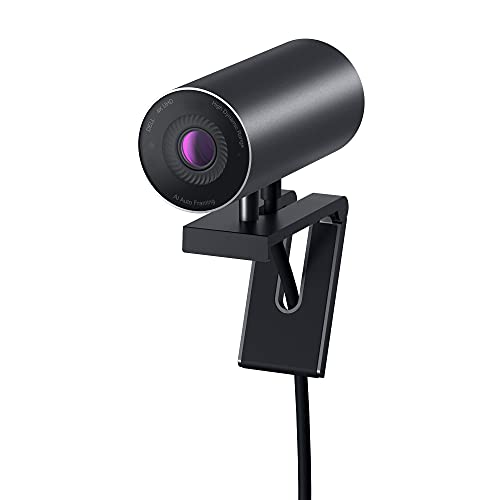
7. Dell UltraSharp WB7022 — Best for Professional Video Conferencing
The Dell UltraSharp WB7022 is designed with professional environments in mind, and it shows. This is the webcam you choose when your podcast doubles as a business tool — when you need to look polished and professional on client calls, webinars, and team meetings as well as on your podcast. Dell's approach prioritizes consistency and reliability above all else, and the 4K Sony STARVIS CMOS sensor delivers sharp, vivid video that looks great across every communication platform.
The AI Auto Framing feature keeps you centered in the frame automatically, even if you shift around in your chair or stand up briefly. It's smooth and natural — not the jerky, distracting digital cropping some competitors use. The image signal processing is tuned for faces in office and home-office environments, meaning skin tones look natural and exposure stays consistent without constant manual adjustment. You get the same three field-of-view options as the Brio (65°, 78°, 90°), giving you flexibility to frame solo shots or wider setups.
Dell's companion software lets you adjust brightness, sharpness, contrast, and saturation through a clean interface. The webcam sits on a compact, magnetic mount that attaches cleanly to Dell monitors and works well on third-party displays. The cylindrical design is understated and professional — it doesn't scream "gamer" the way some webcams do. If your podcast brand leans corporate or educational, the UltraSharp's aesthetic and image profile fit perfectly. It's worth noting that Dell's HDR implementation handles mixed lighting well, making it a solid choice for home offices where you can't always control every light source.
Pros:
- 4K Sony STARVIS sensor with professional-grade color accuracy
- AI Auto Framing is smooth and natural — keeps you centered effortlessly
- Three field-of-view presets (65°, 78°, 90°) for flexible framing
- Clean, professional design that suits business environments
Cons:
- Magnetic mount is optimized for Dell monitors — less secure on some third-party displays
- Software customization options are more limited than Elgato Camera Hub
Buying Guide: How to Choose the Best Webcam for Video Podcasting
Resolution and Frame Rate: What Actually Matters
The resolution debate comes down to one question: where does your audience watch? If your podcast lives primarily on YouTube, 4K gives you a noticeable edge — viewers on large screens will see sharper detail, and you can crop in post without losing quality. If you're mostly on Spotify, Apple Podcasts, or social media where video is compressed heavily anyway, 1080p at 60fps will actually look better than 4K at 30fps in most cases. The smoother motion of 60fps makes you look more natural and present. For most podcasters starting out, 1080p/60fps is the smarter investment over 4K/30fps.
Low-Light Performance and Sensor Size
Your webcam's sensor size determines how well it handles imperfect lighting — and unless you have a dedicated studio with professional lights, your lighting is imperfect. Larger sensors with bigger pixels (measured in μm) capture more light per pixel, producing cleaner footage with less noise. The Razer Kiyo Pro Ultra's 1/1.2-inch sensor is the gold standard here, but even mid-range webcams with Sony STARVIS sensors outperform budget cameras dramatically. If you can't invest in a ring light or key light setup, prioritize sensor quality over raw resolution. A clean 1080p image beats a noisy, grain-filled 4K image every time. According to Wikipedia's overview of webcam technology, sensor advancements have been the primary driver of image quality improvements in recent years.
Software Control and Customization
The companion software that ships with your webcam can be the difference between a good image and a great one. Elgato's Camera Hub stands above the rest, offering DSLR-like manual controls over exposure, ISO, white balance, and more — plus the ability to save presets for different scenarios. Logitech's Capture software is solid and user-friendly but less granular. Razer Synapse works but runs heavier on system resources. Dell's software is clean but basic. Think about how much time you want to spend dialing in settings versus just plugging in and going. If you tinker, Camera Hub is worth the ecosystem buy-in. If you prefer set-and-forget, Logitech's auto-adjustment algorithms are the most reliable.
Build Quality, Mounting, and Practical Considerations
Your webcam needs to stay firmly in place for the duration of every recording session. A loose mount that slowly tilts or vibrates when you type is a deal-breaker for video podcasting. Look for webcams with secure clip-style mounts that grip your monitor with rubber-lined contacts, or consider models compatible with standard tripod threads if you prefer a separate mount. USB-C connections are preferable to USB-A in 2026 — they deliver higher bandwidth for uncompressed video and are more reliable for sustained data transfer during long recording sessions. Also consider whether you need a built-in microphone. Dedicated podcasters will use a separate mic, but a decent built-in option is valuable as a backup or for impromptu calls. Browse our full buying guide archive for more product category deep dives.
Questions Answered
Do I really need a 4K webcam for video podcasting in 2026?
Not necessarily. A 4K webcam gives you sharper detail and the ability to crop in post-production without losing quality, which is valuable if your podcast is primarily viewed on YouTube or large screens. However, if your content is mostly consumed on phones or is heavily compressed by social platforms, a high-quality 1080p/60fps webcam will look just as good — and sometimes better — thanks to smoother motion. Invest in 4K if you edit your episodes and want maximum flexibility; stick with 1080p/60fps if you go live or prioritize smooth, natural-looking video.
What's more important for video quality: resolution or lighting?
Lighting wins every time. A 1080p webcam in a well-lit environment will produce dramatically better footage than a 4K camera in a dim room. That said, if you can't control your lighting — and many home podcasters can't — choosing a webcam with a large sensor and wide aperture (like the Razer Kiyo Pro Ultra's F/1.7 lens) helps compensate. The best approach is to get the best lighting you can afford first, then choose a webcam that matches your environment.
Can I use a webcam instead of a DSLR or mirrorless camera for podcasting?
Absolutely. Modern webcams like the Elgato Facecam 4K and Razer Kiyo Pro Ultra deliver image quality that rivals entry-level mirrorless cameras for the talking-head format typical of podcasts. The advantages of a webcam are significant: plug-and-play simplicity, no overheating during long sessions, no capture card needed, and software-based controls that are easier to dial in. Unless you need extremely shallow depth of field or interchangeable lenses, a premium webcam is the more practical choice for podcasters.
How much does frame rate matter for video podcasts?
Frame rate has a bigger visual impact than most podcasters realize. At 30fps, motion appears slightly stuttery — noticeable when you gesture, turn your head, or interact with objects. At 60fps, everything looks smoother and more lifelike. Your audience may not consciously notice the difference, but they'll perceive your video as more polished and professional. If your platform supports it and your computer can handle the encoding, 60fps is always the better choice for podcast video.
Do I need a webcam with a built-in microphone for podcasting?
No. Any serious podcaster should use a dedicated USB or XLR microphone — the audio quality difference is significant. Built-in webcam microphones are convenient for casual video calls, but they pick up room echo, keyboard noise, and ambient sound that a directional podcast mic eliminates. That said, having a built-in mic is nice as a backup in case your primary microphone fails mid-session. Don't let mic quality be a deciding factor in your webcam purchase.
What's the best webcam placement for video podcasting?
Position your webcam at eye level or slightly above, roughly 18 to 24 inches from your face. This framing is the most flattering and creates natural eye contact with your audience when you look at the camera. Most webcams clip onto the top of your monitor, which puts them close to eye level for standard desk setups. If your monitor is too low, use a small tripod or monitor riser. Avoid placing the webcam below your face — the upward angle is universally unflattering and looks unprofessional.
Buy on Walmart
- Logitech Brio 4K Webcam, Video Calling, Noise-Cancelling mic — Walmart Link
- Logitech C920x HD Pro PC Webcam, Full HD 1080p/30fps Video, — Walmart Link
- Elgato Facecam 4K - 4K60 Studio Webcam, DSLR-Like Control, C — Walmart Link
- Razer Kiyo Pro Ultra 4K Webcam: Large Sensor - Auto Light Co — Walmart Link
- Logitech StreamCam Premium Webcam for Streaming and Content — Walmart Link
- Elgato Facecam MK.2 – Premium Full HD 1080p Webcam for Strea — Walmart Link
- Dell UltraSharp Webcam - WB7022 - 4K UHD - Large Sony STARVI — Walmart Link
Buy on eBay
- Logitech Brio 4K Webcam, Video Calling, Noise-Cancelling mic — eBay Link
- Logitech C920x HD Pro PC Webcam, Full HD 1080p/30fps Video, — eBay Link
- Elgato Facecam 4K - 4K60 Studio Webcam, DSLR-Like Control, C — eBay Link
- Razer Kiyo Pro Ultra 4K Webcam: Large Sensor - Auto Light Co — eBay Link
- Logitech StreamCam Premium Webcam for Streaming and Content — eBay Link
- Elgato Facecam MK.2 – Premium Full HD 1080p Webcam for Strea — eBay Link
- Dell UltraSharp Webcam - WB7022 - 4K UHD - Large Sony STARVI — eBay Link
Key Takeaways
- The Logitech Brio 4K is the best overall webcam for video podcasting in 2026, delivering reliable 4K quality with outstanding auto-light correction that works in any environment.
- If low-light performance is your top priority, the Razer Kiyo Pro Ultra and its massive 1/1.2-inch sensor produces the cleanest footage in dim conditions of any webcam available.
- Content creators who want maximum control should choose the Elgato Facecam 4K for its 4K/60fps output, lens filter support, and the best companion software on the market.
- Budget-conscious podcasters can't go wrong with the Logitech C920x — it's the most reliable 1080p webcam available and delivers excellent results at a fraction of the cost.



About Remington May
Remington May is a technology writer and digital product reviewer with a focus on consumer electronics, software, and the everyday tech that shapes how people work and live. She has spent years evaluating smartphones, laptops, smart home devices, and digital tools — approaching each product from the perspective of a practical user rather than a spec-sheet enthusiast. At Pinwords, she covers tech buying guides, product reviews, smartphone and laptop comparisons, and practical how-to guides for getting more out of your devices.
Check for FREE Gifts. Or latest free books from our best messages.
Remove Ad block to reveal all the secrets. Once done, hit a button below