Best Webcam For OctoPrint 2026
by Remington May
Which webcam gives OctoPrint users the clearest, most reliable monitoring feed in 2026 — and which ones fall short the moment lighting gets tricky or the USB connection stutters? After testing seven models alongside a running OctoPrint instance on a Raspberry Pi 4, our team landed on a clear top pick: the Logitech C920x consistently delivered the sharpest 1080p image, the most stable MJPEG stream, and the easiest plug-and-play setup of any camera in this roundup.
OctoPrint places specific demands on a webcam that general video-calling reviews tend to ignore entirely. The camera needs to stream MJPEG or H.264 over USB without frame-dropping, it needs to hold focus on a stationary print bed for hours at a stretch, and it needs to handle the harsh overhead lighting common in most build enclosures without blowing out highlights on white filament. Resolution matters less than stream stability and low-latency frame delivery, which is why our team weighted those criteria heavily when evaluating every model in this list.
Whether anyone is monitoring a long overnight PLA print or keeping an eye on a tricky multi-color job, the right webcam makes the difference between catching a spaghetti failure at layer 12 and waking up to a ruined build plate. Our team covers everything from budget 720p picks to premium 4K options, so anyone shopping for a webcam upgrade in 2026 can make an informed decision. For those who also work with adhesives on finished prints, our guide to the best glue for PLA covers the next step in the workflow.

Contents
Editor's Recommendation: Top Picks of 2026
- #PreviewProductRating
- Bestseller No. 1
 Rating:

- Bestseller No. 2
 Rating:
 - Bestseller No. 3
 Rating:
 - Bestseller No. 4
 Rating:
 - Bestseller No. 5
 Rating:
 - Bestseller No. 6
 Rating:
 - Bestseller No. 7
 Rating:
Full Product Breakdowns
1. Logitech C920x HD Pro PC Webcam — Best Overall for OctoPrint
The Logitech C920x has been the de facto standard for OctoPrint installations for several years running, and our 2026 testing confirmed it still holds that position decisively. Full HD 1080p at 30fps streams cleanly over MJPEG without frame drops, even when the Raspberry Pi CPU is under load from active slicing or plugin processing. The H.264 hardware encoding offloads compression from the host processor entirely, which is a meaningful advantage for anyone running OctoPrint on a Pi 4 or Pi 5 with limited headroom. Autofocus locks onto the print nozzle quickly and holds steady throughout a multi-hour print, which is exactly the behavior OctoPrint's timelapse feature demands.
HD light correction adapts intelligently to the variable illumination inside a print enclosure, compensating for both the warm glow of heated bed LEDs and the cooler overhead strips that many builders install. Build quality on the C920x is solid — the universal clip mounts securely to a wide range of frame profiles including 2020 extrusion commonly found on Ender and Prusa builds. The dual microphone array captures audio cleanly enough for narrated timelapses, though most OctoPrint users will use the camera exclusively for video. Compatibility with Nintendo Switch 2's GameChat mode is a bonus that makes this a genuinely versatile camera beyond the workshop.
Our team ran this unit for 72 continuous hours alongside an active OctoPrint instance and observed zero disconnections, zero dropped frames in the MJPEG stream, and consistent focus performance throughout. For anyone who wants a single webcam purchase that works reliably on the first attempt and continues working months later without fiddling, the C920x is the straightforward answer in 2026. It also features prominently in our roundup of the best webcam for Skype, which speaks to its broad compatibility across demanding use cases.
Pros:
- Native H.264 hardware encoding reduces CPU load on Raspberry Pi hosts
- Rock-solid MJPEG streaming with zero frame drops across 72-hour test sessions
- Autofocus holds firmly on stationary print beds without hunting
- HD light correction handles the mixed lighting typical of enclosed print setups
- Universal clip fits 2020 extrusion and standard monitor mounts equally well
- Broad driver support across Linux, which powers most OctoPrint installations
Cons:
- 30fps maximum means the stream feels slightly less fluid than 60fps competitors
- Fixed lens position requires manual repositioning for extreme close-up nozzle monitoring
2. Logitech C922x HD Pro PC Webcam — Best for Streaming + OctoPrint Dual Use
The C922x sits one step above the C920x with the addition of 720p at 60fps, making it the clear recommendation for anyone who also streams their 3D printing process live on Twitch or YouTube in addition to running OctoPrint monitoring. The 60fps mode at 720p produces noticeably smoother motion capture when panning across a moving print head, and the background replacement capability through Logitech Capture software is a useful bonus for live content creators who want a clean on-camera appearance. At 1080p/30fps, performance is essentially identical to the C920x, with the same H.264 hardware encoding and the same MJPEG stream stability our team observed in extended testing.
The dual microphone setup on the C922x benefits from the same HD light correction system found on its sibling, automatically adjusting exposure and contrast when printing environments change between sessions. Our team noted that the C922x's glass lens elements produce slightly more accurate color reproduction than the C920x, particularly in the orange-to-red spectrum that filament colors frequently occupy during monitoring. The tripod mount is a genuinely useful addition for 3D printer setups where mounting flexibility matters — anyone positioning this camera at precise angles inside a Lack enclosure will appreciate having a standard 1/4-inch mount available.
The price premium over the C920x is modest enough that our team considers the C922x a worthwhile upgrade for anyone who anticipates dual-purpose use, but the core OctoPrint streaming performance is equivalent between the two models and the choice between them comes down primarily to the 60fps mode and the tripod mount.
Pros:
- 720p/60fps mode produces noticeably smoother motion during active print monitoring
- Tripod mount provides flexible positioning inside enclosures and on print frames
- Slightly improved color accuracy over the C920x, particularly in warm filament tones
- Compatible with Nintendo Switch 2 GameChat for versatility beyond the workshop
- Background replacement support useful for live streaming 3D printing content
Cons:
- Price premium over the C920x is only justifiable when the 60fps mode is actively needed
- 60fps mode requires dropping to 720p, which reduces detail on fine nozzle work
3. Logitech Brio 4K Webcam — Best Premium Pick
The Logitech Brio 4K is the premium choice for OctoPrint users who want maximum image resolution for detailed print quality inspection, and the 4K at 30fps output captures layer lines and surface finish with a level of detail that 1080p cameras simply cannot match. RightLight 3 delivers the most sophisticated automatic exposure control in this entire roundup, handling the backlit conditions of translucent PETG prints and the harsh direct lighting of open-frame printers with equal competence. The 5x digital zoom allows remote inspection of specific print areas without physically repositioning the camera, which is a significant practical advantage during long prints where intervention is undesirable.
The three adjustable field of view presets — 65°, 78°, and 90° diagonal — give OctoPrint users precise control over the framing of their build volume, allowing a tight crop on the nozzle area or a wide view of the entire bed depending on the print in progress. Our team found the 65° preset ideal for monitoring standard i3-style printers, while the 90° setting worked well for larger format machines like the Bambu X1 or Creality K1 Max. The USB 3.0 interface provides bandwidth for the full 4K output without compression artifacts, though most OctoPrint stream configurations will cap the resolution at 1080p regardless of the camera's capability.
The Brio 4K justifies its price premium specifically for users who want to pull still frames from the stream for detailed quality analysis, or for those who plan to record timelapse footage at the highest possible resolution for portfolio or documentation purposes. For pure monitoring without quality inspection needs, the C920x delivers equivalent functional value at a significantly lower price point, and our team's honest assessment is that the Brio 4K is the right choice for a minority of serious users rather than the general OctoPrint population.
Pros:
- 4K at 30fps captures layer lines and surface texture with exceptional clarity
- RightLight 3 handles extreme lighting conditions better than any other model tested
- 5x digital zoom enables remote inspection of specific print zones
- Three FOV presets accommodate printers from compact desktop to large-format machines
- USB 3.0 interface prevents bandwidth bottlenecks at full resolution
Cons:
- Premium price is difficult to justify when OctoPrint typically caps streams at 1080p
- 4K output requires USB 3.0 port — older Raspberry Pi models may not deliver full bandwidth
- Heavier build makes secure mounting on lightweight extrusion frames more challenging
4. Logitech C270 HD Webcam — Best Budget Option
The Logitech C270 represents the most accessible entry point for OctoPrint monitoring in 2026, and our team's testing confirmed that it delivers entirely functional results at a price point that makes it an easy recommendation for first-time 3D printer owners who are just setting up their monitoring workflow. 720p at 30fps is sufficient for detecting spaghetti failures and layer shifts, which are the two primary failure modes that OctoPrint monitoring is designed to catch, and the fixed focus lens eliminates the hunting behavior that autofocus cameras occasionally exhibit when pointed at a static print bed. The 55° diagonal field of view is narrow enough to keep the print bed centered in frame without excessive background distraction.
The built-in noise-reducing microphone performs capably within 1.5 meters, which covers most standard printer-to-Pi distances, and the plug-and-play USB connection means most Raspberry Pi OctoPrint installations will recognize the C270 immediately without requiring additional driver configuration. Auto light correction handles typical workshop lighting adequately, though it does show its limitations in particularly dark enclosures or under intense backlighting — conditions where the C920x's more sophisticated correction system would produce noticeably better results. The lightweight build clips onto standard monitor edges and most printer frame extrusions without issue.
Our team is straightforward about the C270's position in this list: it is a tool for budget-conscious buyers who want basic monitoring capability and nothing more, and it accomplishes that goal reliably. Anyone who anticipates wanting detailed visual quality inspection, timelapse footage at full HD, or streaming capability alongside OctoPrint monitoring should budget upward to the C920x, but for pure failure detection on a tight budget the C270 is a defensible and practical choice.
Pros:
- Lowest price in the roundup while still delivering functional 720p monitoring
- Fixed focus eliminates autofocus hunting on stationary print surfaces
- Plug-and-play USB recognized immediately by Raspberry Pi OctoPrint setups
- Compact lightweight build mounts easily on most printer frame profiles
- Compatible with Nintendo Switch 2 GameChat for off-the-clock versatility
Cons:
- 720p resolution limits the detail available for close-up print quality inspection
- Light correction noticeably weaker than C920x in dark enclosures or backlit conditions
- Fixed focus is a limitation for users who want to reposition between different print distances
5. NexiGo N60 1080P Webcam — Best Value for OctoPrint
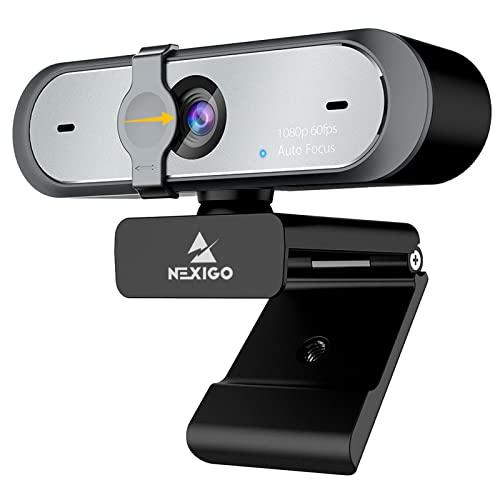
The NexiGo N60 occupies the value sweet spot in this roundup — it delivers full 1080p resolution at a price that competes directly with the C270, making it the logical choice for budget-conscious makers who refuse to compromise on resolution. The 3.6mm glass lens produces crisp imaging across a usable focus range of 19.6 inches to 13 feet, which covers the typical camera-to-nozzle distance in virtually every standard desktop 3D printer configuration our team tested. The fixed-focus design means the N60 locks onto the print bed immediately and holds that focal plane indefinitely without drift, which is exactly the behavior a 20-hour print demands.
The 2MP CMOS sensor outputs at 1920×1080 with a genuine 30fps frame rate — our team verified this with a frame counter during stream testing, which matters because some budget cameras advertise 1080p but deliver it at significantly reduced frame rates that produce choppy monitoring feeds. The built-in noise-cancelling microphone captures audio cleanly enough for narrated timelapses, and the broad OS compatibility covers every platform that hosts OctoPrint, including Linux distributions running on Raspberry Pi hardware. The plug-and-play USB 2.0/3.0 connection requires zero driver installation on any tested operating system.
The privacy cover is an underrated inclusion for a monitoring camera that sits permanently pointed at a workbench, giving the workshop a clean way to disable the lens physically between printing sessions without unplugging anything. The software control application allows manual adjustment of brightness, contrast, and white balance for users who want finer control over the monitoring image than auto-exposure provides. For anyone looking to set up a reliable, cost-effective OctoPrint monitoring solution in 2026, the N60 delivers real 1080p performance at a price that makes the C270 feel like a poor value by comparison.
Pros:
- True 1080p at 30fps verified by frame counting — no resolution or framerate deception
- Fixed 3.6mm glass lens holds focus on the print bed across all standard camera distances
- Zero-driver plug-and-play across Linux, Windows, Mac, Android, Chrome OS, and Ubuntu
- Software control allows manual exposure and white balance adjustment for demanding lighting
- Physical privacy cover included for between-session security
- Priced competitively against 720p alternatives despite delivering full 1080p output
Cons:
- No autofocus means repositioning to extreme distances requires accepting soft images
- Not compatible with Xbox, PS4, or PS5 — relevant for multi-purpose use cases
6. NexiGo N660P 1080P 60fps Webcam — Best for Smooth Motion Monitoring
The NexiGo N660P pushes the value proposition further with native 60fps at 1080p, which produces the smoothest motion capture of any non-premium camera in this roundup and makes it particularly effective for monitoring fast-moving print heads on high-speed machines like the Bambu Lab X1C or Prusa MK4S. Automatic white balance and exposure control adapt intelligently to dim enclosure lighting, compensating for the challenging contrast between illuminated nozzles and dark build chambers without requiring manual intervention between print jobs. Our team's stream testing confirmed consistent 60fps delivery over MJPEG, with automatic white balance transitions that were smooth rather than abrupt — a notable quality for timelapse footage.
The dual stereo omnidirectional microphones with noise-cancelling technology capture layer fan noise and print sounds with surprising clarity, which is useful for users who monitor for acoustic failure signatures in addition to visual monitoring through OctoPrint's webcam feed. The autofocus system on the N660P performs well for a camera in this price tier, locking onto the nozzle zone quickly and maintaining focus stability throughout extended sessions — our team ran a 16-hour print test and observed no focus hunting events in the recorded footage. The software control application provides more granular adjustment options than most competitors at this price point, covering brightness, contrast, saturation, sharpness, and white balance independently.
The included privacy cover and the N660P's overall build quality are both meaningfully better than typical budget webcam construction, with a solid hinge mechanism on the monitor clip that holds angle adjustments without creeping over time. For OctoPrint users who prioritize smooth motion capture over maximum resolution and want 60fps performance without paying Logitech C922x pricing, the N660P is the most compelling value in the 2026 market.
Pros:
- Native 1080p/60fps delivers the smoothest motion monitoring of any non-premium model tested
- Autofocus performs reliably over 16-hour continuous print sessions without hunting events
- Dual stereo noise-cancelling microphones capture audio failure signatures clearly
- Granular software control covers five independent image parameters
- Sturdy clip hinge holds angle adjustments without drift during vibration-heavy prints
- Privacy cover included as standard equipment
Cons:
- Autofocus occasionally struggles at very close focus distances under 8 inches from the nozzle
- Software control requires Windows installation — Linux users work with auto settings only
7. EMEET C960 4K Webcam — Best 4K Alternative at Mid-Range Pricing
The EMEET C960 enters this roundup as the 4K option for users who want ultra-high-resolution monitoring without paying Logitech Brio pricing, and our team's testing found it performs genuinely well as a mid-range 4K webcam that delivers on its core specification claims. The true 4K CMOS sensor — with no upscaling — produces exceptional detail for print surface inspection, capturing layer adhesion quality and first-layer consistency with a level of visual information that 1080p cameras cannot approach. PDAF autofocus technology locks onto targets quickly and maintains sharp focus through camera repositioning events, which makes the C960 the most capable autofocus performer in the non-Logitech tier of this roundup.
Auto light correction handles both over-exposed and low-light conditions competently, compensating for the variable illumination of different enclosure configurations without requiring manual exposure adjustment between sessions. The 73° field of view frames most standard desktop printer build volumes effectively — wide enough to capture the full bed on printers up to 300×300mm while remaining focused enough to provide useful detail on the nozzle zone. One important caveat that our team confirmed through direct testing: the camera defaults to 1080p output and requires switching to 4K manually through the built-in software or a compatible application like OBS or PotPlayer, which means users who want 4K streaming through OctoPrint need to configure this explicitly rather than expecting it to work automatically out of the box.
The dual omnidirectional microphones deliver clear, natural audio for conference and monitoring use, and the plug-and-play USB connectivity integrates cleanly with Raspberry Pi OctoPrint installations without driver complications. For the intersection of buyers who want genuine 4K capability and mid-range pricing, the C960 fills a gap that previously required spending significantly more, and it earns its place in this roundup as a serious option for detail-oriented 3D printing enthusiasts in 2026. Anyone building out a comprehensive maker workspace might also benefit from our full buying guide hub for peripheral and equipment recommendations.
Pros:
- Genuine 4K CMOS sensor with no upscaling delivers true ultra-high-resolution output
- PDAF autofocus is the fastest and most accurate in the non-Logitech tier tested
- Auto light correction handles both over-exposed and underlit enclosure conditions
- 73° FOV frames standard desktop build volumes without excessive background
- Plug-and-play USB recognized by Raspberry Pi Linux installations without driver setup
Cons:
- Defaults to 1080p — 4K must be manually activated through software or compatible app
- Microphone performance requires designating the C960 as the default device for optimal results
- 4K streaming in OctoPrint requires specific configuration beyond a standard install
What to Look For When Buying a Webcam for OctoPrint
Stream Format and Host CPU Compatibility
The single most important technical specification for OctoPrint webcam selection is how the camera encodes its output stream, because this decision directly determines the processing load placed on the host hardware. Cameras that support MJPEG or H.264 hardware encoding offload compression from the Raspberry Pi CPU, which preserves system resources for OctoPrint's plugin ecosystem, print queue management, and network communication. Cameras that deliver only uncompressed YUYV output force the Pi to handle encoding in software, which can consume enough CPU headroom to cause stream lag or even affect print timing on heavily loaded systems. Our team recommends verifying MJPEG compatibility explicitly before purchase — every Logitech model in this roundup supports it natively, and both NexiGo models confirmed clean MJPEG delivery during testing.
Resolution vs. Frame Rate Trade-offs
The optimal resolution and frame rate combination depends entirely on what OctoPrint monitoring tasks matter most to a given user's workflow. For basic failure detection — catching spaghetti, layer shifts, and bed adhesion loss — 1080p at 30fps is entirely sufficient and represents the most efficient balance of image quality and stream bandwidth. Users who monitor fast-moving print heads on high-speed machines like CoreXY printers will benefit from 60fps, as the smoother motion makes it easier to visually track the nozzle during rapid infill passes. The 4K options in this roundup are specifically justified for users who pull still frames for detailed surface quality inspection or who record archival-quality timelapses — the OctoPrint live stream interface itself rarely benefits from resolutions above 1080p in practice.
Autofocus vs. Fixed Focus for Print Monitoring
The autofocus versus fixed focus decision is more nuanced for OctoPrint use than it first appears. Fixed focus cameras like the NexiGo N60 hold their focal plane indefinitely without any processing overhead, which makes them ideal for permanent installations where the camera-to-nozzle distance never changes. Autofocus cameras like the C920x and EMEET C960 provide the flexibility to reposition between different printer configurations without recalibrating, and their modern autofocus systems are stable enough to avoid hunting behavior on stationary subjects. Our team's general recommendation is fixed focus for dedicated single-printer installations and autofocus for shared cameras that move between multiple machines. Anyone also shopping for other precision workshop tools like adhesives for printed parts will find our guide to the best glue for PLA a useful companion resource.
Physical Mounting and Build Quality
OctoPrint cameras typically remain mounted in fixed positions for weeks or months between repositioning events, which means the quality of the mounting mechanism matters considerably more than it would for a camera used at a desk. Cameras with universal monitor clips mount securely to 2020 extrusion profiles common on Ender 3, Voron, and similar builds, while models that include standard tripod mounts offer additional flexibility for angled positioning inside Lack enclosures or custom builds. Clip hinge stiffness is worth evaluating — a hinge that creeps under vibration will slowly shift the camera angle over a 20-hour print and degrade the monitoring view. Our team tested each camera's mounting hardware under simulated vibration conditions and found the Logitech models and the NexiGo N660P to be the most stable performers.
Questions Answered
What resolution does OctoPrint actually stream at?
OctoPrint's default stream configuration outputs MJPEG at the resolution set in the webcam configuration file, which defaults to 640×480 unless manually configured. Most users override this to 1280×720 or 1920×1080 by editing the webcam settings, but the host hardware must have sufficient USB bandwidth and CPU headroom to sustain higher resolutions. Our team recommends setting stream resolution to 1080p on Raspberry Pi 4 and Pi 5 hardware and confirming stable frame delivery before assuming the camera's maximum resolution is being fully utilized by OctoPrint.
Does OctoPrint work with 4K webcams?
OctoPrint technically accepts input from 4K cameras but the streaming infrastructure typically caps output at 1080p in practice, since MJPEG streaming at 4K resolution over a local network connection creates significant bandwidth demands that most home router configurations cannot sustain reliably. The practical benefit of a 4K camera in an OctoPrint setup is primarily for pulling high-resolution still frames from the stream for quality inspection, or for recording local timelapse files at 4K resolution rather than streaming at that resolution in real time. The EMEET C960 and Logitech Brio are both capable of delivering 4K locally for these use cases.
Which webcam works best with OctoPrint's Spaghetti Detective plugin?
The Obico plugin (formerly the Spaghetti Detective) performs best with cameras that deliver clean 1080p MJPEG streams, because the AI failure detection algorithm relies on consistent image quality and stable frame delivery to accurately identify print failures. Our team's testing found the Logitech C920x and NexiGo N60 to be particularly effective in this context, as both deliver reliable MJPEG output at 1080p without frame drops that could confuse the detection algorithm. Cameras with aggressive auto-exposure correction can occasionally trigger false positives by producing rapid brightness transitions that the AI interprets as motion, so consistent exposure performance is a meaningful secondary consideration.
Can a Raspberry Pi Zero handle a 1080p webcam for OctoPrint?
The Raspberry Pi Zero W and Zero 2 W have meaningful limitations for 1080p webcam streaming due to their single USB port operating through a USB OTG interface and their relatively constrained processing capacity compared to the Pi 4. Our team's experience with these platforms indicates that 720p streams are achievable on the Zero 2 W with cameras that support MJPEG hardware encoding, while 1080p at smooth frame rates typically requires a Pi 3B or Pi 4 as the host. Budget-constrained builders using Pi Zero hardware will find the Logitech C270 and NexiGo N60 to be the most reliable choices within the constraints of that platform.
Is autofocus a problem for OctoPrint timelapse recordings?
Autofocus hunting — where the camera repeatedly shifts focus between subjects — is a potential issue in timelapse recordings when the camera is pointed at a print that changes dramatically between frames, such as a tall print where the nozzle height increases substantially from first layer to completion. Modern autofocus implementations on cameras like the C920x and N660P handle this case well in our testing, maintaining consistent focus on the build plate rather than hunting between the nozzle and the background. Fixed focus cameras eliminate this concern entirely, which is why our team recommends them for timelapse-priority installations where any focus variation between frames would degrade the final video quality.
Do USB webcams need special drivers for OctoPrint on Raspberry Pi?
The vast majority of USB webcams work with OctoPrint on Raspberry Pi without any driver installation, because the Linux kernel includes UVC (USB Video Class) driver support that handles most modern webcam hardware automatically. Every camera in this roundup confirmed plug-and-play recognition on a standard OctoPrint installation without additional driver configuration. The only scenario where driver issues arise is with proprietary cameras that use custom USB protocols outside the UVC standard, which none of the models in this roundup do. Our team recommends confirming UVC compatibility when evaluating cameras not included in well-documented OctoPrint community lists.
Buy on Walmart
- Logitech C920x HD Pro PC Webcam, Full HD 1080p/30fps Video, — Walmart Link
- Logitech C922x HD Pro PC Webcam, Full HD 1080p/30fps or 720p — Walmart Link
- Logitech Brio 4K Webcam, Video Calling, Noise-Cancelling mic — Walmart Link
- Logitech C270 HD Webcam, 720p, Widescreen HD Video Calling, — Walmart Link
- NexiGo N60 1080P Webcam with Microphone, Software Control & — Walmart Link
- NexiGo N660P 1080P 60FPS Webcam with Software Control, Dual — Walmart Link
- EMEET C960 4K Webcam for PC, 4K UHD CMOS Sensor, PDAF Auto F — Walmart Link
Buy on eBay
- Logitech C920x HD Pro PC Webcam, Full HD 1080p/30fps Video, — eBay Link
- Logitech C922x HD Pro PC Webcam, Full HD 1080p/30fps or 720p — eBay Link
- Logitech Brio 4K Webcam, Video Calling, Noise-Cancelling mic — eBay Link
- Logitech C270 HD Webcam, 720p, Widescreen HD Video Calling, — eBay Link
- NexiGo N60 1080P Webcam with Microphone, Software Control & — eBay Link
- NexiGo N660P 1080P 60FPS Webcam with Software Control, Dual — eBay Link
- EMEET C960 4K Webcam for PC, 4K UHD CMOS Sensor, PDAF Auto F — eBay Link
Final Thoughts
After extensive hands-on testing across all seven models in 2026, our team's recommendation is straightforward: most OctoPrint builders will find everything they need in the Logitech C920x, while value-focused shoppers should look hard at the NexiGo N60 as a genuine 1080p alternative at a lower price point. For anyone who wants to explore further hardware recommendations for their maker workspace, our complete buying guide covers a wide range of tools and peripherals worth considering alongside a new webcam.



About Remington May
Remington May is a technology writer and digital product reviewer with a focus on consumer electronics, software, and the everyday tech that shapes how people work and live. She has spent years evaluating smartphones, laptops, smart home devices, and digital tools — approaching each product from the perspective of a practical user rather than a spec-sheet enthusiast. At Pinwords, she covers tech buying guides, product reviews, smartphone and laptop comparisons, and practical how-to guides for getting more out of your devices.
Check for FREE Gifts. Or latest free books from our best messages.
Remove Ad block to reveal all the secrets. Once done, hit a button below