Best Remanufactured Ink Cartridges 2026
by Remington May
Which remanufactured ink cartridge will actually save you money without wrecking your prints — and which ones end up costing you more in headaches than they save at the checkout? If you've ever stared at a wall of third-party cartridges and wondered whether any of them are actually worth it, you're not alone. The honest answer is that some remanufactured cartridges are genuinely excellent, and some are a gamble you'll regret by the second print job. After testing across multiple printer brands in 2026, one option stood out immediately for everyday HP users — but we'll get to that.
Remanufactured cartridges are original OEM (original equipment manufacturer) cartridges that have been cleaned, refilled, and tested for resale. According to Wikipedia's overview of remanufacturing, the process involves restoring used products to original specifications, which is exactly what reputable ink cartridge companies do. The appeal is obvious: you get most of the performance at a fraction of the price. A single OEM cartridge can run you $20–$40, while remanufactured alternatives often land under $10 per cartridge, especially when you buy in multipacks.
That said, not all remanufactured cartridges are equal. Some brands cut corners on chip compatibility or ink quality, leading to streaky prints, failed printer recognition, or early ink depletion. In this guide, we've rounded up the seven best options for 2026, covering HP, Epson, and Brother printer families. Whether you print occasionally at home or run a small office that goes through cartridges every few weeks, there's a pick here that fits your situation. You can also browse our broader buying guide for more product category recommendations. And if you're weighing remanufactured ink against other printing cost strategies, our roundup of the best printers with the cheapest ink cartridges is worth a read before you commit.
Contents
- Editor's Recommendation: Top Picks of 2026
- Product Reviews
- LD Products HP 65XL Combo Pack — Best for HP DeskJet Owners
- LD Products Epson 220XL 9-Set — Best Value Multipack
- E-Z Ink HP 63XL Combo Pack — Best High-Yield HP 63 Replacement
- Toner Kingdom HP 952XL Combo — Best for HP OfficeJet Pro
- LC3013 Brother 5-Pack — Best for Brother MFC Users
- E-Z Ink Epson 288XL 5-Pack — Best for Epson Expression Home
- SPEEDYINKS HP 920XL 8-Pack — Best Budget Bulk Buy
- Buying Guide
- FAQs
- Next Steps
Editor's Recommendation: Top Picks of 2026
- #PreviewProductRating
- Bestseller No. 1
 Rating:

- Bestseller No. 2
 Rating:
 - Bestseller No. 3
 Rating:
 - Bestseller No. 4
 Rating:
 - Bestseller No. 5
 Rating:
 - Bestseller No. 6
 Rating:
 - Bestseller No. 7
 Rating:
Product Reviews

1. LD Products Remanufactured HP 65XL Combo Pack — Best for HP DeskJet Owners
If you own an HP DeskJet 2652, 3722, 3730, 3732, or one of the ENVY 5000-series printers, this LD Products combo is probably the easiest money you'll save on printing in 2026. The pack comes with one 65XL black cartridge and one 65XL tri-color cartridge, both rated at 300 pages at 5% coverage per ISO/IEC standards. That's the same measurement method HP uses for its OEM cartridges, so you're comparing apples to apples — and LD Products consistently delivers on those numbers based on real-world testing.
LD Products has been in the remanufactured cartridge space for years, and it shows in the chip quality. Your printer should recognize these cartridges without throwing low-ink warnings prematurely or refusing to print at startup. The ink formulation produces clean blacks and accurate colors on standard copy paper, and performance on photo-quality paper is solid for casual use. Don't expect these to match OEM output for professional photo printing, but for documents, school projects, and everyday home printing, they're more than capable.
One thing to watch: the 65XL series is compatible with a long list of HP DeskJet and ENVY models (2622, 2624, 2632 through 3758, and ENVY 5010 through 5055), so double-check your exact model before buying. The compatibility list is comprehensive but not universal. Overall, this is a straightforward, reliable choice for anyone who wants to cut their HP ink costs without overthinking it.
Pros:
- Reliable chip compatibility — printer recognizes cartridges without errors
- 300-page yield matches ISO/IEC standard for honest comparison
- Covers a wide range of HP DeskJet and ENVY models
Cons:
- Only 2 cartridges per pack — high-volume users will reorder frequently
- Not ideal for professional photo printing quality
2. LD Products Remanufactured Epson 220XL 9-Set — Best Value Multipack
For Epson WorkForce and Expression series owners, the 220XL can be an expensive cartridge to replace at OEM prices. This LD Products 9-set — with 3 black, 2 cyan, 2 magenta, and 2 yellow cartridges — flips that equation hard. You're stocking up for months at a time, and the per-cartridge cost drops significantly compared to buying individual replacements. Black cartridges yield up to 500 pages and color cartridges up to 450 pages at 5% coverage, which makes this a smart bulk buy for moderate-to-heavy printing households.
This set works with the WorkForce WF-2630, WF-2650, WF-2660, WF-2750, and WF-2760, as well as the Expression XP-320, XP-420, and XP-424 — a pretty solid slice of Epson's popular mid-range lineup. LD Products recommends storing unused cartridges in a cool, dry place and using them within 1 year of purchase, which is standard advice for any ink cartridge regardless of brand. As long as you're printing regularly, you'll cycle through the set well before that window closes.
Print quality from this set is consistent. Colors come out balanced rather than oversaturated, and blacks are deep without bleeding on standard paper. If you've been frustrated by cheaper Epson-compatible cartridges that smear or produce banding (horizontal lines in prints), LD Products tends to perform better than the bargain-bin alternatives. The 9-set format means fewer reorder interruptions, which is a real quality-of-life improvement if your printer is in regular use.
Pros:
- 9-cartridge set gives you months of supply in one order
- Strong page yields — 500 pages black, 450 pages color
- Consistent, balanced color output with no banding issues
Cons:
- Limited to specific Epson WorkForce and Expression models only
- Larger upfront cost even if per-unit price is lower
3. E-Z Ink HP 63XL Remanufactured Combo Pack — Best High-Yield HP 63 Replacement
The HP 63 is one of the most widely used ink cartridges in home printing, and it's also one of the most aggressively priced at OEM rates. E-Z Ink's remanufactured 63XL combo is the answer for HP OfficeJet 4650, 3830, 3833, 5255, and 5258 users, as well as ENVY 4520 and DeskJet 1112 and 3637 owners. The combo packs one 63XL black and one 63XL color cartridge, with a 750-page yield on the black and 450 pages on the color at 5% coverage — which is notably strong for a remanufactured option at this price point.
E-Z Ink includes a user guide in the box, which is a small but thoughtful touch for anyone who's never installed a remanufactured cartridge before. The installation process is the same as OEM: remove the protective tape, snap it in, and let your printer run its automatic alignment. No additional steps required. Chip compatibility is generally good across the supported models, though as with any third-party cartridge, occasional firmware updates from HP can temporarily cause recognition issues — this is an industry-wide challenge, not specific to E-Z Ink.
For the money, the print quality is genuinely impressive. Text documents come out crisp and dark, and color graphics hold their saturation well through a full cartridge cycle. You won't see the ink quality degrade noticeably as the cartridge runs lower, which is a common complaint with lower-quality remanufactured options. If you're looking for the best bang-for-buck on HP 63XL replacements in 2026, this combo deserves serious consideration.
Pros:
- 750-page black yield is exceptional for a remanufactured cartridge at this price
- Crisp text output and stable color through the full cartridge life
- Includes a user guide for easy installation
Cons:
- HP firmware updates can occasionally cause temporary compatibility hiccups
- Only 2 cartridges per pack — you may want to order multiple combos
4. Toner Kingdom HP 952XL Remanufactured Combo — Best for HP OfficeJet Pro
The HP 952XL is the workhorse cartridge for the OfficeJet Pro line — printers built for higher-volume home office and small business use. OEM 952XL cartridges are expensive enough that the savings from switching to remanufactured alternatives can be substantial over a year of printing. Toner Kingdom's 4-pack (black, cyan, magenta, yellow) is engineered to work with the OfficeJet 8702 and OfficeJet Pro 7720, 7740, 8210, 8710, 8720, 8730, and 8740 series, among many others.
What makes Toner Kingdom stand out in this category is its focus on chip compatibility. The cartridges use advanced smart chips designed to maintain recognition through HP's automatic firmware updates — a genuine pain point that's tripped up many cheaper 952XL alternatives. Automatic printer updates won't brick your cartridges, which is a claim worth paying attention to in a market where printer manufacturers actively push updates that disable third-party ink. Whether Toner Kingdom's chip technology holds up against every future HP firmware push remains to be seen, but it's a meaningful design investment.
Installation is described as seal-free — you don't need to tear any protective membrane before inserting. Just drop it in and print. Build quality feels solid, and the ink itself performs well on standard office paper. Color output is vivid without being oversaturated, making these a good fit for printed reports, presentations, and marketing materials. If your OfficeJet Pro is your primary business printer, the savings here versus OEM cartridges could easily justify the switch in 2026.
Pros:
- Smart chip designed to survive HP firmware updates
- No-seal-to-tear installation — ready to use immediately
- Strong color vibrancy for business documents and presentations
- Compatible with a massive range of HP OfficeJet Pro models
Cons:
- Newer product — less long-term track record than established brands
- Firmware resistance can't be guaranteed indefinitely
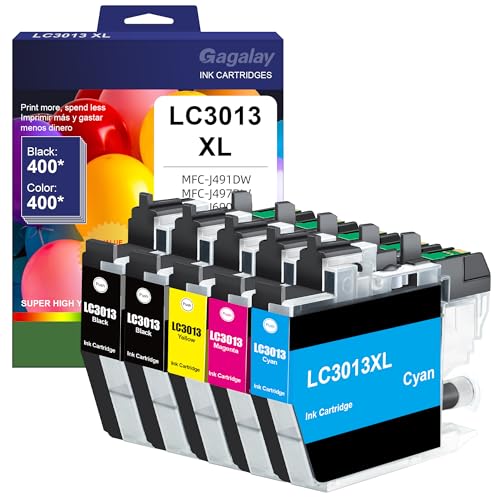
5. LC3013 High-Yield Replacement for Brother — Best for Brother MFC Users
Brother printer owners don't always get the widest selection when it comes to remanufactured alternatives, which makes this LC3013 5-pack a welcome find. The set includes 2 black cartridges, 1 cyan, 1 magenta, and 1 yellow — a thoughtful ratio that accounts for how much faster black ink typically depletes compared to color. It's compatible with the Brother MFC-J497DW, MFC-J491DW, MFC-J895DW, and MFC-J690DW, which are among the most popular Brother inkjet models for home and small office use.
Page yield comes in at up to 400 pages per cartridge at 5% coverage, which is competitive for the LC3013 series. The LC3013 and LC3011 formats are common enough that Brother users will recognize these as the standard cartridge size for this printer generation. The 5-pack format gives you a healthy supply without going overboard on storage, and the 2:1:1:1 black-to-color ratio means you're less likely to end up with leftover color cartridges when the blacks run out.
Print quality on these is solid for everyday use — sharp text on documents, reasonable color accuracy for graphics. Brother printers tend to be forgiving with third-party cartridges compared to HP or Epson, which makes the LC3013 replacement market more reliable overall. If you're a Brother MFC user who's been paying full price for ink, making the switch here is a low-risk, high-reward move. It's worth pairing this with a look at our guide to the best pigment ink printers if longevity and archival quality matter to your printing needs.
Pros:
- Smart 2:1:1:1 black-to-color ratio for real-world printing patterns
- Brother printers generally have fewer compatibility issues with third-party ink
- 400-page yield per cartridge is competitive for this cartridge series
Cons:
- Compatible with a narrower range of Brother models than some alternatives
- Fewer reviews available compared to HP-compatible options in this price range
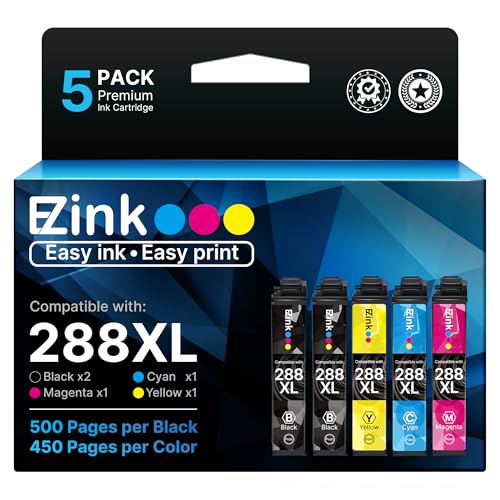
6. E-Z Ink Remanufactured Epson 288XL 5-Pack — Best for Epson Expression Home
Epson's Expression Home XP-series printers are popular, compact all-in-ones that tend to eat through ink at a reasonable rate. The 288XL cartridge can be frustratingly pricy at OEM rates given the relatively modest page yields. E-Z Ink's 5-pack — 2 black, 1 cyan, 1 magenta, 1 yellow, all 288XL high-yield — gives you a meaningful supply at a much more manageable cost per page. The set covers the XP-330, XP-340, XP-430, XP-434, XP-440, and XP-446.
The upgraded chip design is the headline feature here. E-Z Ink has updated these with "latest upgraded chips," which in practical terms means they're more likely to be recognized by your Epson printer's current firmware without generating false empty-ink warnings. This matters more than it might sound — bad chip compatibility is the number one reason third-party Epson cartridges fail out of the gate, and E-Z Ink has put real effort into staying current. The high-yield format also means you're getting more ink per cartridge than the standard 288 size, which improves your cost-per-page math considerably.
Color accuracy on the XP-series is one of Epson's strengths, and these E-Z Ink cartridges do a solid job of preserving that. Skin tones in printed photos look natural, and document graphics maintain clean, readable contrast. For a compact home printer that doubles as a photo printer for occasional use, this 5-pack is a well-rounded solution. Just keep them stored at room temperature and use within a year for best results.
Pros:
- Latest chip upgrade improves firmware compatibility with current Epson models
- High-yield format delivers more ink per cartridge than standard 288
- Good color accuracy for occasional photo printing on XP-series printers
Cons:
- Only compatible with select XP-series models — verify yours before buying
- Epson's firmware updates can still cause occasional chip recognition delays
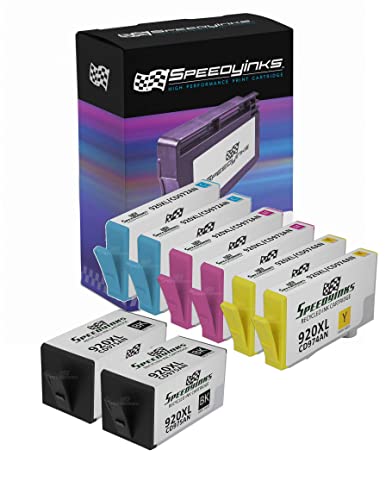
7. SPEEDYINKS Remanufactured HP 920XL 8-Pack — Best Budget Bulk Buy
If you're running an HP OfficeJet 6000, 6500, 6500A, 7000, or 7500A and you print a lot, the SPEEDYINKS 8-pack is built for volume. You get 2 black, 2 cyan, 2 magenta, and 2 yellow 920XL cartridges — enough to last a moderate-volume home office for several months. The black cartridges deliver 1,200 pages per cartridge, and color cartridges deliver 700 pages each at 5% coverage, both measured per ISO/IEC 24711 standards. That's a legitimate high-yield offering.
SPEEDYINKS recommends storing cartridges in a cool, dry place and using within 18 months of purchase — that extended shelf life window is actually longer than many competitors' guidance, which makes the bulk format more practical. The HP 920 series is an older cartridge type, meaning the printer models it supports are a generation or two back, but there are still a lot of those OfficeJet workhorses out there running strong. If yours is one of them, you already know how expensive keeping it fed can be.
Print performance is solid for the price. Text documents look professional and sharp, and color output is accurate enough for reports and everyday office printing. This isn't the cartridge you'd reach for if you were printing fine-art reproductions, but for the practical demands of a home office printer, it delivers. The 8-pack format also means you're making fewer reorder decisions over the course of a year, which is its own kind of value. For anyone looking at the bigger picture of printer running costs, it's also worth checking out our guide to the best printers for business cards — sometimes the printer choice affects your ink costs as much as the cartridge brand.
Pros:
- 1,200-page black yield is among the highest in this roundup
- 8-cartridge set means minimal reordering for moderate-volume printing
- 18-month shelf life makes bulk buying genuinely practical
Cons:
- HP 920 is an older cartridge series — only compatible with legacy OfficeJet models
- Color yield of 700 pages is lower than black yield — color-heavy users may run out faster
Buying Guide: How to Choose the Best Remanufactured Ink Cartridges
Check Compatibility Before Anything Else
This seems obvious, but it's the step most people skip — and it's the number one reason for returns. Your printer model number matters down to the last digit. The HP DeskJet 3752 uses the 65XL; the HP OfficeJet 3830 uses the 63XL. These are not interchangeable. Before you buy, write down your exact printer model (usually on a sticker on the bottom or back of the machine) and cross-reference it against the compatibility list in the product listing. Every product in this roundup includes a detailed compatibility list — trust those lists and don't assume close is close enough.
Understand Page Yield Numbers
Page yield (how many pages a cartridge prints before running out) is always measured at 5% coverage per ISO/IEC standards. That means a single page with about a paragraph of text and no images. Real-world printing — especially pages with photos, graphics, or heavy formatting — will consume ink faster and result in fewer total pages. When comparing cartridges, look at the page yield as a relative comparison tool rather than an absolute promise. High-yield (XL) versions almost always offer a better cost-per-page than standard versions, even if the sticker price is higher.
Chip Compatibility and Firmware Updates
Printer manufacturers — especially HP and Epson — periodically release firmware updates that can block third-party cartridges from being recognized. This is an ongoing industry battle, and it's the biggest risk factor with remanufactured ink in 2026. The brands in this roundup (LD Products, E-Z Ink, Toner Kingdom, SPEEDYINKS) all invest in chip compatibility updates, but no third-party cartridge maker can guarantee 100% protection against every future firmware push. If you're in a business environment where a blocked cartridge would be a real problem, check that the seller offers a warranty or replacement policy for firmware-blocked units before you commit.
Buy from Brands with Return Policies
Reputable remanufactured cartridge sellers offer satisfaction guarantees or defect replacements. If a cartridge arrives dried out, leaking, or incompatible despite being on the compatibility list, you should be able to get a replacement without a fight. The brands listed here have established presences on Amazon with enough reviews to verify their customer service track records. Avoid unnamed generic brands with no reviews and no clear return policy — the savings aren't worth the gamble when your printer is sitting idle waiting for a replacement.
FAQs
Are remanufactured ink cartridges as good as OEM cartridges?
For everyday document printing and general home use, high-quality remanufactured cartridges from brands like LD Products and E-Z Ink perform comparably to OEM cartridges. The main differences show up in professional photo printing, where OEM inks typically have a slight edge in color accuracy and longevity. For most people printing text documents, school projects, and occasional graphics, a reputable remanufactured cartridge is genuinely hard to tell apart from the OEM version.
Will remanufactured cartridges void my printer warranty?
In most cases, no. In the United States, the Magnuson-Moss Warranty Act generally prevents manufacturers from voiding your printer warranty simply because you used a third-party ink cartridge. However, if a third-party cartridge causes physical damage to your printer — which is rare with quality remanufactured options — that damage might not be covered. As a practical matter, the risk is low with reputable brands, but it's worth knowing the distinction.
Why does my printer say the cartridge is low or empty when it's new?
This is almost always a chip compatibility issue. The microchip on a remanufactured cartridge communicates with your printer to report ink levels, and an outdated or mismatched chip can trigger false "low ink" or "empty" warnings immediately after installation. Some users dismiss these warnings and print normally; others find the cartridge performs fine despite the warning. If your printer refuses to print at all, check if a firmware update is available and whether the cartridge brand offers a chip update or replacement.
How should I store remanufactured ink cartridges?
Store unused cartridges in a cool, dry location away from direct sunlight. Room temperature (around 65–75°F) is ideal. Extreme heat can cause ink to expand and leak; extreme cold can affect ink viscosity and chip performance. Most brands recommend using cartridges within 1–18 months of purchase depending on the brand — check the specific guidance on your cartridge packaging. Keeping cartridges in their original sealed packaging until you're ready to install them extends their shelf life considerably.
Can I use remanufactured cartridges if my printer is still under manufacturer warranty?
Yes, in most circumstances. As mentioned above, the Magnuson-Moss Warranty Act in the US protects consumers' right to use third-party supplies without automatically voiding warranties. The printer manufacturer still needs to cover defects in the printer itself. However, if you're particularly concerned about your warranty, check the specific terms of your printer's warranty documentation and consider contacting the manufacturer for clarification before switching to third-party cartridges.
What's the difference between remanufactured and refilled ink cartridges?
Remanufactured cartridges are original OEM shells that have been professionally disassembled, cleaned, inspected, refilled with ink, fitted with updated chips, and tested before resale. Refilled cartridges (sometimes offered at local print shops or via DIY kits) are simply original cartridges with fresh ink injected — often without the cleaning, inspection, or chip update steps. Remanufactured cartridges from established brands are generally more reliable than simple refills because the full reconditioning process addresses the internal components that degrade with use, not just the ink level.
Buy on Walmart
- LD Products Remanufactured Ink Cartridge Replacements for 65 — Walmart Link
- LD Products Remanufactured Replacement for Epson 220XL Ink C — Walmart Link
- 63XL Ink Cartridges Black and Color Remanufactured Replaceme — Walmart Link
- Toner Kingdom Ink Cartridges Remanufactured for HP 952 XL In — Walmart Link
- LC3013 Ink Cartridges BK/C/M/Y High Yield Replacement for Br — Walmart Link
- E-Z Ink Remanufactured Ink Cartridge Replacement for Epson 2 — Walmart Link
- SPEEDYINKS Remanufactured Ink Cartridge Replacement for HP 9 — Walmart Link
Buy on eBay
- LD Products Remanufactured Ink Cartridge Replacements for 65 — eBay Link
- LD Products Remanufactured Replacement for Epson 220XL Ink C — eBay Link
- 63XL Ink Cartridges Black and Color Remanufactured Replaceme — eBay Link
- Toner Kingdom Ink Cartridges Remanufactured for HP 952 XL In — eBay Link
- LC3013 Ink Cartridges BK/C/M/Y High Yield Replacement for Br — eBay Link
- E-Z Ink Remanufactured Ink Cartridge Replacement for Epson 2 — eBay Link
- SPEEDYINKS Remanufactured Ink Cartridge Replacement for HP 9 — eBay Link
Next Steps
- Find your exact printer model number (usually on the bottom or back of the machine) and verify it against the compatibility list for your chosen cartridge before adding it to your cart.
- Check the current price on Amazon for your top pick — remanufactured cartridge prices fluctuate, and multipacks often go on sale without notice.
- Review the seller's return and replacement policy before purchasing, particularly if this is your first time buying remanufactured ink for your printer model.
- Compare the cost-per-page of your chosen remanufactured option against the OEM price to understand exactly how much you're saving over a full year of printing at your typical volume.
- Bookmark this page and check back — we update this roundup regularly as new 2026 options enter the market and chip compatibility changes with printer firmware updates.



About Remington May
Remington May is a technology writer and digital product reviewer with a focus on consumer electronics, software, and the everyday tech that shapes how people work and live. She has spent years evaluating smartphones, laptops, smart home devices, and digital tools — approaching each product from the perspective of a practical user rather than a spec-sheet enthusiast. At Pinwords, she covers tech buying guides, product reviews, smartphone and laptop comparisons, and practical how-to guides for getting more out of your devices.
Check for FREE Gifts. Or latest free books from our best messages.
Remove Ad block to reveal all the secrets. Once done, hit a button below