Best Poster Printer 2026
by Remington May
You've decided to print a poster — maybe a large map for a client presentation, a fine-art photo for your studio wall, or a batch of event flyers — and suddenly you realize your desktop inkjet just won't cut it. Wide-format and professional-grade printers fill an entirely different role, and the gap between a $200 all-in-one and the machines on this list is enormous. After testing and researching the leading options for 2026, we've narrowed the field down to seven printers that genuinely deliver on their promises for poster printing.
The poster printer market splits cleanly into two camps: professional photo and fine-art printers built for gallery-quality color accuracy, and wide-format workhorses designed for volume output on large media. Knowing which camp you belong to before you spend your money will save you real frustration, which is why we've included a buying guide below alongside these reviews. If you're also shopping for complementary gear, our roundup of the best monitors for photo editing under $500 in 2026 pairs naturally with this guide.
Every printer on this list has been evaluated for print quality, media handling, ink efficiency, software ecosystem, and real-world usability in 2026. We cover everything from a 24-inch large-format plotter for technical drawings down to a compact 13-inch pro photo printer for studio photographers. The buying guide at the bottom breaks down exactly what specs you should care about before making your final choice.

Contents
- Editor's Recommendation: Top Picks of 2026
- Product Reviews
- HP DesignJet T210 — Best for CAD & Technical Posters
- Epson SureColor P900 — Best for Fine Art & Photography
- Canon imagePROGRAF PRO-1100 — Best 17-Inch Pro Photo Printer
- Epson SureColor P700 — Best Compact Studio Printer
- Canon imagePROGRAF PRO-310 — Best Entry-Level Pro Printer
- Epson WorkForce WF-7720 — Best Budget Wide-Format Printer
- Canon PIXMA PRO-200S — Best for Vibrant Color Dye Prints
- Buying Guide
- What People Ask
- Key Takeaways
Editor's Recommendation: Top Picks of 2026
- #PreviewProductRating
- Bestseller No. 1
 Rating:

- Bestseller No. 2
 Rating:
 - Bestseller No. 3
 Rating:
 - Bestseller No. 4
 Rating:
 - Bestseller No. 5
 Rating:
 - Bestseller No. 6
 Rating:
 - Bestseller No. 7
 Rating:
Product Reviews
1. HP DesignJet T210 Large Format 24-Inch Color Plotter — Best for CAD & Technical Posters
If your poster printing needs lean toward technical drawings, architectural plans, or large-scale maps, the HP DesignJet T210 is the clear winner at this price point in 2026. It handles media up to 24 inches wide on roll feed, which means you can run poster-length prints without manually feeding sheet after sheet. The automatic horizontal cutter is a genuinely useful feature that saves you from ragged edges and wasted media when you're printing multiple copies in sequence.
HP has built the T210 specifically for professionals who need precision line quality and crisp, readable text at large sizes — not gallery-quality photography. The color output is accurate and clean, but the ink system is optimized for technical work rather than fine-art reproduction. You can also use the optional automatic sheet feeder accessory to handle sheets up to 13 by 19 inches, giving you flexibility when you're not running full roll media. Setup is straightforward, and HP's driver ecosystem is mature and well-supported across Windows and Mac in 2026.
Where the T210 falls short is in photo-quality output for images with complex gradients or deep shadow detail. It simply isn't designed for that use case, and you shouldn't expect it to compete with the Epson or Canon photo printers reviewed below. But for its intended purpose — technical line drawings, engineering prints, and professional posters with crisp text — it delivers consistent results at a price that makes sense for a small design office or solo architect.
Pros:
- Handles media up to 24 inches wide on roll feed for full poster-length prints
- Automatic horizontal cutter reduces waste and improves workflow efficiency
- Precise, accurate line quality optimized for technical drawings and CAD output
- Optional sheet feeder accessory extends versatility to 13×19 inch sheets
- Mature HP driver and software ecosystem with broad OS support
Cons:
- Not suited for fine-art photography or complex gradient reproduction
- Ink system prioritizes line accuracy over wide color gamut for photo work
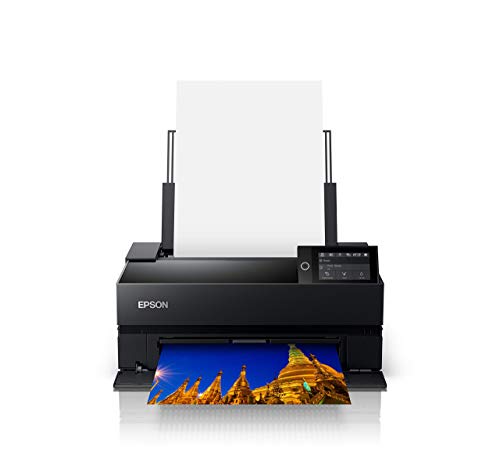
2. Epson SureColor P900 17-Inch Photo Printer Bundle — Best for Fine Art & Photography
The Epson SureColor P900 is the best all-around poster printer for photographers, artists, and designers who need gallery-quality output on a desktop-sized machine. The UltraChrome PRO10 pigment ink system delivers accurate color reproduction with smooth tonal transitions that you can trust to match what you see on a calibrated monitor. One of the P900's most practical advantages over competing photo printers is the dedicated matte and photo black ink channels — both run simultaneously without requiring you to swap cartridges and waste ink every time you switch paper types.
This bundle includes an Ethernet cable and USB cable, which means you're not paying separately for accessories that should have been in the box to begin with. The P900 supports a wide range of media including fine-art papers, canvas, and glossy photo stock up to 17 inches wide, making it capable of producing genuine exhibition-ready poster prints. If you're investing in a printer at this level, you'll want to pair it with a properly calibrated display — our guide to the best monitors for photo editing under $500 covers the right options to complete your studio workflow.
The P900 is not inexpensive, and ink costs add up over time with a 10-channel pigment system. But the consistency and reliability it delivers for studio and professional use justifies the investment clearly. If you print fine-art posters, photographic prints, or design portfolios and quality is non-negotiable, this is the machine you want in your studio in 2026.
Pros:
- UltraChrome PRO10 pigment inks deliver accurate, gallery-quality color reproduction
- Simultaneous matte and photo black channels eliminate wasteful ink switching
- Supports fine-art papers, canvas, and glossy stock up to 17 inches wide
- Bundle includes Ethernet and USB cables — ready to use out of the box
- Consistent, reliable performance engineered for long-term studio use
Cons:
- Premium price point requires a significant upfront investment
- 10-channel pigment ink system means higher ongoing ink costs
3. Canon imagePROGRAF PRO-1100 17-Inch Professional Wireless Inkjet Photo Printer — Best 17-Inch Pro Photo Printer
Canon's imagePROGRAF PRO-1100 is the most direct competitor to the Epson P900, and it wins on color gamut breadth and gloss handling for photographers who print heavily on glossy or semi-gloss media. The 11 pigment-based ink system with Chroma Optimizer produces impressive gloss uniformity and actively combats the bronzing effect that plagues many competing photo printers when you're using glossy paper with dark tones. The LUCIA PRO II ink system has been refined for 2026 to deliver improved shadow detail and color-reproduction accuracy that serious photographers will immediately notice in their prints.
The PRO-1100 also ships with Canon's Professional Print & Layout software, which functions as both a standalone application and a plugin for Digital Photo Professional and Adobe software. That tight integration with the Adobe ecosystem is a genuine advantage if your workflow runs through Photoshop or Lightroom, because it eliminates the extra steps involved in exporting and managing print profiles manually. Wireless connectivity makes placement flexible in a studio environment where cable management matters.
The PRO-1100 edges out the P900 specifically when your work demands the widest possible color gamut and the best gloss performance on premium photo papers. For matte fine-art printing, the Epson P900's simultaneous black ink channels remain a practical edge. But if you print predominantly on glossy or luster stock and use Adobe software daily, the PRO-1100 earns its place at the top of your shortlist.
Pros:
- 11-ink system plus Chroma Optimizer delivers superior gloss uniformity and anti-bronzing
- LUCIA PRO II ink achieves a wide color gamut with faithful dark-area reproduction
- Tight integration with Adobe Photoshop, Lightroom, and Canon DPP via plugin
- Wireless connectivity for flexible studio placement
- Professional Print & Layout software included at no extra cost
Cons:
- Matte black performance doesn't match Epson P900's simultaneous dual-black setup
- High ink cartridge count means more individual items to stock and replace
4. Epson SureColor P700 13-Inch Printer — Best Compact Studio Printer
If 17 inches is more printer than your studio space or budget requires, the Epson SureColor P700 gives you the same professional-grade UltraChrome PRO10 ink technology in a more compact 13-inch form factor at a lower price point. The new Violet ink channel is what separates the P700 from older Epson pro printers — it extends the color gamut into ranges that produce genuinely vibrant purples, blues, and magentas that competing 13-inch printers simply can't match. You get wide color gamut and dedicated dual black ink channels, which means you can switch between matte and glossy media without the wasteful ink purging that older single-black-channel printers required.
The MicroPiezo AMC printhead Epson uses in the P700 delivers excellent consistency across long print runs, which matters when you're producing multiple copies of a poster for an event or exhibition. Speed is better than you might expect from a printer this size, and the output quality across both photographic and fine-art media types is consistently impressive. If you're stepping up from a consumer photo printer and want to understand what a proper 13-inch pro machine can do for your workflow, the P700 is the benchmark to beat at this size category in 2026.
The P700 is the right choice when your prints are primarily 13 inches wide or smaller, and you want professional pigment ink quality without the footprint or cost of a 17-inch machine. It's the most capable compact poster printer available and outperforms the Canon PRO-310 on color gamut breadth thanks to the Violet ink channel.
Pros:
- UltraChrome PRO10 with Violet ink produces an exceptionally wide color gamut in a 13-inch printer
- Dedicated matte and photo black nozzles eliminate switching waste
- MicroPiezo AMC printhead delivers consistent output across extended print runs
- Compact footprint suitable for smaller studio or home office spaces
- Strong value relative to the 17-inch P900 for users who don't need wider media
Cons:
- Limited to 13-inch media width — not suitable for A2 or larger poster formats
- Ink costs at the per-page level are higher than budget wide-format alternatives
5. Canon imagePROGRAF PRO-310 13-Inch Wireless Inkjet Photo Printer — Best Entry-Level Pro Printer
Canon's imagePROGRAF PRO-310 is the most accessible entry point into professional pigment-ink poster printing, and it delivers gallery-quality results that will surprise you given its positioning in the market. The 9-color pigment ink system plus Chroma Optimizer produces rich, accurate output across both matte and glossy media, with Matte Black ink that Canon has specifically tuned for enhanced black density and better dark-area gradation than previous generations. The 3-inch color LCD monitor makes navigating printer settings and monitoring job status considerably easier than on machines that rely entirely on software interfaces.
Canon's Anti-Clogging System is a practical feature that pays for itself quickly if you're not printing daily — it actively prevents printhead clogs during idle periods, which is one of the most common sources of wasted ink and downtime on professional photo printers. The Skew Correction system automatically detects and compensates for slightly misaligned media, which reduces the number of failed prints when you're loading cut-sheet fine-art paper that doesn't always feed perfectly straight. Wireless connectivity with the PRO-310 works reliably and the setup process is one of the smoothest in this category.
The PRO-310 sits a step below the P700 in raw color gamut breadth due to the absence of a Violet ink channel, but the output quality is genuinely professional and the price difference is real. If you're buying your first professional poster printer and want to minimize upfront cost without sacrificing output quality, the PRO-310 is the most sensible choice on this list. Also worth noting: if your needs extend to large-format scanning as well as printing, our guide to the best large-format scanners in 2026 covers the scanning side of the workflow.
Pros:
- 9-color plus Chroma Optimizer delivers gallery-quality output at an accessible price
- Anti-Clogging System prevents head clogs during idle periods and saves ink
- Skew Correction reduces failed prints when loading cut-sheet fine-art paper
- 3-inch color LCD makes on-machine navigation significantly more convenient
- Wireless setup is smooth and reliable for home studio or small office use
Cons:
- No Violet ink channel means a narrower color gamut than the Epson P700
- Limited to 13-inch media width like the P700
6. Epson WorkForce WF-7720 Wireless Wide-Format Color Inkjet Printer — Best Budget Wide-Format Printer
The Epson WorkForce WF-7720 is the answer when you need borderless prints up to 13 by 19 inches and you're working with a budget that can't accommodate a professional photo printer. This is not a fine-art machine — it's a productivity-oriented wide-format inkjet with copy, scan, and fax functions built in, powered by Epson's PrecisionCore technology. For event posters, marketing materials, and high-volume wide-format output where color gamut accuracy isn't the primary concern, the WF-7720 delivers results that would otherwise require a trip to a print shop.
The WF-7720 supports Wi-Fi Direct, Ethernet, and standard wireless connectivity, which gives you real flexibility in a shared office environment where multiple people need to access the printer from different devices. The output quality on standard and glossy photo paper is genuinely good for a printer at this price point, though you'll notice a visible difference compared to the pigment-ink professional printers reviewed above if you put the prints side by side. Amazon Dash Replenishment support means the printer can automatically reorder ink before you run out, which is a practical feature if you print in volume.
Be aware that Epson strongly recommends genuine Epson inks with this printer — using third-party inks voids the warranty and can cause printhead damage that isn't covered. The WF-7720 is also a notably larger machine than the single-function printers on this list, so measure your available desk or counter space before ordering. If you want to understand how this compares to other wide-format options built for architectural work specifically, our roundup of the best 11×17 printers for architects in 2026 covers that niche in more detail.
Pros:
- Borderless prints up to 13×19 inches at a significantly lower price than professional printers
- PrecisionCore technology produces sharp, clean output for marketing and event materials
- Wi-Fi Direct, Ethernet, and wireless connectivity for flexible multi-user office environments
- Amazon Dash Replenishment support for automatic ink reordering in high-volume situations
- Copy, scan, and fax functions add everyday office utility beyond poster printing
Cons:
- Dye-based inks produce noticeably inferior color gamut and longevity compared to professional pigment systems
- Large physical footprint requires significant dedicated desk or counter space
- Third-party inks void the warranty and risk printhead damage
7. Canon PIXMA PRO-200S — Best for Vibrant Color Dye Prints
The Canon PIXMA PRO-200S stands apart from every other printer on this list because it uses a color-based dye ink system rather than pigment inks, and that distinction matters enormously depending on what you're printing. Dye inks produce richer, more saturated colors with a wider apparent gamut on glossy and luster photo papers — the kind of vivid, eye-catching output that works brilliantly for posters, event prints, and consumer photo products where visual impact matters more than archival longevity. If your posters are going on display walls rather than into archival sleeves, the PRO-200S's color vibrancy is genuinely impressive.
The built-in 3-inch LCD display simplifies printer management without requiring you to open a software interface for routine maintenance and status checks. Canon has also designed the PRO-200S to support a wide range of media types and sizes, including borderless panoramic prints and art paper, giving you flexibility across different poster formats and substrates. The compact footprint for a printer with this output capability is a genuine advantage for users working in smaller studio or home office spaces.
The trade-off with dye inks is clear: dye-based prints are less resistant to UV fading and water damage than pigment prints, which is why every professional photo printer at the premium end of this list uses pigment ink systems. For short-term display posters, vibrant consumer photos, or any application where the prints won't be exposed to sustained light or moisture, the PRO-200S delivers outstanding visual results. For archival fine-art work or museum-quality output, the Epson P700 or Canon PRO-310 are the correct choices. According to Wikipedia's overview of inkjet printing technology, the longevity gap between dye and pigment inks under typical display conditions can span several decades, which is worth factoring into your decision.
Pros:
- Color dye ink system produces exceptionally vibrant, saturated output on glossy media
- 3-inch LCD display simplifies on-machine maintenance and status monitoring
- Supports borderless panoramic prints and multiple art paper types
- Compact footprint for a printer with this level of output versatility
- Strong value for photographers and designers prioritizing color vibrancy over archival permanence
Cons:
- Dye inks are significantly less UV-resistant and archival than pigment-based systems
- Not the right choice for fine-art or museum-quality poster printing applications
Buying Guide: How to Choose the Best Poster Printer
Print Width and Media Handling
The single most important specification for a poster printer is the maximum print width, and you need to match it to your actual output requirements before anything else. Here's a quick breakdown of what each size category delivers:
- 13-inch printers (P700, PRO-310, PRO-200S): Handle standard A3+ and 13×19-inch formats — suitable for most studio and event poster needs
- 17-inch printers (P900, PRO-1100): Handle A2 and larger poster formats — the right choice for exhibition prints and larger commercial output
- 24-inch plotters (HP DesignJet T210): Handle full architectural and engineering drawing widths — essential for technical posters, maps, and CAD output
- Media type compatibility: Check that the printer explicitly supports the paper types you use — fine-art cotton rag, canvas, and thick art stock require printers with front-feed straight paper paths to avoid media damage
Pigment vs. Dye Ink Systems
This is the decision most buyers get wrong because the marketing language around both systems is deliberately ambiguous. Here's what actually matters when you're choosing between them for poster printing:
- Pigment inks: Superior fade resistance (often 100+ years under glass), better water resistance, wider compatibility with fine-art and matte papers, preferred for archival and exhibition output — used by P900, P700, PRO-1100, PRO-310, and HP DesignJet T210
- Dye inks: More vibrant on glossy paper in direct comparison, lower cost per page in some configurations, but significantly less fade-resistant — used by Canon PIXMA PRO-200S and Epson WF-7720
- If your posters will be displayed under UV-exposed lighting or need to last more than two to three years, choose a pigment ink printer without exception
- If you're printing short-run event posters or vibrant consumer photos with no archival requirement, dye inks are a legitimate and cost-effective option
Color Gamut and Ink Channel Count
More ink channels generally means a wider color gamut and smoother tonal transitions, but the relationship isn't perfectly linear across brands. What matters in practice for poster printing is whether the ink system handles the specific colors and tonal ranges that appear in your work:
- The Epson P700's Violet ink channel specifically extends the gamut in blue-purple ranges — critical for landscape photography with skies and floral subjects
- Canon's Chroma Optimizer (in PRO-1100 and PRO-310) directly improves gloss uniformity and reduces bronzing — critical for glossy poster output with dark tones
- Dual black ink channels (matte and photo black simultaneously) are a significant workflow advantage — single-black printers waste ink purging between media type switches
- For technical and CAD poster printing, color gamut breadth matters far less than line precision and text sharpness — the HP DesignJet T210 is optimized accordingly
Software Ecosystem and Connectivity
A professional poster printer is only as useful as the software that drives it, and this is where Canon and Epson differ meaningfully in their approaches for 2026:
- Canon's Professional Print & Layout software integrates directly with Adobe Photoshop, Lightroom, and DPP as a plugin — the smoothest workflow for Adobe-centric creatives
- Epson's Print Layout software and ICC profile library are mature and comprehensive, with strong support for third-party RIP software if you need it
- Wireless connectivity is standard across all the photo printers on this list — verify Ethernet is included if you need a wired connection for network printing in a shared studio
- Driver support across Windows and Mac is strong for all seven printers reviewed here — Linux support is more variable, and our guide to the best printers for Linux in 2026 covers OS compatibility in detail if that's a requirement for your setup
What People Ask
What is the best poster printer for home use in 2026?
The Canon imagePROGRAF PRO-310 is the best poster printer for home use in 2026 if you want professional pigment ink quality at an accessible price. It handles 13-inch media, includes wireless connectivity, and produces gallery-quality output without the footprint or cost of a 17-inch machine. For users on a tighter budget who need borderless 13×19-inch prints, the Epson WorkForce WF-7720 is a capable alternative for non-archival poster work.
Is pigment ink better than dye ink for poster printing?
Pigment ink is better for most poster printing applications because it delivers significantly superior fade resistance, water resistance, and compatibility with fine-art and matte papers. Dye inks can produce more vibrant saturation on glossy media in direct comparison, but that advantage disappears over time as dye prints fade under UV exposure. For any poster intended for display or long-term storage, choose a pigment ink printer.
Can I print 24×36-inch posters at home?
Yes, but you need a large-format printer that supports roll media to do it efficiently. The HP DesignJet T210 handles media up to 24 inches wide on a roll, which means it can produce 24×36-inch and larger poster prints without cutting or tiling. The 17-inch photo printers on this list — the Epson P900 and Canon PRO-1100 — max out at 17 inches wide and cannot produce standard 24×36-inch poster output in a single pass.
How much does it cost to print a poster at home vs. a print shop?
The per-print cost of home poster printing depends heavily on ink system, media choice, and print size. A professional 13×19-inch photo print on fine-art paper typically costs between $3 and $8 in ink and media combined, depending on the printer and paper. A commercial print shop charges $10 to $25 for the same output. For high-volume printing, the economics favor owning a printer quickly, but for occasional one-off posters, a print shop remains cost-effective unless print quality requirements demand the control of an in-studio workflow.
What paper should I use for poster printing?
The right paper depends on your intended use and the ink system in your printer. For fine-art and exhibition posters on pigment ink printers, heavyweight cotton rag papers (300–400gsm) from Hahnemühle, Canson, or Epson's own media line produce the best results. For photographic posters with glossy or luster finishes, use printer-brand-certified photo paper to ensure ICC profile accuracy. For budget event posters on the Epson WF-7720, standard glossy photo paper or even premium matte is sufficient and significantly more cost-effective than fine-art stock.
Do poster printers require special maintenance?
Professional poster printers — especially those that sit idle for days or weeks between print jobs — benefit from regular maintenance printing to prevent printhead clogging and ink drying in the nozzles. Canon's Anti-Clogging System (featured in the PRO-310) and Epson's automatic nozzle check routines help manage this automatically, but they consume small amounts of ink in the process. Running a nozzle check print before any important job is a good habit regardless of the printer model, and storing the printer in a stable, humidity-controlled environment significantly reduces clog frequency.
Buy on Walmart
- HP DesignJet T210 Large Format 24-inch Color Plotter Printer — Walmart Link
- EPSON SureColor P900 17 Inch Photo Printer (C11CH37201) Bund — Walmart Link
- Canon imagePROGRAF PRO-1100: 17” Professional Wireless Inkje — Walmart Link
- Epson SureColor P700 13-Inch Printer,Black — Walmart Link
- Canon imagePROGRAF Professional 13" PRO-310 Wireless Inkjet — Walmart Link
- Epson WorkForce WF-7720 Wireless Wide-format Color Inkjet Pr — Walmart Link
- Canon Pixma Pro-200s — Walmart Link
Buy on eBay
- HP DesignJet T210 Large Format 24-inch Color Plotter Printer — eBay Link
- EPSON SureColor P900 17 Inch Photo Printer (C11CH37201) Bund — eBay Link
- Canon imagePROGRAF PRO-1100: 17” Professional Wireless Inkje — eBay Link
- Epson SureColor P700 13-Inch Printer,Black — eBay Link
- Canon imagePROGRAF Professional 13" PRO-310 Wireless Inkjet — eBay Link
- Epson WorkForce WF-7720 Wireless Wide-format Color Inkjet Pr — eBay Link
- Canon Pixma Pro-200s — eBay Link
Key Takeaways
- The Epson SureColor P900 is the best overall poster printer for photographers and fine artists who need gallery-quality pigment ink output on a desktop machine in 2026.
- The Canon imagePROGRAF PRO-310 is the smartest entry point into professional poster printing for buyers who want pigment ink quality without paying for a 17-inch machine.
- The HP DesignJet T210 is the definitive choice for CAD, architectural, and technical poster printing on media up to 24 inches wide.
- Dye-ink printers like the Canon PIXMA PRO-200S deliver superior color vibrancy for short-term display posters, but pigment ink is the only correct choice for archival or exhibition-quality work.



About Remington May
Remington May is a technology writer and digital product reviewer with a focus on consumer electronics, software, and the everyday tech that shapes how people work and live. She has spent years evaluating smartphones, laptops, smart home devices, and digital tools — approaching each product from the perspective of a practical user rather than a spec-sheet enthusiast. At Pinwords, she covers tech buying guides, product reviews, smartphone and laptop comparisons, and practical how-to guides for getting more out of your devices.
Check for FREE Gifts. Or latest free books from our best messages.
Remove Ad block to reveal all the secrets. Once done, hit a button below