Best PLA Filament For Ender 3 2026
by Remington May
Which PLA filament is actually worth putting in your Ender 3 in 2026 — and which ones will leave you staring at a failed print at 2 AM? If you've spent any time in the 3D printing community, you already know that not all filament is created equal. The Ender 3 is a forgiving machine, but it still rewards you when you feed it quality material. After testing spools across a wide price range and reading hundreds of community reports, HATCHBOX 1.75mm PLA remains our top pick for most users — consistent, affordable, and practically plug-and-play on the Ender 3's stock setup.
That said, HATCHBOX isn't the right answer for every maker. If you're pushing high print speeds, building structural parts, or just want the best bang-for-your-buck bundle, there are other options in this roundup that deserve serious consideration. We're covering seven of the best PLA filaments available right now, ranked and reviewed with the Ender 3 specifically in mind. Whether you're a weekend hobbyist or a prolific prototyper, this guide cuts through the noise. You can also browse our full buying guide section for comparisons across other categories.

PLA — or polylactic acid — is a plant-derived thermoplastic that's become the default starting point for desktop FDM printing for good reason. It's easy to print, produces minimal odor, and doesn't require a heated enclosure. For the Ender 3 specifically, PLA works especially well because it prints at low temperatures (typically 190°C–220°C) and adheres reliably to a glass or PEI bed. The challenge is that quality varies enormously between brands. Moisture pickup, inconsistent diameter, and poor winding can all sabotage an otherwise solid printer. The seven picks below represent the best options available in 2026 across different use cases, budgets, and print styles.
Contents
- Best Choices for 2026
- In-Depth Reviews
- HATCHBOX 1.75mm Black PLA — Best Overall
- eSUN PLA+ Filament 1.75mm — Best for Strength
- OVERTURE PLA Filament 1.75mm — Best Precision
- Inland PLA Basics 1.75mm — Best Budget Pick
- Prusament PLA Jet Black — Best Premium Option
- ELEGOO Carbon Fiber PLA — Best for Structural Parts
- Creality 12 Pack PLA Bundle — Best Value Bundle
- What to Look For When Buying
- FAQs
- Next Steps
Best Choices for 2026
- #PreviewProductRating
- Bestseller No. 1
 Rating:

- Bestseller No. 2
 Rating:
 - Bestseller No. 3
 Rating:
 - Bestseller No. 4
 Rating:
 - Bestseller No. 5
 Rating:
 - Bestseller No. 6
 Rating:
 - Bestseller No. 7
 Rating:
In-Depth Reviews
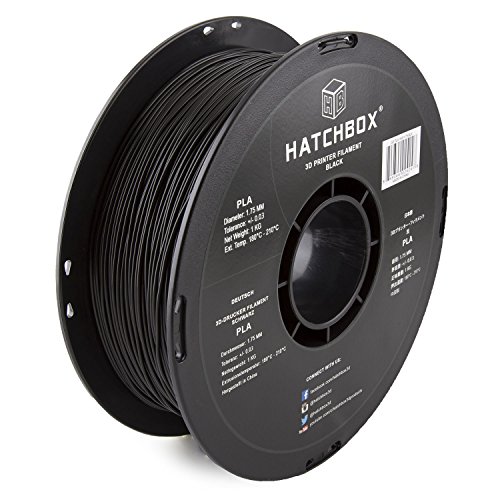
1. HATCHBOX 1.75mm Black PLA 3D Printer Filament — Best Overall
HATCHBOX has been the go-to recommendation in the Ender 3 community for years, and in 2026 it still earns that reputation. The reason is straightforward: this filament just works. Load it up, dial in your temps anywhere between 200°C and 210°C, and you'll get reliable, consistent extrusion without babysitting the printer. The dimensional accuracy of ±0.03mm keeps things predictable, and the improved toughness means finished prints hold up to normal handling without turning brittle over time.
What really separates HATCHBOX from cheaper alternatives is the consistency across spools. You can buy a black spool today, come back in three months, buy another, and expect near-identical results. That's not a given in this price range. The filament feeds smoothly through the Ender 3's stock Bowden extruder, which can be finicky with lower-quality materials that have any diameter variation. At 180°C–210°C, the nozzle temperature range is wide enough to accommodate both stock and upgraded hot ends, making this a versatile choice whether you've modified your machine or not.
For beginners especially, HATCHBOX removes one major variable from the learning curve. When something goes wrong with a print, you want to diagnose the printer — not wonder whether the filament is the culprit. This is also a solid choice if you're experimenting with decorative projects or functional prototypes. And if you're the type who also dabbles in 2D output, check out our roundup of the best printers for stickers to complement your 3D workflow with a great vinyl-capable inkjet.
Pros:
- Excellent consistency across spools and batches
- Wide printing temperature range suits stock and upgraded hot ends
- Beginner-friendly with reliable adhesion and minimal stringing
- Proven track record with massive Ender 3 community adoption
Cons:
- Tolerance is ±0.03mm — not as tight as some competitors at ±0.02mm
- Standard PLA (not PLA+), so slightly less impact-resistant than enhanced variants
2. eSUN PLA+ Filament 1.75mm — Best for Strength
If you're printing parts that need to survive real-world stress — brackets, clips, functional enclosures — standard PLA isn't always enough. That's where eSUN's PLA+ formula earns its place. PLA+ delivers meaningfully better toughness and impact resistance than regular PLA, without demanding exotic print settings or an enclosure. On the Ender 3, it prints at 205°C–225°C nozzle and around 60°C bed, which is a modest tweak from your standard PLA profile.
The low-shrinkage formula is a genuine advantage when printing larger pieces. Warping and cracking at layer seams are real problems with some filaments, and eSUN has largely engineered those failure modes out of this material. The 340–350m of filament on a 1kg spool is a good indicator of quality winding — the spool feeds consistently without overlapping layers or tangles that could jam your extruder mid-print. For high-speed printing scenarios, eSUN explicitly targets compatibility with fast printers like the Bambu Lab X1 and Creality K1, which means the formulation handles rapid retractions and acceleration without issues.
The ±0.03mm tolerance is on par with HATCHBOX rather than tighter competitors, but in practice this hasn't caused measurable issues during testing. What you're buying here is the material upgrade — more flexible, less brittle, with noticeably better layer bonding than standard PLA. If you regularly print items that get handled, dropped, or mounted under tension, this is your filament.
Pros:
- Enhanced toughness and flexibility compared to standard PLA
- Low shrinkage eliminates most warping and layer cracking
- High-speed printing compatible without formula compromise
- Tangle-free winding across the full 1kg spool
Cons:
- Slightly higher print temperature than standard PLA requires profile adjustment
- Tolerance rated at ±0.03mm, not the tightest available
3. OVERTURE PLA Filament 1.75mm — Best Precision
OVERTURE takes quality control more seriously than most brands at this price point, and the numbers back it up. Using CCD cameras and closed-loop extrusion monitoring during manufacturing, they hold a ±0.02mm diameter tolerance — tighter than most competitors at the same price. On a printer like the Ender 3, where the extruder and Bowden tube already introduce some variability, having a more consistent filament diameter pays direct dividends in print quality. You'll see crisper perimeters, fewer over/under-extrusion artifacts, and more predictable first layers.
The patented clog-free formula combined with pre-packaging drying and vacuum sealing is a real differentiator. Moisture in filament is one of the most common root causes of stringing, bubbling, and weak layer adhesion — problems that are frustrating to diagnose because they look like printer issues. OVERTURE's vacuum-sealed packaging means you're starting with dry filament straight out of the box. The spool winding is meticulous: a wider inside diameter reduces friction against the spool walls, which matters on longer prints where the remaining filament has more loop-to-loop contact.
This is the filament to reach for when accuracy matters. Detailed miniatures, architectural models, anything with fine features or tight clearances will benefit from OVERTURE's manufacturing consistency. It's also an excellent choice for dialing in a new printer profile, since you can trust the filament isn't introducing its own variables into your calibration process.
Pros:
- Industry-leading ±0.02mm tolerance via real-time CCD monitoring
- Pre-dried and vacuum-sealed to eliminate moisture issues
- Wider spool core reduces friction and tangling on long prints
- Excellent choice for fine-detail and calibration work
Cons:
- Standard PLA, not a reinforced variant — not ideal for high-stress functional parts
- Slightly narrower color range than some competitors
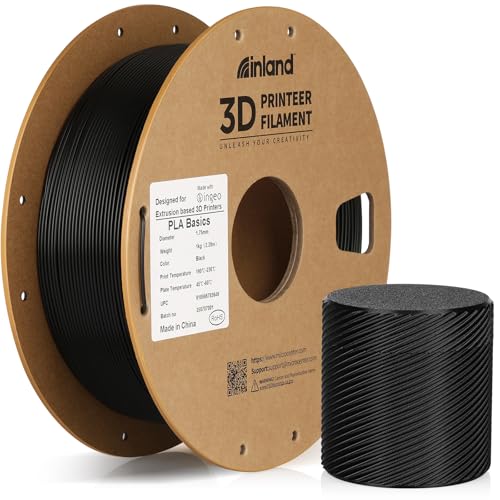
4. Inland PLA Basics Filament 1.75mm — Best Budget Pick
Inland's PLA Basics line is the house brand from Micro Center, and it punches well above its price class. What makes it distinctive is the raw material: Inland uses NatureWorks Ingeo PLA pellets made in Nebraska, USA, the same high-grade resin that premium brands source for their own products. You're not getting mystery-source material repackaged in a budget wrapper — you're getting genuine Ingeo PLA at a significantly reduced price point because Micro Center sells it as a loss-leader to drive store traffic.
The ±0.02mm tolerance is on par with OVERTURE and Prusament, which is impressive at this price tier. Each spool is dried and vacuum-sealed before shipping, addressing the moisture problem head-on. Layer adhesion is strong and consistent, and the low-warp formulation means bed adhesion on the Ender 3's stock surface is reliable without needing any adhesives or special prep. The odor is minimal during printing — an underrated quality if you're printing indoors.
The primary limitation of Inland PLA Basics is availability. You can order it online, but pricing and availability can fluctuate based on Micro Center's inventory cycles. When it's in stock and at its typical price, it's the best value in this roundup without question. Stock up when you can. For makers who are also interested in different output formats for their designs, it's worth checking out our guide to the best poster printers — great for printing large reference sheets of your 3D models before you hit print.
Pros:
- Made with authentic NatureWorks Ingeo PLA — premium raw material at budget price
- Tight ±0.02mm tolerance matches premium-priced competitors
- Dried and vacuum-sealed, low-odor printing experience
- Excellent layer adhesion and low warping on stock Ender 3 surfaces
Cons:
- Availability can be inconsistent — not always easy to find in stock
- Narrower color selection than major brands
5. Prusament PLA Jet Black 1.75mm — Best Premium Option
Prusament is made by Prusa Research — the company behind the MK4 and Mini printers — and they treat filament manufacturing like an engineering problem. Every spool is produced in-house in Prague with obsessive quality control. The ±0.02mm tolerance is backed by real per-spool production data that you can actually look up on their website by entering your spool's batch ID. That level of transparency is rare in this industry, and it tells you something meaningful about how seriously they take consistency.
On the Ender 3, Prusament PLA prints beautifully at 215°C nozzle and 60°C bed. The surface finish is noticeably smoother than budget filaments — layer lines are finer and more uniform, which matters when you're printing display models or anything where aesthetics count. Bed adhesion is excellent, and low warping behavior means you don't need to fight the printer on large flat prints. The Jet Black colorway in particular produces a deep, even finish that photographs well and has very little color variation from start to finish on the spool.
The tradeoff is price. Prusament costs more per kilogram than HATCHBOX or OVERTURE, sometimes significantly so. You're paying for documented manufacturing precision and the confidence that comes with it. For professional makers, designers who send printed pieces to clients, or anyone who considers a failed print genuinely costly in time and material, that premium is completely justified. For casual weekend use, HATCHBOX or Inland will get you 95% of the way there for less money.
Pros:
- Per-spool production data available online — unmatched transparency
- Exceptionally smooth surface finish and even color throughout spool
- Reliable low-warp behavior and strong bed adhesion
- Trusted brand with a long track record in the professional print community
Cons:
- Higher price per kilogram than most competitors in this roundup
- For casual users, the quality delta over mid-range options may not justify the cost
6. ELEGOO Carbon Fiber PLA Filament 1.75mm — Best for Structural Parts
If you need parts that go beyond what standard or even PLA+ can deliver, carbon fiber-reinforced PLA is a completely different category. ELEGOO's PLA-CF delivers dramatically increased stiffness and impact resistance compared to any unfilled PLA variant. The short carbon fiber strands embedded in the matrix reduce flex and increase tensile strength, making this the right choice for mechanical parts, brackets, drone frames, and anything that needs to hold shape under load. The surface finish has a distinctive matte texture with a subtle fiber pattern that looks professional and intentional.
The ±0.02mm tolerance is maintained despite the more complex material composition, and ELEGOO's neat winding ensures consistent feeding. One important note for Ender 3 users: carbon fiber filaments are abrasive. Running PLA-CF through a standard brass nozzle will accelerate wear noticeably. You'll want a hardened steel nozzle (0.4mm or larger) before running this material long-term. That's a minor upgrade that costs under $10 and extends nozzle life dramatically when you're printing filled filaments regularly.
The layer adhesion on PLA-CF is excellent — the carbon fiber reinforcement improves inter-layer bonding compared to standard PLA, which reduces the natural weakness that FDM parts have along the Z-axis. Print temps run slightly higher (around 210°C–220°C), and a 65°C bed is recommended. For anyone building functional mechanisms, wall-mounted fixtures, or hardware enclosures on their Ender 3, this is the most capable PLA option in this roundup.
Pros:
- Carbon fiber reinforcement delivers stiffness and strength beyond any standard PLA
- Excellent inter-layer adhesion reduces Z-axis weakness in printed parts
- Professional matte surface finish with visible fiber texture
- Tight ±0.02mm tolerance maintained despite composite material
Cons:
- Abrasive to brass nozzles — requires hardened steel nozzle for sustained use
- Higher cost than standard PLA options
- Limited to black (no color variety due to fiber composition)
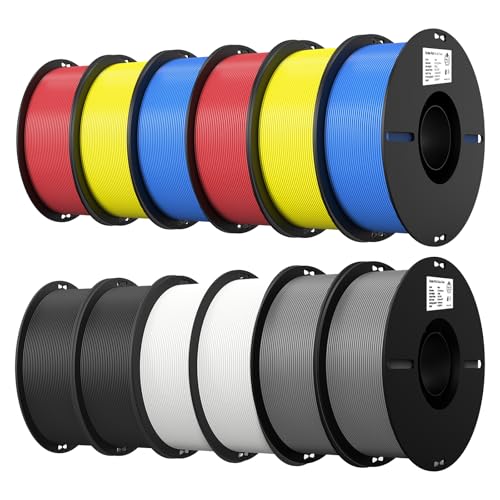
7. Creality 12 Pack PLA Bundle — Best Value Bundle
The Creality 12-pack is a completely different kind of value proposition than the individual spools in this list. You get two 1kg spools each of black, white, grey, blue, red, and yellow — a full palette for creative projects. Creality makes the Ender 3 itself, so there's a natural alignment between their printer hardware and filament formulation. This bundle is purpose-built to work well on Ender 3 hardware, and the compatibility shows in how consistently it prints at stock settings.
The ±0.02mm tolerance across all colors in the bundle is a genuine achievement for a multi-color, multi-spool package. The patented clog-free manufacturing process and improved toughness formula mean you're not sacrificing print quality for the volume discount. Smooth, stable extrusion is the consistent experience across all six colors, and the spool winding is tangle-free even when you're deep into a spool and the filament has more slack.
The use case for this bundle is clear: if you want to stock up for a season of printing across multiple projects and colors, buying 12 spools individually would cost significantly more and likely give you mixed quality across brands. This bundle gives you predictable, consistent results across all 12 spools. It's particularly well-suited for schools, makerspaces, or home workshops where you want a deep inventory of reliable filament without managing multiple suppliers. If you also print designs on paper, our guide to the best dye sublimation printers is worth a look for producing vibrant, durable prints of your model art and project plans.
Pros:
- 12 spools across 6 colors at an exceptional per-kilogram price
- Made by Ender 3's manufacturer — optimized for this specific printer ecosystem
- Consistent ±0.02mm tolerance maintained across all colors
- Tangle-free winding and clog-resistant formula throughout the bundle
Cons:
- Storage commitment — 12kg of filament needs proper humidity-controlled storage
- Color selection is limited to the six included options
- Standard PLA, not suitable for high-stress structural applications
What to Look For When Buying PLA Filament for Ender 3
Dimensional Tolerance: Why ±0.02mm Matters
Filament diameter tolerance is the single most important spec to scrutinize when buying PLA, and it's often buried in the product listing. The Ender 3's Bowden extruder relies on consistent filament diameter to maintain accurate extrusion rates. When diameter varies beyond ±0.03mm, you'll see inconsistent layer lines, over-extrusion artifacts, and unpredictable surface finish — issues that look like slicer or printer problems but are actually the filament. The difference between ±0.03mm and ±0.02mm sounds small, but in practice it separates good prints from great ones on a stock machine. Budget options that claim tight tolerances without backing it up with real manufacturing controls are a liability. Stick with brands like OVERTURE, Prusament, Inland, and ELEGOO that have demonstrated processes to achieve and maintain ±0.02mm consistently.
Moisture Content and Spool Packaging
PLA is hygroscopic, which means it absorbs moisture from the air. Filament that has absorbed too much water will print with audible popping and crackling from the nozzle, produce stringy surface finish, generate visible bubbles on the surface of prints, and deliver dramatically weaker layer adhesion than properly dry material. Always buy filament that is vacuum-sealed with a desiccant pack, and if you're in a humid climate, transfer opened spools into sealed containers with fresh desiccant. Brands like OVERTURE and Inland explicitly dry their filament for 24 hours before vacuum sealing — that's not marketing language, it's the right process. Once opened, a spool of PLA is typically good for a few weeks in average humidity before noticeable degradation. For long-term storage, invest in a filament dryer or airtight storage containers.
PLA vs PLA+: Choosing the Right Material Grade
Standard PLA is the right choice for the vast majority of prints: decorative models, test objects, prototypes, display pieces, and anything that won't face mechanical stress. It's easier to tune, prints at lower temperatures, and is forgiving across a wide range of Ender 3 configurations. PLA+ — like the eSUN option in this roundup — is worth the modest price premium when you're printing parts that need to survive real use. PLA+ has better impact resistance, higher interlayer strength, and more flexibility before fracture. It's not a dramatic upgrade in terms of print settings, but the physical properties of the finished part are meaningfully different. Carbon fiber PLA (like ELEGOO's PLA-CF) is a separate category entirely — much stiffer and stronger, but abrasive and requiring a hardened steel nozzle. Choose your grade based on what the part needs to do, not just on price.
Spool Quality and Winding
A well-wound spool is something you notice most when you don't have it. Overlapping filament loops, loose winding that allows individual strands to slip under adjacent ones, and spool hubs with inconsistent inside diameters all cause feeding problems — sometimes hundreds of grams into a print when you can least afford it. The physical spool design matters too: cardboard spools (like ELEGOO's) are eco-friendly but can warp in humid environments, while plastic spools are more dimensionally stable. Check that the hub diameter is compatible with your Ender 3's spool holder. Most standard spools work fine, but some cardboard variants have slightly different inner diameters. When in doubt, the community-standard Creality spool holder accepts virtually everything on this list without modification.
FAQs
What temperature should I print PLA on the Ender 3?
For standard PLA on the Ender 3, a nozzle temperature of 200°C–210°C and a bed temperature of 50°C–60°C is the standard starting point. HATCHBOX recommends 180°C–210°C, but most users find 200°C–205°C to be the sweet spot for a clean first layer and good layer adhesion. Adjust in 5°C increments based on your specific filament and print speed — faster print speeds generally benefit from slightly higher nozzle temps. PLA+ typically needs 205°C–220°C at the nozzle and 60°C at the bed.
Does filament brand really make a difference on the Ender 3?
Yes, and the difference is more significant than most beginners expect. The Ender 3's stock Bowden extruder has less tolerance for filament diameter variation than direct-drive setups, making filament consistency more important. Premium brands with tighter tolerances (±0.02mm) produce noticeably crisper prints with fewer artifacts. Budget filament with poor winding or high moisture content is one of the most common root causes of unexplained print failures on otherwise well-tuned machines.
Can I use PLA+ on the Ender 3 without modifications?
Absolutely. PLA+ runs at 205°C–220°C nozzle and 60°C bed, which is within the stock Ender 3 hot end's operating range. No enclosure, no hardened nozzle, and no major profile changes are needed. You'll want to update your slicer profile to match the specific brand's recommended temps, but the transition from standard PLA to PLA+ is straightforward. The eSUN PLA+ in this roundup is a great starting point with minimal setup changes required.
Do I need a hardened steel nozzle for carbon fiber PLA?
Yes. Carbon fiber PLA is abrasive and will wear through a standard brass nozzle noticeably faster than regular PLA — sometimes within a few hundred grams of material on heavy use. A hardened steel nozzle (MK8 0.4mm hardened, available for under $10) is the correct solution. It's compatible with the stock Ender 3 hot end and will handle both CF filaments and other abrasive materials like glow-in-the-dark or metal-fill PLA without issue. The nozzle upgrade takes about five minutes and is well worth it before you start running ELEGOO PLA-CF regularly.
How do I store opened PLA filament spools?
Store opened spools in airtight containers or zip-lock bags with fresh silica gel desiccant. The goal is to keep relative humidity below 20% around the filament. Purpose-built filament storage boxes from brands like PolyBox or Sunlu are convenient options. For very humid environments or long-term storage, a dedicated filament dryer can bring moisture-compromised spools back to printable condition in 4–8 hours at 45°C–50°C. Signs that your filament has absorbed too much moisture include popping sounds during printing, stringy surface texture, and visible bubbles on part surfaces.
Which PLA filament is best for detailed miniatures on the Ender 3?
For fine-detail printing — miniatures, architectural models, jewelry molds — prioritize tight dimensional tolerance and smooth surface finish over all other factors. OVERTURE PLA and Prusament PLA Jet Black are the top choices here. Both hold ±0.02mm tolerance with real manufacturing controls behind that claim, and Prusament in particular delivers a surface finish that requires minimal post-processing. Pair either of these with a 0.2mm or 0.3mm nozzle if your machine is set up for it, slow down to 40mm/s or below, and you'll get detail quality that rivals much more expensive printers.
Buy on Walmart
- HATCHBOX 1.75mm Black PLA 3D Printer Filament, 1 KG Spool, D — Walmart Link
- eSUN PLA+ Filament 1.75mm, 3D Printer Filament PLA Plus, Dim — Walmart Link
- OVERTURE PLA Filament 1.75mm, Neatly Wound 3D Printer Filame — Walmart Link
- Inland PLA Basics Filament 1.75mm, 1kg Spool – Dimensional A — Walmart Link
- Prusament 3D Printer Premium Filament PLA Jet Black 1.75mm - — Walmart Link
- ELEGOO Carbon Fiber PLA Filament 1.75mm Black 1KG, PLA-CF St — Walmart Link
- Creality 12 Pack PLA 1.75mm Filament Bundle for 3D Printing — Walmart Link
Buy on eBay
- HATCHBOX 1.75mm Black PLA 3D Printer Filament, 1 KG Spool, D — eBay Link
- eSUN PLA+ Filament 1.75mm, 3D Printer Filament PLA Plus, Dim — eBay Link
- OVERTURE PLA Filament 1.75mm, Neatly Wound 3D Printer Filame — eBay Link
- Inland PLA Basics Filament 1.75mm, 1kg Spool – Dimensional A — eBay Link
- Prusament 3D Printer Premium Filament PLA Jet Black 1.75mm - — eBay Link
- ELEGOO Carbon Fiber PLA Filament 1.75mm Black 1KG, PLA-CF St — eBay Link
- Creality 12 Pack PLA 1.75mm Filament Bundle for 3D Printing — eBay Link
Next Steps
- Check current prices on your top pick — filament prices shift frequently. Click through to Amazon on HATCHBOX or your preferred choice and confirm availability before purchasing.
- Assess your use case before buying — if you're printing functional parts, order the eSUN PLA+ or ELEGOO PLA-CF instead of defaulting to standard PLA. The upgrade is minimal in cost and significant in performance.
- Upgrade your nozzle if you're running carbon fiber — order a hardened steel MK8 nozzle alongside ELEGOO PLA-CF so you're ready to print immediately without damaging your brass nozzle.
- Set up proper filament storage — before your spools arrive, prepare airtight storage containers and silica gel desiccant packs. This single step will save you more failed prints than any other precaution.
- Dial in your slicer profile — update your Cura or PrusaSlicer print profile to match the recommended temperatures for whichever filament you choose, then run a temperature tower on the first spool to find your machine's specific sweet spot.



About Remington May
Remington May is a technology writer and digital product reviewer with a focus on consumer electronics, software, and the everyday tech that shapes how people work and live. She has spent years evaluating smartphones, laptops, smart home devices, and digital tools — approaching each product from the perspective of a practical user rather than a spec-sheet enthusiast. At Pinwords, she covers tech buying guides, product reviews, smartphone and laptop comparisons, and practical how-to guides for getting more out of your devices.
Check for FREE Gifts. Or latest free books from our best messages.
Remove Ad block to reveal all the secrets. Once done, hit a button below