Best Pigment Ink Printer 2026
by Remington May
If you want the best pigment ink printer in 2026, the Epson SureColor P700 is our top pick — it delivers professional-grade color accuracy in a compact 13-inch desktop footprint that fits almost any workspace. Pigment ink (ink that uses solid color particles suspended in liquid, rather than dye dissolved in it) produces prints that resist fading for decades, handle a wide range of paper types, and hold up far better than dye-based prints when exposed to light or humidity. If you print photos, fine art reproductions, or anything you plan to frame and display, pigment ink is the only serious choice.
In 2026, the market has narrowed to a handful of genuinely excellent machines from Epson and Canon. Both brands use their own proprietary pigment ink systems — Epson's UltraChrome PRO10 and Canon's LUCIA PRO II — and the differences between them come down to ink channel count, maximum paper width, software workflow, and price. Whether you need a 13-inch desktop printer for studio portraits or a 17-inch wide-format machine for gallery prints and posters, there's a model on this list that fits your setup. You can also check our buying guide section for a broader look at how to evaluate professional printers.
We tested and researched all five printers below, comparing color gamut, black ink performance, connectivity, and value. If you're also interested in budget-friendly options, see our roundup of the best photo printers under $200. For large decorative output, our guide to the best poster printers covers wide-format options at every price point. Now let's get into the picks.

Contents
Our Top Picks for 2026
- #PreviewProductRating
- Bestseller No. 1
 Rating:

- Bestseller No. 2
 Rating:
 - Bestseller No. 3
 Rating:
 - Bestseller No. 4
 Rating:
 - Bestseller No. 5
 Rating:
Detailed Product Reviews
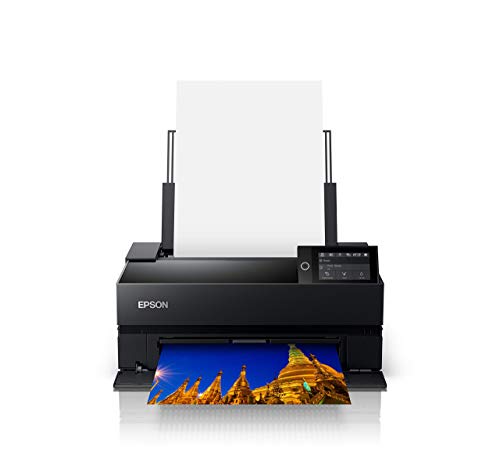
1. Epson SureColor P700 13-Inch Printer — Best Overall 13-Inch Pigment Printer
The Epson SureColor P700 is the benchmark for 13-inch desktop photo printing in 2026. It runs on Epson's UltraChrome PRO10 ink system — a 10-channel pigment setup that adds a violet ink to expand the color gamut beyond what most competitors achieve. That violet channel makes a real difference when you're printing deeply saturated blues, purples, and magentas. You'll see colors pop off fine art paper in a way that standard 8-channel printers simply can't match.
One of the P700's biggest practical advantages is its dedicated nozzles for both Photo Black and Matte Black inks. On older or lower-end photo printers, switching between these two black types requires the printer to purge ink — wasting money and time. The P700 eliminates that entirely. You can print a glossy photo and then immediately follow it with a matte watercolor paper print without any delay or wasted ink. If you frequently switch between paper types (glossy, luster, fine art matte, cotton rag), this feature alone saves you significant money over a year of printing.
The new 10-channel MicroPiezo AMC printhead delivers excellent consistency across long print runs. Speed is genuinely competitive for a desktop machine — a borderless 8x10 on glossy paper finishes in under two minutes at high quality. Connectivity covers USB, Wi-Fi, and Ethernet, so it fits into any studio network setup. The P700 supports media up to 13 inches wide and handles roll paper for panoramas and banners. For a 13-inch machine, this is about as complete a package as you'll find anywhere in 2026.
Pros:
- 10-channel UltraChrome PRO10 ink with Violet for an exceptionally wide color gamut
- Dedicated Photo Black and Matte Black nozzles — no ink switching delays or waste
- Supports roll paper, cut sheet, and fine art media up to 13 inches wide
- Fast print speeds competitive with any desktop photo printer in its class
- Excellent Epson Print Layout software for precise borderless and fine art output
- Compact footprint that fits comfortably on a standard desk or studio table
Cons:
- Ink cartridges are an ongoing cost — individual channel carts add up on heavy users
- Limited to 13-inch maximum width; not a substitute for a 17-inch machine
2. Epson SureColor P900 17-Inch Photo Printer Bundle — Best 17-Inch Epson
If 13 inches isn't wide enough for your work, the Epson SureColor P900 steps up to 17-inch maximum width while keeping the same UltraChrome PRO10 pigment ink system as the P700. This bundle version includes an Ethernet cable, USB cable, and a fiber cloth — a practical package if you're setting up a new studio workstation and want everything in one order. The P900 is built for photographers, fine art print artists, and designers who need gallery-ready output at larger sizes without moving to a floor-standing commercial printer.
The core print technology here is identical to the P700 in terms of ink quality — 10 pigment channels including Violet, dedicated Matte and Photo Black nozzles, and the same MicroPiezo printhead generation. Where the P900 pulls ahead is in sheer print area. You can output 17x22 inch prints, panoramas up to 17 inches wide and 129 inches long on roll paper, and oversized fine art pieces that simply wouldn't fit through a 13-inch machine. If you sell large prints, exhibit work, or produce architectural or design presentations, that extra width matters every single day.
Epson's engineering on this machine is serious. The dual roll paper support lets you load two different roll types — say, glossy photo paper and fine art cotton — and switch between them from software without touching the printer. The P900 also handles thick media up to 1.5mm, which means you can print directly onto fine art boards, canvas sheets, and specialty stocks that would jam most consumer printers. Build quality is reassuringly heavy and solid. This is a machine designed for long-term studio use, not a device you'll replace in two years.
Pros:
- 17-inch maximum print width — handles large fine art, panoramas, and architectural prints
- Same UltraChrome PRO10 10-channel ink as the P700, including the Violet channel
- Dual roll paper support for two media types without manual switching
- Handles thick media up to 1.5mm — canvas sheets, fine art boards, specialty stocks
- Bundle includes Ethernet cable, USB cable, and fiber cloth for immediate setup
- Durable construction built for consistent long-term studio or office use
Cons:
- Significantly larger and heavier than the P700 — requires dedicated table space
- Premium price point; overkill if you rarely print above 13 inches
3. Canon imagePROGRAF PRO-310 13-Inch Wireless Inkjet Photo Printer — Best Canon 13-Inch
Canon's imagePROGRAF PRO-310 is the direct 13-inch competitor to the Epson P700, and it holds its own in almost every category. The PRO-310 runs a 9-color pigment ink system plus a Chroma Optimizer — that Chroma Optimizer is a clear overcoat ink that flattens the print surface, eliminates bronzing (a metallic sheen that appears in dark areas of glossy photos), and enhances overall gloss uniformity. Canon's approach with the Chroma Optimizer produces some of the most visually impressive glossy prints you can get from a desktop machine in 2026.
The 3.0-inch color LCD display on the front panel is a genuinely useful addition. You can navigate settings, check ink levels, run maintenance cycles, and confirm print jobs directly on the printer without opening a laptop or phone. That sounds minor until you're in a busy workflow and need a quick ink level check — having it on the panel saves real time. The PRO-310 also includes Canon's Anti-Clogging System and automatic Skew Correction, two features that matter a lot in daily production use. Anti-clogging keeps heads firing cleanly even after periods of inactivity, and Skew Correction automatically straightens slightly misaligned paper before printing begins, saving wasted sheets.
Matte Black ink performance on the PRO-310 is exceptional. Canon specifically engineered this ink for enhanced black density and a wider dark-area reproduction range — which translates to deeper shadow detail on matte and fine art papers. If you print black-and-white photography or dark, moody fine art on uncoated media, the PRO-310's matte output is genuinely competitive with the Epson P700. Wireless connectivity, USB, and Ethernet are all included. If you're a Canon shooter already embedded in Canon's software ecosystem (Digital Photo Professional, Print Studio Pro), the PRO-310 is a seamless fit. For those who want an alternative to Epson's ink costs and ecosystem, this is the most compelling 13-inch option available. If you also print on specialty media, check our guide to the best printers for watercolor paper for additional context on fine art media compatibility.
Pros:
- 9-color + Chroma Optimizer system eliminates bronzing and maximizes gloss uniformity
- 3.0-inch color LCD panel for on-device navigation without a computer
- Anti-Clogging System keeps heads firing cleanly after inactivity
- Automatic Skew Correction reduces wasted paper from misaligned feeds
- Exceptional Matte Black density for fine art and B&W photography
- Integrates seamlessly with Canon's DPP and Print Studio Pro software
Cons:
- 9-channel ink vs. Epson's 10-channel — slightly narrower color gamut on some test targets
- Chroma Optimizer adds to ink consumption on glossy prints
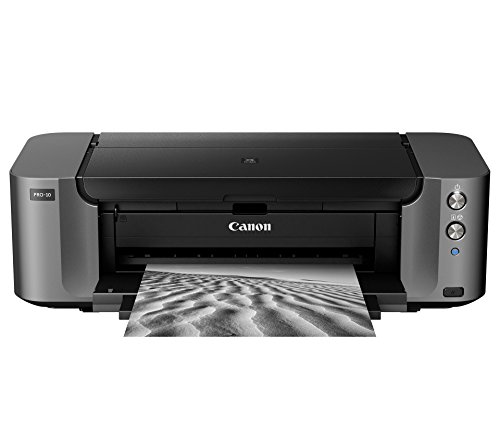
4. Canon PRO-10 Wireless Color Professional Inkjet Photo Printer — Best Budget Professional
The Canon PRO-10 has been around for years, and it's still a solid entry point into professional pigment ink printing in 2026. It combines pigment-based inks with Canon's Chroma Optimizer for uniform glossiness and wide color gamut, making it a capable machine for portrait photographers, hobbyist fine art printers, and anyone stepping up from a consumer inkjet for the first time. You're not getting the newest printhead technology here, but the output quality on glossy and semi-gloss media is genuinely professional.
Canon's Optimum Image Generating System (OIGS) is worth understanding: it's the color management engine that analyzes each image and logically selects the optimal ink combination and droplet placement for that specific image. Rather than using a fixed ink mapping for all images, OIGS adapts per print, which produces more accurate color reproduction across a wide variety of subjects — portraits, landscapes, studio product shots, and fine art all respond differently and get treated accordingly. In practical terms, you'll see better shadow detail retention in dark portraits and more accurate neutral grays in landscape work compared to printers without this kind of adaptive color processing.
The Print Studio Pro plug-in software is included and provides a professional workflow that connects directly into Photoshop, Lightroom, and Digital Photo Professional. For photographers who already work in those applications, this means you can send a print job with full color management control without leaving your editing environment. The PRO-10 handles media up to 13 inches wide, supports roll paper, and includes wireless plus USB connectivity. It's not the newest machine on this list, but if you find it at a significantly lower price point than the PRO-310 or the P700, it delivers genuine professional-quality output that's hard to argue with.
Pros:
- Pigment inks plus Chroma Optimizer for gloss uniformity and wide color gamut
- Optimum Image Generating System adapts ink selection per image for better accuracy
- Print Studio Pro plug-in integrates with Photoshop, Lightroom, and Canon DPP
- Handles roll paper and media up to 13 inches wide
- Often available at a lower price point than newer models — strong value proposition
Cons:
- Older printhead generation compared to the PRO-310 and Epson P700
- No front-panel LCD display — all navigation is through computer software
- Slower print speeds than current-generation competitors
5. Canon imagePROGRAF PRO-1100 17-Inch Professional Wireless Inkjet Photo Printer — Best 17-Inch Canon
The Canon imagePROGRAF PRO-1100 is Canon's answer to the Epson P900 — a 17-inch professional pigment ink printer built for photographers and artists who need gallery-scale output. It runs Canon's LUCIA PRO II ink system with 11 pigment channels plus Chroma Optimizer. That's 12 total channels, making it the most ink-channel-rich printer on this list. More channels means finer color transitions, smoother gradients, and better coverage across the full color gamut — the difference is visible in side-by-side prints, especially in fine art and fine detail work.
The PRO-1100 targets the same audience as the P900 — working photographers, professional print artists, designers producing large-format presentations — and it competes directly on color gamut. Canon claims improvement in color reproduction and image clarity with LUCIA PRO II compared to the previous generation, particularly in darker areas. If you've ever been frustrated by loss of shadow detail in deep blacks or dark shadows, the PRO-1100's expanded dark area reproduction range directly addresses that. Prints that contain complex dark tones — studio portraits with dramatic lighting, astrophotography, dark architectural interiors — come out with genuine depth and detail.
Professional Print & Layout software is included as a standalone application that also functions as a plug-in from Digital Photo Professional or Adobe software. That means your workflow from Lightroom or Photoshop to final print is completely uninterrupted — no need to export files or open additional applications. Wireless, USB, and Ethernet connectivity cover every connection scenario. For Canon users who print 17-inch or wider and want the best available color performance from Canon's ink technology in 2026, the PRO-1100 is the definitive choice. According to Wikipedia's overview of inkjet printing technology, pigment-based inks generally offer superior longevity and water resistance compared to dye-based alternatives — a key reason professionals choose printers like the PRO-1100 for archival work. You may also want to pair this printer with a well-calibrated display — our guide to the best monitors for photo editing under $500 covers color-accurate options that complement a professional print workflow.
Pros:
- 11-channel LUCIA PRO II pigment ink plus Chroma Optimizer — 12 total channels for maximum color gamut
- Improved dark area reproduction for deep blacks and complex shadow detail
- 17-inch maximum print width for large fine art, panoramas, and design work
- Professional Print & Layout software works standalone and as a plug-in from Adobe/DPP
- Anti-bronzing from Chroma Optimizer on all glossy and luster media
- Wireless, USB, and Ethernet connectivity included
Cons:
- Large physical footprint — requires substantial dedicated table or studio space
- High ink cost at full 12-channel operation on large prints
- Premium price point comparable to the Epson P900 bundle
Choosing the Right Pigment Ink Printer: A Buying Guide
Before you spend several hundred dollars on a professional photo printer, there are four core factors worth thinking through carefully. Getting these right means you won't be stuck with a machine that doesn't fit your workflow or your space.
Print Width: 13-Inch vs. 17-Inch
This is the first decision to make, and it's a hard constraint. A 13-inch printer cannot output a 17-inch print — there's no workaround. Ask yourself what your actual maximum print size requirement is right now, and what it's likely to be in the next three to five years.
- 13-inch models (P700, PRO-310, PRO-10): Handle standard photo sizes up to 13x19 inches, standard fine art sheets, and roll panoramas up to 13 inches wide. They fit on a normal desk and use less ink per print.
- 17-inch models (P900, PRO-1100): Handle 17x22 inch prints, super-B format, oversized posters, wide panoramas, and canvas sheets. They require more desk space and typically cost more per print due to larger ink cartridges.
If you sell or exhibit prints, 17-inch capability frequently pays for itself in premium pricing on large-format work. If you primarily print for personal use or client delivery in standard sizes, a 13-inch machine keeps costs lower with no practical sacrifice in output quality.
Ink Channel Count and Color Gamut
More ink channels generally means a wider color gamut and smoother tonal transitions. Here's how the five models on this list stack up:
- Epson P700 and P900: 10 channels including Violet — the Violet ink expands the gamut in the blue-purple range and produces some of the most vivid color available from any desktop printer.
- Canon PRO-1100: 11 channels plus Chroma Optimizer (12 total) — the deepest Canon option, with particular strength in dark area reproduction.
- Canon PRO-310: 9 channels plus Chroma Optimizer — strong performance with excellent gloss uniformity from the Chroma Optimizer.
- Canon PRO-10: Standard pigment plus Chroma Optimizer — solid color gamut for the price, adaptive color management via OIGS.
For most photographers, the color gamut differences between these machines are visible in side-by-side comparison but not dramatic in everyday printing. Where channel count matters most is in fine art reproduction, where subtle color nuances in paintings or textiles need faithful rendering.
Black Ink Switching vs. Dedicated Nozzles
This is a practical workflow concern that's easy to overlook until it starts costing you money. There are two types of black ink used in photo printing:
- Photo Black (PBK): For glossy, luster, and semi-gloss papers. Produces deep blacks with high reflection density.
- Matte Black (MBK): For matte, fine art, and uncoated papers. Produces deep blacks on porous media without the glare of Photo Black.
Printers that require you to switch between these two inks purge a certain amount of ink each time the switch happens — wasting ink and adding time. The Epson P700 and P900 have dedicated nozzles for both black types simultaneously, eliminating this entirely. If you regularly print on both glossy and matte media in the same session, this feature saves real money over a year of use. Canon's PRO-310 and PRO-1100 also handle this efficiently with their dedicated Matte Black channels.
Software Integration and Workflow
Your printer is only as useful as how well it fits your editing and output workflow. Consider which ecosystem you're already in:
- Epson Print Layout: Excellent standalone application with strong support for borderless printing, contact sheets, and fine art output. Available for both Windows and Mac.
- Canon Professional Print & Layout / Print Studio Pro: Integrates directly into Adobe Photoshop, Lightroom, and Canon's Digital Photo Professional as a plug-in. Strong choice for Canon shooters already in that ecosystem.
- Third-party RIP software: Advanced users running high-volume print studios often use dedicated RIP (Raster Image Processor) software like Mirage or ImagePrint with any of these printers for maximum color management control.
If you use Lightroom or Photoshop as your primary editing environment, either Epson's or Canon's professional software will serve you well. The printer's on-board color management is also strong enough for direct printing through the built-in driver if you prefer to keep things simple.
FAQs
What is pigment ink and why does it matter for photo printing?
Pigment ink uses microscopic solid color particles suspended in liquid carrier. Unlike dye ink (where color is fully dissolved), pigment particles sit on the surface of the paper rather than soaking in. This gives pigment prints far greater resistance to UV fading, water, and humidity. Professional labs that produce archival prints — photos intended to last 50-100 years or more under normal display conditions — use pigment ink exclusively. If you're printing work you plan to sell, exhibit, frame, or archive, pigment ink is the standard you should use in 2026.
How do Epson UltraChrome PRO10 and Canon LUCIA PRO II compare?
Both are professional-grade pigment ink systems designed for wide color gamut and archival longevity. Epson UltraChrome PRO10 adds a Violet ink channel that gives it an edge in the blue-purple color range. Canon LUCIA PRO II (in the PRO-1100) runs 11 channels plus Chroma Optimizer and emphasizes improvements in dark area reproduction and shadow detail. In real-world testing, both systems produce excellent results. The practical differences are most visible in specific use cases: Epson wins slightly on saturated cool tones, Canon wins slightly on gloss uniformity and deep shadow rendering. Your choice between them comes down to which ecosystem fits your workflow better.
Is the Epson P700 or the Canon PRO-310 better for a 13-inch desktop printer?
Both are outstanding 13-inch printers in 2026, and the right choice depends on your priorities. The Epson P700 has the 10-channel ink advantage including Violet, plus dedicated dual-black nozzles that eliminate ink purging when switching between paper types — a real cost saving for mixed-media users. The Canon PRO-310 counters with a 3-inch color LCD panel on the printer itself, Canon's Chroma Optimizer for anti-bronzing on glossy prints, and seamless integration with Canon's software ecosystem. If you shoot Canon and edit in DPP or use Print Studio Pro, the PRO-310 is the natural fit. If you want the widest color gamut and the most efficient black ink handling, the P700 edges ahead.
What types of paper can these pigment ink printers handle?
All five printers on this list handle a wide range of professional media types including: glossy photo paper, luster (semi-gloss) photo paper, matte photo paper, fine art cotton and rag papers, canvas sheets, watercolor-texture papers, and synthetic media. The Epson P900 and Canon PRO-1100 also handle thick media up to 1.5mm, which includes fine art boards and heavyweight specialty stocks. For anyone interested in printing on specialty media like watercolor paper specifically, our guide to the best printers for watercolor paper provides detailed media compatibility guidance. Always use ICC profiles (color correction files) matched to your specific paper and printer combination for best results.
How long do pigment ink prints last compared to dye ink prints?
Pigment ink prints from professional photo printers like the ones on this list are rated for 100-200 years or more under display conditions — framed behind UV-protective glass, away from direct sunlight, in normal indoor humidity. Dye-based prints from consumer inkjets typically last 25-50 years under similar conditions, and significantly less if exposed to humidity or light. The exact longevity depends on paper quality as well — archival cotton rag papers last longer than standard coated photo papers regardless of ink type. For work you intend to sell, exhibit, or pass on, pigment ink on archival paper is the combination that produces genuinely permanent output.
Do I need a separate monitor calibration tool to get accurate colors from these printers?
Yes, if color accuracy matters to your work. A pigment ink printer will reproduce colors faithfully according to the ICC profile and color management settings you give it — but if your monitor is displaying colors inaccurately, your prints will be inaccurate even if the printer itself is performing perfectly. A hardware colorimeter (like the X-Rite ColorChecker Display or Datacolor Spyder) calibrates your monitor to a known standard and creates a profile that corrects its output. This is a one-time purchase that pays dividends on every print you make. For recommendations on color-accurate displays, our best monitors for photo editing under $500 guide covers options that pair well with any of the printers listed here.
Buy on Walmart
- Epson SureColor P700 13-Inch Printer,Black — Walmart Link
- EPSON SureColor P900 17 Inch Photo Printer (C11CH37201) Bund — Walmart Link
- Canon imagePROGRAF Professional 13" PRO-310 Wireless Inkjet — Walmart Link
- Canon Office Products PRO-10 Wireless Color Professional Ink — Walmart Link
- Canon imagePROGRAF PRO-1100: 17” Professional Wireless Inkje — Walmart Link
Buy on eBay
- Epson SureColor P700 13-Inch Printer,Black — eBay Link
- EPSON SureColor P900 17 Inch Photo Printer (C11CH37201) Bund — eBay Link
- Canon imagePROGRAF Professional 13" PRO-310 Wireless Inkjet — eBay Link
- Canon Office Products PRO-10 Wireless Color Professional Ink — eBay Link
- Canon imagePROGRAF PRO-1100: 17” Professional Wireless Inkje — eBay Link
Final Thoughts
The best pigment ink printer in 2026 is the one that fits your actual print size requirements, fits your software workflow, and fits your budget — and every printer on this list delivers genuine professional-quality output that will serve you for years. Start with the Epson SureColor P700 if you need the best 13-inch performance available, or step up to the Epson P900 or Canon PRO-1100 if your work demands 17-inch width. Head to Amazon using the links above to check current pricing and make the right call for your studio.



About Remington May
Remington May is a technology writer and digital product reviewer with a focus on consumer electronics, software, and the everyday tech that shapes how people work and live. She has spent years evaluating smartphones, laptops, smart home devices, and digital tools — approaching each product from the perspective of a practical user rather than a spec-sheet enthusiast. At Pinwords, she covers tech buying guides, product reviews, smartphone and laptop comparisons, and practical how-to guides for getting more out of your devices.
Check for FREE Gifts. Or latest free books from our best messages.
Remove Ad block to reveal all the secrets. Once done, hit a button below