Best ABS Filament 2026
by Remington May
You're halfway through a functional enclosure print when your spool runs out — and suddenly you're down a rabbit hole of Amazon listings trying to figure out which ABS filament won't warp your parts or clog your hotend at 2 a.m. Sound familiar? Choosing the right ABS can mean the difference between crisp, durable parts and a plate full of spaghetti. In 2026, the market has matured enough that you have real options beyond just grabbing whatever's cheapest.
ABS (Acrylonitrile Butadiene Styrene) remains one of the most widely used 3D printing filaments for a reason. It's strong, heat-resistant, and machinable after printing — qualities that PLA simply can't match for functional applications. Whether you're printing automotive brackets, electronics housings, or functional prototypes, ABS is still the go-to material when toughness and temperature resistance matter. That said, not all ABS filaments are created equal. Dimensional accuracy, warping tendency, and odor levels vary significantly between brands.
We've evaluated seven top-selling ABS filaments available in 2026, considering print quality, ease of use, dimensional accuracy, and overall value. If you're also exploring other filament types, check out our guide to the best carbon fiber filament for high-strength composite printing. Before you buy, here's everything you need to know — starting with our top picks and ending with a buying guide that cuts through the marketing fluff. For more recommendations across all product categories, browse our full buying guide.
Contents
Editor's Recommendation: Top Picks of 2026
- #PreviewProductRating
- Bestseller No. 1
 Rating:

- Bestseller No. 2
 Rating:
 - Bestseller No. 3
 Rating:
 - Bestseller No. 4
 Rating:
 - Bestseller No. 5
 Rating:
 - Bestseller No. 6
 Rating:
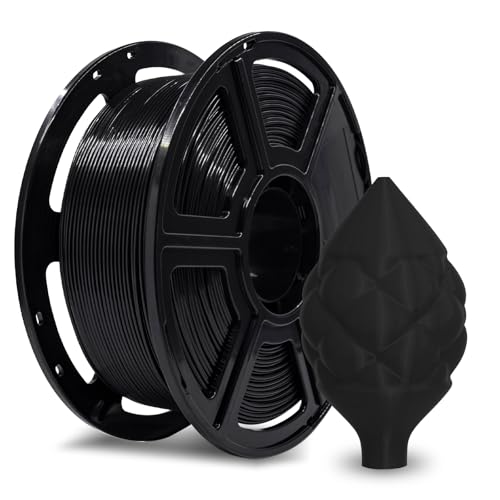
 - Bestseller No. 7
 Rating:

Our Hands-On Reviews
1. HATCHBOX ABS 3D Printer Filament — Best Overall
HATCHBOX has been a staple in the 3D printing community for years, and their ABS filament continues to earn that reputation in 2026. The dimensional accuracy of +/- 0.03 mm is among the tightest in this class, which translates directly to fewer clogs, consistent extrusion, and reliable layer bonding throughout long prints. If you've ever dealt with a filament that starts fine and then starts skipping mid-print, you'll appreciate how well this spool performs across its entire length.
The recommended nozzle temperature range of 210°C–240°C is lower than many ABS options, making it more accessible for printers that max out around 240°C. Beginners will find that the filament flows consistently without requiring fine-tuned retraction settings right out of the gate. Experienced users can push higher speeds and more complex geometries without worrying about purity or tolerance drift. It's available in a broad range of colors, though the black variant remains the most popular for functional parts.
The 1 kg spool fits standard spool holders without issue, and the filament winds cleanly with no tangling observed during testing. One note: like all ABS, this filament benefits from an enclosure to minimize warping on large flat parts. It's not a magic solution to ABS's inherent challenges, but it performs at or above expectation for its price point. If you need a dependable ABS that works across a wide range of printers, this is your starting point.
Pros:
- Tight +/- 0.03 mm dimensional accuracy reduces clogging
- Lower nozzle temp range (210–240°C) suits a wide range of printers
- Consistent quality from spool start to finish
- Great for both beginners and experienced users
- Strong, impact-resistant final prints
Cons:
- Still requires an enclosure for large prints to prevent warping
- ABS odor is present during printing — ventilate your space

2. eSUN ABS+ Filament 1.75mm — Best for Large Prints
If warping and cracking on larger prints have been your nemesis with standard ABS, eSUN ABS+ is worth your serious attention. This is an enhanced formulation — not plain ABS — and the difference shows. eSUN has engineered this material to dramatically reduce the inter-layer cracking and bed separation that makes standard ABS frustrating when printing anything with significant surface area. ABS+ delivers noticeably better toughness and layer adhesion compared to the base material, while retaining the heat resistance ABS is known for.
Dimensional tolerance is rated at +/- 0.05 mm, which is slightly wider than HATCHBOX but still within acceptable range for most functional applications. In practice, extrusion consistency is excellent — no stringing, minimal bubbling, and the nozzle stays clear across multi-hour prints. The 410–425 m total length on the 1 kg spool is accurately rated, and the tight winding means you won't fight tangles even at the tail end of the spool.
Surface finish quality is a genuine highlight. eSUN ABS+ produces a smooth, clean exterior that requires less post-processing than many competitors. If you're printing parts that need to look good without extensive sanding, this formulation gives you a head start. The material handles bridging better than standard ABS and shows less delamination under stress testing. For mechanical parts, brackets, or anything large, this is a strong pick.
Pros:
- ABS+ formula significantly reduces warping and cracking on large prints
- Excellent layer bonding and surface finish
- Tangle-free spool with accurate length rating
- No bubbles, minimal stringing
- Good impact strength and wear resistance
Cons:
- Slightly wider tolerance (+/- 0.05 mm) vs. top-tier options
- Still benefits from an enclosure for best results
3. Polymaker PolyLite ABS Filament 1.75mm — Best for Functional Parts
Polymaker's PolyLite ABS stands out because of one specification that matters in real applications: a Vicat Softening Temperature of 104°C. That's the point at which the material starts to deform under heat load, and 104°C puts it firmly in the range needed for engine bays, electronics enclosures, and outdoor hardware. If you're printing parts that will actually be used in demanding thermal environments, this is the filament that won't let you down on that front.
The formulation uses a specialty bulk-polymerized ABS resin with lower volatile content than traditional ABS. What that means practically: less off-gassing during printing, and a more stable melt that reduces the erratic behavior sometimes associated with cheaper ABS materials. The +/- 0.03 mm dimensional accuracy matches the best in this roundup, and the vacuum-sealed resealable packaging with desiccant ensures the filament arrives moisture-free — a detail that matters more than most people realize for ABS, which is hygroscopic and degrades with moisture exposure.
Polymaker is transparent about the material's UV sensitivity — for outdoor applications that need UV resistance, they point you toward their ASA filament, which is honest and useful guidance. For indoor functional parts, though, PolyLite ABS is among the most engineered options in this price range. If you're also working with specialty materials, our guide to the best glue for PLA covers adhesion solutions that work equally well for ABS post-print assembly.
Pros:
- 104°C Vicat Softening Temperature — excellent for high-temp applications
- Low volatile content for reduced odor and stable melt
- Vacuum-sealed packaging with desiccant protects moisture-sensitive material
- Tight +/- 0.03 mm dimensional accuracy
- Strong mechanical properties for functional parts
Cons:
- Not UV resistant — requires ASA for outdoor applications
- Slightly premium price compared to budget options
4. OVERTURE ABS Filament 1.75mm — Best Finish Quality
OVERTURE's ABS earns the finish quality crown for this roundup. The formulation produces a characteristically glossy surface straight off the print bed, and that's not marketing language — it's a real and noticeable difference compared to matte-finish ABS materials. If your prints need to look professional without spending hours sanding, OVERTURE ABS delivers the cleanest out-of-printer appearance in this group. For display models, product prototypes, or anything a client might see, that matters.
The tolerance specification is impressive at +/- 0.02 mm — the tightest on this list. That precision pays dividends in consistent layer deposition and mechanical fit tolerances. OVERTURE has also put genuine thought into the spool design: a grid layout for tangle management, a clear length and weight indicator, a viewing hole to check remaining filament, and a larger inner diameter for smoother feeding. These are quality-of-life details that add up over long print sessions. The cardboard spool is also lighter and more eco-friendly than plastic alternatives.
Heat resistance is strong for standard ABS, making it appropriate for automotive parts, enclosures, and functional hardware. Low warping is claimed in the marketing, and while it still benefits from an enclosure like all ABS materials, user reports confirm it performs better than average on adhesion without requiring a raft. The glossy finish also means acetone vapor smoothing (a common ABS post-processing technique) produces exceptional results with this filament.
Pros:
- Tightest dimensional accuracy at +/- 0.02 mm
- Glossy surface finish reduces post-processing time
- Thoughtfully designed spool with tangle management and weight gauge
- Better-than-average bed adhesion for ABS
- Eco-friendly cardboard spool
Cons:
- Still requires enclosure for large, flat geometries
- Glossy finish may not suit all applications
5. SUNLU ABS Filament 1.75mm — Best Budget Pick
SUNLU has built a strong reputation by delivering reliable filaments at accessible prices, and their ABS is a solid example of that approach. If you're running high volumes of functional parts and need to keep material costs down without sacrificing basic quality, SUNLU ABS gives you a dependable workhorse option. It's not the most precisely engineered filament on this list, but it performs consistently within its stated specs and is compatible with the vast majority of FDM printers on the market.
The emphasis on impact resistance and durability is well-founded. SUNLU ABS handles repeated physical stress without the brittleness you sometimes see in lower-grade materials. Printed parts hold up to friction, light impact, and compression without deforming prematurely. For anyone printing hobby hardware, replacement mechanical parts, or non-critical prototypes, the performance-to-price ratio here is hard to beat.
It's worth noting that SUNLU ABS is standard ABS — not an ABS+ formula — so warping behavior is on par with the category baseline. You'll want an enclosure for anything larger than about 150mm, and bed adhesion requires the usual preparation (PEI sheet, ABS slurry, or a heated bed at 100–110°C). If you're monitoring your 3D printing setup remotely, pairing this with a reliable camera is a good move — see our roundup of the best webcam for OctoPrint for options that work well for filament monitoring.
Pros:
- Competitive price point for high-volume printing
- Compatible with 99% of FDM printers
- Good impact resistance and durability
- Consistent extrusion and minimal clogging
Cons:
- Standard ABS formula — warping risk is higher than ABS+ alternatives
- Dimensional tolerance not specified as tightly as premium options
- Requires enclosure and proper bed prep for best results
6. ERYONE ABS+ Filament 1.75mm — Best Low-Odor Option
ABS odor is one of the most common complaints about printing with this material, and ERYONE addresses it directly with their ABS+ formulation. The claim that this filament "prints without odour" is an overstatement — there is still some off-gassing — but the reduction compared to standard ABS is real and meaningful for home or office printing environments. If you're printing in a space without dedicated ventilation, ERYONE ABS+ is the most practical option on this list for reducing fume-related concerns.
Beyond the odor improvement, the ABS+ formula delivers better inter-layer bonding than standard ABS, and ERYONE confirms this translates to fewer cracks and rare warping even on moderate-sized prints. The recommended nozzle temperature of 230–270°C and bed temperature of 80–100°C at print speeds of 40–100 mm/s give you a wide operating window, meaning you won't need to dial in parameters as precisely as with finicky filaments. The +/- 0.03 mm dimensional accuracy is solid and consistent with the better options in this category.
ERYONE positions this filament for mechanical parts, molds, toys, auto parts, and electronics — all applications where ABS's strength and heat resistance shine. The scratch and heat resistance properties hold up well in testing. The main caveat: like all ABS and ABS+, this filament still produces best results with an enclosure. The lower-odor formulation doesn't eliminate the need for adequate air circulation, it just makes the experience more tolerable in less-than-ideal printing spaces.
Pros:
- Significantly reduced odor compared to standard ABS
- ABS+ formula for better inter-layer bonding and reduced warping
- Wide operating window (230–270°C nozzle, 80–100°C bed)
- +/- 0.03 mm dimensional accuracy
- Scratch and impact resistant prints
Cons:
- Not completely odor-free — still requires ventilation
- Enclosure still recommended for optimal results
7. FLASHFORGE ABS Pro Filament 1.75mm — Best Bed Adhesion
FLASHFORGE ABS Pro earns its spot at the end of this list by solving one of the most aggravating ABS problems: first-layer adhesion. This filament delivers strong bed adhesion that anchors the first layer reliably without the babysitting that standard ABS often demands. Combined with excellent bridging performance that prevents mid-print delamination, FLASHFORGE ABS Pro is the most print-and-walk-away option on this roundup for ABS material.
The "Pro" designation reflects a genuine engineering improvement — reduced shrinkage compared to standard ABS is a key differentiator. Less shrinkage means less dimensional distortion across the part as it cools, which matters for parts with tight tolerances or complex overhangs. The elimination of strong odors is an additional benefit, though like ERYONE's ABS+, it still produces fumes and requires ventilation. Hot deformation resistance below 90°C and the +/- 0.02 mm dimensional tolerance tie it with OVERTURE for the tightest accuracy spec on this list.
FLASHFORGE states that this filament delivers excellent results without pre-drying or special parameter adjustments — a bold claim that holds up for most users printing in reasonable humidity conditions. It's compatible with a broad range of FDM printers, not just FLASHFORGE's own machines. For action camera mounts, tool housings, and electrical device enclosures, this is a purpose-built choice. According to Wikipedia's overview of ABS, the material's combination of rigidity, impact resistance, and machinability makes it uniquely suited to these applications — and ABS Pro delivers on all three fronts.
Pros:
- Outstanding first-layer bed adhesion reduces print failures
- Reduced shrinkage for better dimensional fidelity
- Tight +/- 0.02 mm dimensional accuracy
- Strong bridging performance prevents delamination
- Reduced odor and no pre-drying required in normal conditions
Cons:
- Hot deformation threshold (below 90°C) is lower than Polymaker's 104°C spec
- Premium price compared to budget options on this list
Key Features to Consider When Choosing ABS Filament
Dimensional Accuracy and Tolerance
This is the specification that matters most for print quality, and it's the one most filament buyers overlook. Dimensional accuracy determines how consistently the filament diameter holds across the spool, which directly affects extrusion rate, clog frequency, and layer uniformity. In 2026, the best options offer +/- 0.02 mm to +/- 0.03 mm tolerance. The difference between a +/- 0.02 mm and a +/- 0.05 mm filament is the difference between dialing in your settings once versus constant re-adjustment. If you're printing precision mechanical parts or anything with snap-fit tolerances, prioritize tighter specs.
- +/- 0.02 mm: Premium tier — OVERTURE and FLASHFORGE ABS Pro
- +/- 0.03 mm: Excellent — HATCHBOX, Polymaker, ERYONE
- +/- 0.05 mm: Acceptable — eSUN ABS+
Standard ABS vs. ABS+: Know What You're Buying
Several filaments in this roundup are branded as ABS+ rather than standard ABS. The distinction matters. ABS+ formulations use modified resin blends that reduce brittleness, improve inter-layer adhesion, and — most importantly for many users — decrease warping tendency on large prints. You're not choosing between two grades of the same material; you're choosing between two different engineering priorities.
- Standard ABS: Higher heat resistance ceiling, more available in a range of colors, often cheaper — but more prone to warping and cracking
- ABS+: Better toughness and layer bonding, less warping, sometimes reduced odor — trade-off is sometimes slightly lower thermal ceiling
- For large prints or anyone without a fully enclosed printer, ABS+ is the safer starting point
- For high-temperature applications where the vicat softening point matters precisely, stick with standard ABS from a quality manufacturer
Enclosure Requirements and Bed Adhesion
Every ABS and ABS+ filament in this roundup benefits from an enclosed print environment. The heated air inside an enclosure slows the cooling rate of the part, reducing the thermal gradient that causes warping and layer separation. This isn't optional advice — it's a fundamental property of the material. ABS shrinks as it cools, and uneven cooling creates stress that pulls parts off the bed or cracks layers apart. An enclosure is your primary mitigation tool.
- Heated bed temperature should be 90–110°C for most ABS formulations
- PEI print surfaces provide excellent adhesion without glue or hairspray
- ABS slurry (dissolved scrap ABS in acetone) is an effective bed prep for glass surfaces
- Avoid drafts and air conditioning near the printer during long prints
- FLASHFORGE ABS Pro and OVERTURE both show better-than-average adhesion, but still require a heated bed
Packaging, Storage, and Moisture Management
ABS is hygroscopic — it absorbs moisture from the air, and wet filament causes bubbling, popping, and poor layer adhesion during printing. How your filament is packaged tells you a lot about the manufacturer's quality standards. Polymaker's vacuum-sealed, resealable bags with desiccant are the gold standard here. Regardless of packaging, store your ABS in airtight containers with fresh desiccant between print sessions. If you suspect moisture absorption, dry the filament at 70–80°C for 4–6 hours before printing.
- Vacuum-sealed with desiccant: Polymaker PolyLite — best out-of-box moisture protection
- Store all ABS in airtight bins or filament dry boxes between use
- Signs of wet filament: audible popping, steam, rough surface finish, stringing
- A filament dryer is a worthwhile investment if you print ABS regularly in humid environments
What People Ask
What temperature should I print ABS filament at?
Most ABS filaments print best at a nozzle temperature between 220°C and 260°C, with a heated bed at 90–110°C. The exact setting depends on your specific filament brand and printer setup. HATCHBOX ABS runs well at 210–240°C, while ERYONE ABS+ and FLASHFORGE ABS Pro recommend up to 270°C. Start at the lower end of the recommended range and adjust up if you see poor layer adhesion or under-extrusion. Always use a heated bed with ABS — printing without one will result in severe warping on almost any geometry.
Do I need an enclosure to print ABS?
Yes, for anything beyond small, simple parts, an enclosure is strongly recommended. ABS shrinks as it cools, and an open-air environment creates uneven temperature gradients that cause warping, layer splitting, and bed adhesion failures. An enclosure keeps the ambient temperature around your print elevated, slowing the cooling rate and dramatically reducing these problems. ABS+ formulations like eSUN ABS+ and ERYONE ABS+ handle open-air printing better than standard ABS, but they still benefit significantly from an enclosure on prints larger than 100–150mm.
What's the difference between ABS and ABS+?
Standard ABS (Acrylonitrile Butadiene Styrene) is the classic formulation with excellent heat resistance and strength, but it's prone to warping and inter-layer cracking. ABS+ is a modified version that adds rubber tougheners or other additives to improve toughness, reduce brittleness, and decrease warping tendency. ABS+ also tends to produce less odor during printing. The trade-off is that ABS+ sometimes has a slightly lower heat resistance ceiling than the best standard ABS formulations. For most users printing functional parts in an enclosed printer, ABS+ is the better everyday choice.
Is ABS filament safe to use indoors?
ABS printing produces fumes including styrene, which is a known irritant and potential health concern with prolonged exposure. Printing ABS indoors requires good ventilation — at minimum, position your printer near a window or use a ventilation fan to exhaust fumes outside. ERYONE ABS+ and FLASHFORGE ABS Pro are formulated to reduce odor and volatile emissions, but neither eliminates fumes entirely. For regular ABS printing in a home or office, a HEPA and activated carbon air purifier positioned near the printer is a practical investment. Never print ABS in a completely enclosed room without air exchange.
Can I use ABS filament on any FDM 3D printer?
ABS requires a heated bed and a nozzle that reaches at least 220°C, which excludes some entry-level printers with unheated beds or low-temperature hotend limits. Most modern FDM printers with a heated bed can print ABS, but open-frame printers like the Ender 3 series without an enclosure mod will struggle with warping on anything but small parts. SUNLU ABS claims compatibility with 99% of FDM printers, which is accurate if you count enclosed printers. If your printer is open-frame, adding a simple enclosure — even a cardboard box — makes a meaningful difference.
How does ABS compare to PLA for functional parts?
ABS and PLA serve different purposes. PLA is easier to print, more dimensionally stable in open-air environments, and biodegradable — but it softens at around 60°C, making it unsuitable for applications involving heat. ABS has a heat deflection temperature well above 90°C (up to 104°C for Polymaker PolyLite), making it the right choice for engine bays, electronics housings, outdoor hardware, and anything exposed to elevated temperatures. ABS is also more impact resistant and machinable, and it can be solvent-welded or acetone-smoothed. If your part needs to survive real-world thermal or mechanical stress, ABS is the correct material.
Buy on Walmart
- HATCHBOX ABS 3D Printer Filament, Dimensional Accuracy +/- 0 — Walmart Link
- eSUN ABS+ Filament 1.75mm, 3D Printer Filament ABS Plus, Dim — Walmart Link
- Polymaker ABS Filament 1.75mm Black 3D Printer Filament 1.75 — Walmart Link
- OVERTURE ABS Filament 1.75mm, High Strength & Heat-Resistant — Walmart Link
- SUNLU ABS Filament 1.75mm 3D Printer Filament, Highly Resist — Walmart Link
- ERYONE ABS Filament, 3D Printer Filament 1.75mm +/- 0.03mm, — Walmart Link
- FLASHFORGE ABS Pro Filament 1.75mm Black, 3D Printer Filamen — Walmart Link
Buy on eBay
- HATCHBOX ABS 3D Printer Filament, Dimensional Accuracy +/- 0 — eBay Link
- eSUN ABS+ Filament 1.75mm, 3D Printer Filament ABS Plus, Dim — eBay Link
- Polymaker ABS Filament 1.75mm Black 3D Printer Filament 1.75 — eBay Link
- OVERTURE ABS Filament 1.75mm, High Strength & Heat-Resistant — eBay Link
- SUNLU ABS Filament 1.75mm 3D Printer Filament, Highly Resist — eBay Link
- ERYONE ABS Filament, 3D Printer Filament 1.75mm +/- 0.03mm, — eBay Link
- FLASHFORGE ABS Pro Filament 1.75mm Black, 3D Printer Filamen — eBay Link
Key Takeaways
- HATCHBOX ABS is the best overall pick for consistent quality, tight tolerance, and broad printer compatibility in 2026.
- eSUN ABS+ and ERYONE ABS+ are the top choices if warping on large prints or indoor fume reduction is your primary concern.
- Polymaker PolyLite ABS leads the field for high-temperature functional parts, with a 104°C Vicat Softening Temperature and moisture-proof packaging.
- OVERTURE ABS delivers the best out-of-printer surface finish and tightest dimensional accuracy, making it ideal when aesthetics and precision matter equally.



About Remington May
Remington May is a technology writer and digital product reviewer with a focus on consumer electronics, software, and the everyday tech that shapes how people work and live. She has spent years evaluating smartphones, laptops, smart home devices, and digital tools — approaching each product from the perspective of a practical user rather than a spec-sheet enthusiast. At Pinwords, she covers tech buying guides, product reviews, smartphone and laptop comparisons, and practical how-to guides for getting more out of your devices.
Check for FREE Gifts. Or latest free books from our best messages.
Remove Ad block to reveal all the secrets. Once done, hit a button below