How to Relieve Back Pain From Sitting
by Remington May
Are you spending eight hours glued to a chair and wondering why your lower back is on fire by mid-afternoon? That's your body telling you something needs to change — and the good news is that you can learn exactly how to relieve back pain from sitting with targeted adjustments to your habits, chair, and workspace. The fix is simpler than most people think. For more practical guides on tech and productivity, browse the tech articles on PinWords.
Sitting feels passive, but it quietly destroys your spine. When you slouch, your lumbar (lower spine) discs absorb uneven pressure for hours. Your core muscles switch off, your hip flexors tighten, and the dull ache starts. According to MedlinePlus, back pain is one of the leading reasons people miss work — and most cases are entirely preventable.
This guide walks you through the habits hurting your back right now, a step-by-step relief routine you can start today, long-term prevention strategies, a cost breakdown of ergonomic upgrades, and a clear comparison table to help you pick the right solution.
Contents
Bad Habits That Are Making Your Back Pain Worse
Before you can fix the problem, you need to see exactly what's causing it. Most desk workers have at least two or three of these habits without realizing it.
Slouching and Forward Head Posture
Slouching is the number one culprit. When you round your lower back and let your head drift forward, you shift the full load of your upper body onto a few small spinal muscles. Here's what happens in sequence:
- Your lumbar curve flattens, spiking pressure on your discs
- Your hip flexors tighten and pull your pelvis out of alignment
- Your neck and upper back muscles strain to hold your head up
- Blood flow to your back muscles drops, accelerating fatigue
Forward head posture compounds this. For every inch your head moves forward of your shoulders, it adds roughly 10 extra pounds of effective load on your cervical (neck) spine. Over an eight-hour workday, that damage stacks up fast.
Sitting Too Long Without Moving
Your back was not built for marathon sitting sessions. After 30 minutes of static sitting, your spine compresses, your muscles stop contracting, and fluid begins to squeeze out of your discs. After 60 minutes, the damage multiplies.
Most people don't stand up until they're already in pain. By that point, the muscles are already in protective spasm. Breaking the sitting cycle before pain starts is the key — not after.
Wrong Chair and Desk Height
Even perfect posture doesn't help if your environment is fighting you. Common setup mistakes include:
- Chair too low or too high, forcing awkward hip and knee angles
- Monitor too low, dragging your head down and forward all day
- Keyboard too far away, causing you to reach and round your shoulders
- No lumbar support, leaving your lower back with nothing to lean against
Understanding what makes a chair ergonomic is the foundation of a workspace that supports your spine. Most people skip this research and then wonder why their expensive chair still hurts.
How to Relieve Back Pain From Sitting: Step-by-Step
Here's the practical part. These steps are ordered — the first set helps you right now, and the rest set you up for lasting relief from sitting-related back pain.
Immediate Relief Moves for Right Now
If your back hurts as you're reading this, do these first:
- Stand up and walk for 2–3 minutes. Even a short loop around the room resets disc pressure and wakes up sleeping muscles.
- Standing backbend: Place both hands on your lower back and gently arch backward for 5–10 seconds. This directly reverses the forward compression from sitting.
- Hip flexor stretch: Kneel on one knee, push your hips forward gently, hold 30 seconds. Switch sides. This releases the tight hip flexors that constantly tug on your lower back.
- Seated cat-cow: Sitting in your chair, arch your back (cow position), then round it (cat position). Repeat 10 times slowly to restore spinal mobility.
- Shoulder blade squeeze: Pull your shoulder blades together and down, hold 5 seconds, release. Repeat 10 times to counter the forward-slumped shoulder position.
Pro tip: Do the standing backbend every single time you stand up from your desk — it takes three seconds and actively counters the disc compression your spine accumulates all day.
How to Set Up Your Chair Correctly
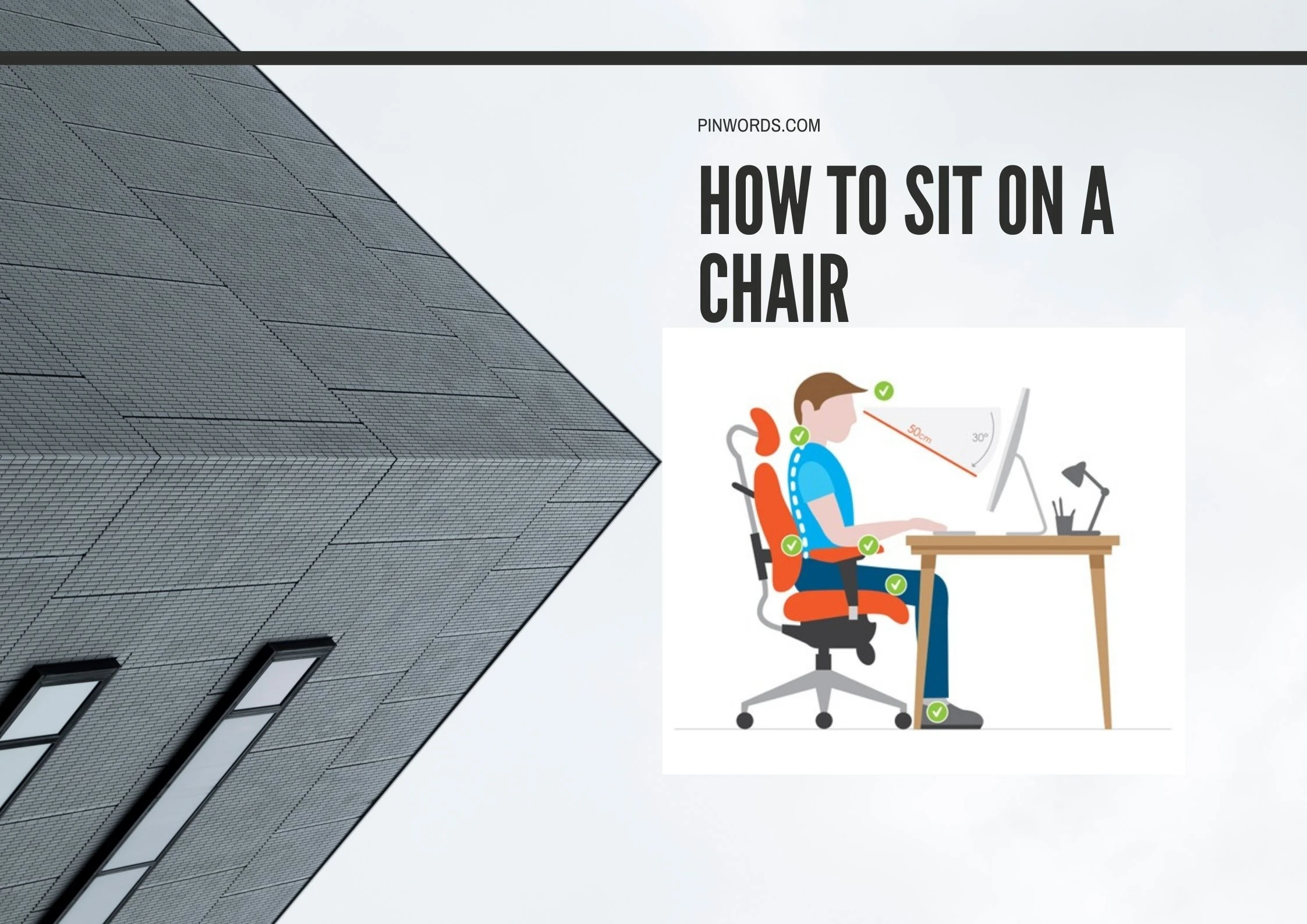
A proper chair setup reduces back strain by as much as 50%. Run through this checklist right now:
- Seat height: Feet flat on the floor. Knees at roughly a 90-degree angle.
- Lumbar support: The backrest curve should press lightly against your lower back — the inward curve, not your tailbone.
- Seat depth: Leave 2–3 finger-widths between the back of your knees and the front edge of the seat.
- Armrests: Set them so your elbows rest at 90 degrees without raising your shoulders.
- Recline angle: A slight recline of 100–110 degrees actually reduces lumbar disc pressure more than sitting rigidly upright at 90 degrees.
Adjusting Your Monitor and Desk
Your chair is only half the equation. Your monitor and desk position control whether your neck and upper back stay neutral all day.
- Top of the monitor should sit at or slightly below eye level
- Screen should be about an arm's length away — roughly 20–24 inches
- Keyboard and mouse should be at elbow height with no reaching, no hunching
- If you use a laptop, get a stand and external keyboard — laptop screens are almost always dangerously low
Building a Routine That Keeps Back Pain Away
Quick fixes work today. What you do consistently every day determines whether you stop back pain for good or just manage it in endless cycles.
Daily Stretching Habits
You don't need a gym membership. These three stretches done morning and evening address the muscles most damaged by prolonged sitting:
- 90/90 hip stretch: Sit on the floor with both knees at 90-degree angles. Hold 60 seconds per side. Releases the piriformis and glutes that refer pain directly to your lower back.
- Child's pose: Kneel and stretch forward, arms extended, forehead to the floor. Hold 30–60 seconds. Decompresses the lumbar spine.
- Doorway chest stretch: Place hands on a door frame at shoulder height, lean forward gently. Hold 30 seconds. Opens the chest and counters the collapsed-shoulder desk posture.
Maintaining your workspace gear matters too. If you rely on a seat cushion for lumbar support, knowing how to clean chair cushions keeps the foam firm and supportive over time — a flat, compressed cushion is as bad as no cushion at all.
Strengthening Your Core
Your core muscles act like a natural brace around your spine. Weak core muscles mean your back has to carry the load alone — and it will fail under daily sitting demands. These three moves done 3–4 times per week are enough to make a real difference:
- Dead bug: Lie on your back, arms and knees up at 90 degrees. Lower one arm and the opposite leg slowly while keeping your lower back pressed flat to the floor. 3 sets of 10 reps.
- Bird dog: On hands and knees, extend one arm and the opposite leg simultaneously, keeping your back flat. 3 sets of 10 reps per side.
- Glute bridge: Lie on your back, feet flat on floor, push hips up and squeeze glutes at the top. 3 sets of 15. Activates the glutes that take load off your lower back all day.
Movement Breaks That Actually Work
The most powerful anti-back-pain habit is also the simplest: stop sitting in one position for long stretches. Use the 20-8-2 rule as your daily framework:
- 20 minutes sitting
- 8 minutes standing
- 2 minutes moving or walking
Set a timer on your phone if you need to. Even if you can't follow this perfectly every cycle, forcing a stand every 20–30 minutes cuts accumulated disc pressure dramatically. A standing desk converter makes this frictionless — more on that below.
Ergonomic Solutions: A Side-by-Side Look
There's no single best solution for back pain from sitting. Your best option depends on your budget, workspace size, and how severe your pain is. Use this comparison to narrow it down fast.
Chair and Seat Options
If your current chair is the primary problem, these are the most common upgrade paths. The best chairs for therapists — professionals who sit for hours seeing clients — share the same ergonomic features every desk worker should prioritize.
| Solution | Best For | Price Range | Setup Effort | Back Relief Impact |
|---|---|---|---|---|
| Lumbar Support Cushion | Quick fix for any existing chair | $15–$60 | None — drop in and go | Moderate |
| Ergonomic Office Chair | Full-day desk workers | $150–$1,500 | 15 min assembly | High |
| Kneeling Chair | Lower back disc issues | $80–$300 | Minimal | Moderate–High |
| Balance Ball Chair | Core activation, short sessions | $40–$120 | Minimal | Low–Moderate |
| Saddle Chair | Reducing lumbar compression | $100–$400 | Minimal | Moderate–High |
Desk and Monitor Accessories
Your chair is one piece of the puzzle. These accessories handle the rest:
- Standing desk converter: Sits on top of your existing desk. Lets you alternate sitting and standing without buying a new desk. ($50–$400)
- Monitor arm: Lets you dial in exact eye-level positioning and distance. ($25–$150)
- Footrest: If your chair is too high for your feet to rest flat, a footrest restores the correct hip angle. ($20–$80)
- Laptop stand with external keyboard: Essential if you work on a laptop. Raises your screen to eye level immediately. ($20–$100 combined)
What It Actually Costs to Fix Your Back Pain
You don't need to spend a fortune to get meaningful relief. Here's a realistic breakdown by budget tier so you can invest at the level that makes sense for your situation.
Budget Tier: $0–$50
This tier is about quick wins using what you already have, plus inexpensive additions:
- $0: Adjust your current chair using the setup checklist above. Most chairs have far more adjustability than people ever use.
- $15–$30: Add a lumbar support cushion. This single change makes a noticeable difference in lower back support on almost any chair.
- $10–$20: A foam roller for 5 minutes after work. Rolls out the tight muscles along your thoracic (mid-back) spine and restores mobility.
- $25–$50: A footrest, if your feet don't sit flat on the floor naturally.
This tier won't solve everything, but it directly addresses the most common causes of everyday back pain from sitting without any major investment.
Mid-Range Tier: $50–$300
The mid-range is where most desk workers get the best value per dollar spent:
- $50–$150: A solid budget ergonomic chair (brands like Hbada or Smug). Real lumbar support, adjustable height, and proper seat depth — a significant upgrade from a basic office chair.
- $80–$200: A standing desk converter. This is the single best tool for the 20-8-2 movement rule — it makes alternating between sitting and standing effortless.
- $25–$80: A monitor arm to get your screen at exact eye height without stacking books under it.
At this tier, you're addressing both your chair support and your monitor position — which covers the two biggest ergonomic mistakes most desk workers make.
Premium Tier: $300+
If your back pain is serious or chronic, a premium setup pays for itself in prevented medical costs and recovered productivity:
- $300–$600: Mid-range ergonomic chairs like the Autonomous ErgoChair or Sihoo M57. Full adjustability across lumbar support, headrest, armrests, and recline tension.
- $600–$1,500+: Premium chairs like the Herman Miller Aeron or Steelcase Leap. The gold standard for all-day seated work, backed by decades of ergonomic research and built to last 10–15 years.
- $400–$800: A full electric sit-stand desk with programmable height presets. Removes every barrier to standing throughout the day.
A premium ergonomic chair used daily lasts a decade or more. Spread over that timeline, the per-year cost is often lower than buying and replacing budget chairs every two years.
Frequently Asked Questions
How long does it take to relieve back pain from sitting?
For mild muscle soreness caused by poor posture, you'll feel improvement within 1–3 days of correcting your setup and adding regular movement breaks. For chronic pain built up over months of bad habits, expect 2–6 weeks of consistent stretching, core work, and ergonomic adjustments before you see lasting change.
Is it better to sit up straight or recline slightly?
A slight recline of 100–110 degrees is actually better for your lumbar discs than sitting rigidly upright at 90 degrees. The reclined position reduces compressive load on your lower spine throughout the day. The key is to keep your lumbar curve properly supported in either position.
Can a bad mattress make sitting-related back pain worse?
Yes. If your mattress isn't supporting your spine during sleep, your back muscles never fully recover overnight. You start every day with tight, fatigued muscles that have less tolerance for the strain of long sitting sessions. Fix both your sleep setup and your desk setup together for the best results.
What is the single best exercise I can do at my desk for back pain?
The standing backbend is the most effective desk exercise. Stand up, place both hands on your lower back, and gently arch backward for 5–10 seconds. It directly reverses the forward disc compression your spine accumulates during sitting. Do it every time you get up from your chair.
Should I stand at my desk all day to avoid back pain?
No — standing all day creates its own problems, including leg fatigue and lower back strain from static loading. The goal is alternating between sitting and standing throughout the day. Use the 20-8-2 rule: 20 minutes sitting, 8 minutes standing, 2 minutes moving. A sit-stand desk or desk converter makes this sustainable.
Key Takeaways
- The root causes of back pain from sitting are slouching, sitting too long without breaks, and a poorly configured chair or monitor height — fix these first.
- You can get immediate relief right now with standing backbends, hip flexor stretches, and seated cat-cow movements — no equipment needed.
- Long-term prevention requires daily stretching, consistent core strengthening, and the 20-8-2 movement rule built into your work schedule.
- Ergonomic improvements scale to any budget — even a $20 lumbar cushion and a proper chair adjustment deliver measurable back pain relief from sitting.



About Remington May
Remington May is a technology writer and digital product reviewer with a focus on consumer electronics, software, and the everyday tech that shapes how people work and live. She has spent years evaluating smartphones, laptops, smart home devices, and digital tools — approaching each product from the perspective of a practical user rather than a spec-sheet enthusiast. At Pinwords, she covers tech buying guides, product reviews, smartphone and laptop comparisons, and practical how-to guides for getting more out of your devices.
Check for FREE Gifts. Or latest free books from our best messages.
Remove Ad block to reveal all the secrets. Once done, hit a button below